Join us at FabCon Atlanta from March 16 - 20, 2026, for the ultimate Fabric, Power BI, AI and SQL community-led event. Save $200 with code FABCOMM.
Register now!Get Fabric Certified for FREE during Fabric Data Days. Don't miss your chance! Request now
Faced such a problem. There is a format table Key (unique) - Date - Doctor - Area
There is a measure that is calculated by the formula: Proc from total = count ('Reel status' [Key]) / CALCULATE (COUNT ('Reel status' [Key]), filter (all ('Reel status'), [Doctor] = "Doctor"))
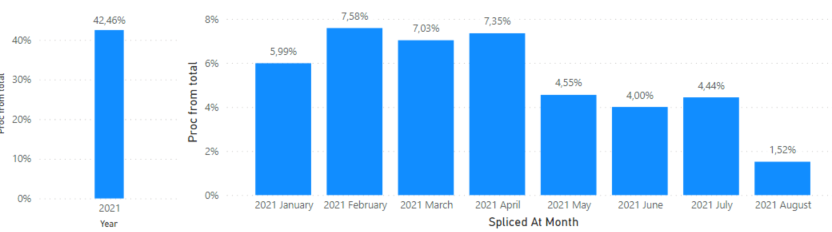
I drop this measure to the visualization and add Area to the filters. As a result, I get the number of lines in which the Area corresponds to the one I need as a percentage of the total number of lines with Doctor in the "Doctor" field. And it works. I display information for the year and total rows with the Doctor status, I have 65K, and for a specific area - 28K. About 42% Will do.
But now I go down to the level below and see not completely correct statistics. The sum of all the columns is still 42%, but now they are smeared by months.
If I understood correctly, then in my measure the numerator is counted for a month, and the denominator is still common. How to explain the measure that if statistics are displayed for a month, then both count ('Reel status' [Key]) and denominator CALCULATE (COUNT ('Reel status' [Key]), filter (all ('Reel status'), [Doctor ] = "Doctor")) should be counted only for a month?
Solved! Go to Solution.
Hi, @Anonymous ;
I think you could create other measure .
Proc from month = COUNT(data[Key]) / CALCULATE (COUNT ([Key]), filter (ALL(data), MONTH([Spliced At])=MONTH(MAX([Spliced At]))&&[Doctor] = "Doctor"))
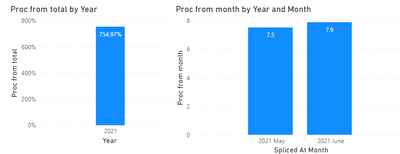
The final output is shown below:
Best Regards,
Community Support Team_ Yalan Wu
If this post helps, then please consider Accept it as the solution to help the other members find it more quickly.
Hi, @Anonymous ;
I think you could create other measure .
Proc from month = COUNT(data[Key]) / CALCULATE (COUNT ([Key]), filter (ALL(data), MONTH([Spliced At])=MONTH(MAX([Spliced At]))&&[Doctor] = "Doctor"))
The final output is shown below:
Best Regards,
Community Support Team_ Yalan Wu
If this post helps, then please consider Accept it as the solution to help the other members find it more quickly.
@Anonymous , do have data for more than a year?
Demonimator is everything across all year for [Doctor] = "Doctor"
And numerator is based on axis
Can you share sample data and sample output in table format? Or a sample pbix after removing sensitive data.
Correctly it turned out to unload information in only a couple of months. Hope this will be enough.
No, now I have information only from the beginning of this year, but in the future I want to increase this range.
I will now try to make an upload without personal information.
Check out the November 2025 Power BI update to learn about new features.
Advance your Data & AI career with 50 days of live learning, contests, hands-on challenges, study groups & certifications and more!