FabCon is coming to Atlanta
Join us at FabCon Atlanta from March 16 - 20, 2026, for the ultimate Fabric, Power BI, AI and SQL community-led event. Save $200 with code FABCOMM.
Register now!- Power BI forums
- Get Help with Power BI
- Desktop
- Service
- Report Server
- Power Query
- Mobile Apps
- Developer
- DAX Commands and Tips
- Custom Visuals Development Discussion
- Health and Life Sciences
- Power BI Spanish forums
- Translated Spanish Desktop
- Training and Consulting
- Instructor Led Training
- Dashboard in a Day for Women, by Women
- Galleries
- Data Stories Gallery
- Themes Gallery
- Contests Gallery
- QuickViz Gallery
- Quick Measures Gallery
- Visual Calculations Gallery
- Notebook Gallery
- Translytical Task Flow Gallery
- TMDL Gallery
- R Script Showcase
- Webinars and Video Gallery
- Ideas
- Custom Visuals Ideas (read-only)
- Issues
- Issues
- Events
- Upcoming Events
Get Fabric Certified for FREE during Fabric Data Days. Don't miss your chance! Request now
- Power BI forums
- Forums
- Get Help with Power BI
- Desktop
- Select rows from table 2 that are not in table 1
- Subscribe to RSS Feed
- Mark Topic as New
- Mark Topic as Read
- Float this Topic for Current User
- Bookmark
- Subscribe
- Printer Friendly Page


- Mark as New
- Bookmark
- Subscribe
- Mute
- Subscribe to RSS Feed
- Permalink
- Report Inappropriate Content
Select rows from table 2 that are not in table 1
I've been beating my head against the wall on this one for several days. Hoping someone here can help.
I'm building a report against an onboarding application. There are two primary lists involved. "Onboarding Tasks" is a SPO list of all tasks involved in onboarding a new branch. "Branch Onboarding Tasks" is a list of all tasks that have been scheduled for a specific branch. New tasks are scheduled as parent tasks are completed, so the Branch Onboarding Tasks doesn't always have all of the tasks listed. I'm trying to build a table in my report that contains all tasks from Onboarding Tasks that have not been scheduled for a given branch (i.e. the tasks don't exist in Branch Onboarding Tasks for that particular branch).
Sample data:
Onboarding Tasks
| Task ID | Task Name |
| 1000 | Task 1 |
| 1010 | Task 2 |
| 1020 | Task 3 |
Branch Onboarding Tasks
| Branch ID | Task ID |
| 1234 | 1000 |
| 1234 | 1010 |
| 5678 | 1000 |
| 9999 | 1000 |
| 9999 | 1010 |
| 9999 | 1020 |
For branch 1234, the table should contain 1 row - Task 1020 - Task 3
For branch 5678 it should contain 2 rows - Task 1010 - Task 2 and Tasks 1020 - Task 3
For branch 9999 it should contain no rows
If I were writing SQL for this, I'd get all task IDs for the given branch from Branch Onboarding Tasks, then get all rows from Onboarding Tasks where the Task ID is not in the list from the first table. I tried a merge into a new table (several versions of the join), but with no success.
Any ideas would be greatly appreciated!!
Solved! Go to Solution.


- Mark as New
- Bookmark
- Subscribe
- Mute
- Subscribe to RSS Feed
- Permalink
- Report Inappropriate Content
Hi,
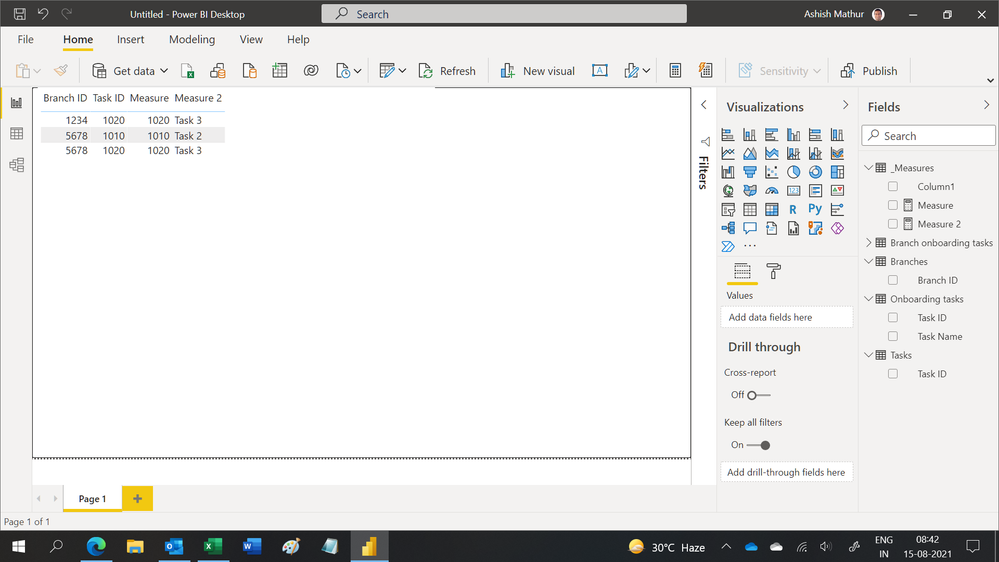
You may download my PBI file from here.
Hope this helps.
Regards,
Ashish Mathur
http://www.ashishmathur.com
https://www.linkedin.com/in/excelenthusiasts/

- Mark as New
- Bookmark
- Subscribe
- Mute
- Subscribe to RSS Feed
- Permalink
- Report Inappropriate Content
Hi @lburgess ,
Here are the steps you can follow
1. Create measure.
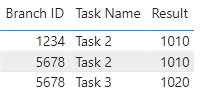
Result =
CALCULATE(SUM('Onboarding Tasks'[Task ID]),FILTER('Onboarding Tasks',NOT([Task ID]) in VALUES('Branch Onboarding Tasks'[Task ID])))
2. Result:
Best Regards,
Liu Yang
If this post helps, then please consider Accept it as the solution to help the other members find it more quickly
- Mark as New
- Bookmark
- Subscribe
- Mute
- Subscribe to RSS Feed
- Permalink
- Report Inappropriate Content
Hi @lburgess ,
Here are the steps you can follow
1. Create measure.
Result =
CALCULATE(SUM('Onboarding Tasks'[Task ID]),FILTER('Onboarding Tasks',NOT([Task ID]) in VALUES('Branch Onboarding Tasks'[Task ID])))
2. Result:
Best Regards,
Liu Yang
If this post helps, then please consider Accept it as the solution to help the other members find it more quickly
- Mark as New
- Bookmark
- Subscribe
- Mute
- Subscribe to RSS Feed
- Permalink
- Report Inappropriate Content
Hi,
You may download my PBI file from here.
Hope this helps.
Regards,
Ashish Mathur
http://www.ashishmathur.com
https://www.linkedin.com/in/excelenthusiasts/
- Mark as New
- Bookmark
- Subscribe
- Mute
- Subscribe to RSS Feed
- Permalink
- Report Inappropriate Content
Close but not quite. My suspicion is the MAX in this measure is the issue.
Sample data:
Onboarding Tasks
| Task ID | Task Name |
| 1000 | Task 1 |
| 1010 | Task 2 |
| 1020 | Task 3 |
Branch Onboarding Tasks
| Branch ID | Task ID |
| 1234 | 1000 |
| 1234 | 1020 |
| 5678 | 1000 |
| 9999 | 1000 |
| 9999 | 1010 |
| 9999 | 1020 |
For branch 1234, the table should contain 1 row - Task 1010 - Task 2
For branch 5678 it should contain 2 rows - Task 1010 - Task 2 and Tasks 1020 - Task 3
For branch 9999 it should contain no rows
- Mark as New
- Bookmark
- Subscribe
- Mute
- Subscribe to RSS Feed
- Permalink
- Report Inappropriate Content
Hi,
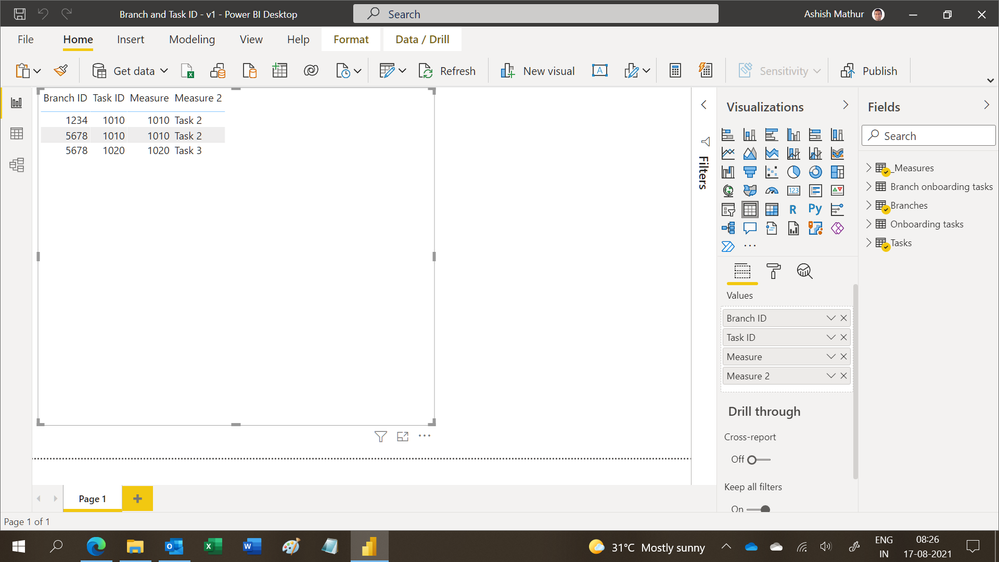
You have not tried my solution. I plugged in your revised data into my PBI file and my result matches yours.
Regards,
Ashish Mathur
http://www.ashishmathur.com
https://www.linkedin.com/in/excelenthusiasts/

- Mark as New
- Bookmark
- Subscribe
- Mute
- Subscribe to RSS Feed
- Permalink
- Report Inappropriate Content
I think that may not be possible in even in SQL because the join(merge) works based the similar columns in both tables and accordingly the data can be distributed to different rows.
Did I answer your question? Mark my post as a solution! Appreciate your Kudos!!
MY Blog || My YouTube Channel || Connect with me on Linkedin || My Latest Data Story - Ageing Analysis
Proud to be a Super User!
Helpful resources

Power BI Monthly Update - November 2025
Check out the November 2025 Power BI update to learn about new features.

Fabric Data Days
Advance your Data & AI career with 50 days of live learning, contests, hands-on challenges, study groups & certifications and more!

FabCon Atlanta 2026
Join us at FabCon Atlanta, March 16-20, for the ultimate Fabric, Power BI, AI and SQL community-led event. Save $200 with code FABCOMM.


