FabCon is coming to Atlanta
Join us at FabCon Atlanta from March 16 - 20, 2026, for the ultimate Fabric, Power BI, AI and SQL community-led event. Save $200 with code FABCOMM.
Register now!- Power BI forums
- Get Help with Power BI
- Desktop
- Service
- Report Server
- Power Query
- Mobile Apps
- Developer
- DAX Commands and Tips
- Custom Visuals Development Discussion
- Health and Life Sciences
- Power BI Spanish forums
- Translated Spanish Desktop
- Training and Consulting
- Instructor Led Training
- Dashboard in a Day for Women, by Women
- Galleries
- Data Stories Gallery
- Themes Gallery
- Contests Gallery
- QuickViz Gallery
- Quick Measures Gallery
- Visual Calculations Gallery
- Notebook Gallery
- Translytical Task Flow Gallery
- TMDL Gallery
- R Script Showcase
- Webinars and Video Gallery
- Ideas
- Custom Visuals Ideas (read-only)
- Issues
- Issues
- Events
- Upcoming Events
The Power BI Data Visualization World Championships is back! Get ahead of the game and start preparing now! Learn more
- Power BI forums
- Forums
- Get Help with Power BI
- Desktop
- Re: How to calculate row number
- Subscribe to RSS Feed
- Mark Topic as New
- Mark Topic as Read
- Float this Topic for Current User
- Bookmark
- Subscribe
- Printer Friendly Page


- Mark as New
- Bookmark
- Subscribe
- Mute
- Subscribe to RSS Feed
- Permalink
- Report Inappropriate Content
How to calculate row number
Hello,
I have a table with the products quantity sales.
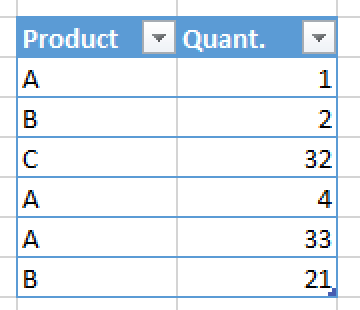
In the example I have product A that repeats 3 times and it is rank 1, product B repeats 2 times and it's rank 2 and finally product C repeats 1 one time, so it's rank 3.
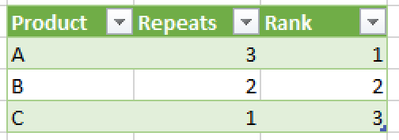
The question it is: how to calculate the rank or row number?
Solved! Go to Solution.


- Mark as New
- Bookmark
- Subscribe
- Mute
- Subscribe to RSS Feed
- Permalink
- Report Inappropriate Content
Hi,
Write these measures:
Instances = countrows(Data)Rank = RANKX(ALL(Data[Product]),[Instances])Hope this helps.

Regards,
Ashish Mathur
http://www.ashishmathur.com
https://www.linkedin.com/in/excelenthusiasts/

- Mark as New
- Bookmark
- Subscribe
- Mute
- Subscribe to RSS Feed
- Permalink
- Report Inappropriate Content
Hi @rbustamante
First, create column / measure for the count of category:
Measure / Column = CALCULATE ( COUNTROWS ( 'Table' ) , ALLEXCEPT ( 'Table' , Table[Product] ) )
Rank = RANKX ( 'Table' , Table[Column] )Measure =
VAR _1 = CALCULATE ( COUNTROWS ( 'Table' ) , ALLEXCEPT ( 'Table' , Table[Product] ) )
VAR _2 = RANKX ( 'Table' , 'Table'[Rank] )
RETURN
_2
RANKX ( 'Table' , 'Table'[Column] , , ASC , Dense )If I have posted a response that resolves your question, please accept it as a solution to formally close the post.
Also, if you are as passionate about Power BI, DAX and data as I am, please feel free to reach out if you have any questions, queries, or if you simply want to connect and talk to another data geek!
Want to connect?www.linkedin.com/in/theoconias


- Mark as New
- Bookmark
- Subscribe
- Mute
- Subscribe to RSS Feed
- Permalink
- Report Inappropriate Content
Flexible solution,
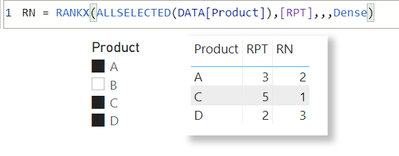
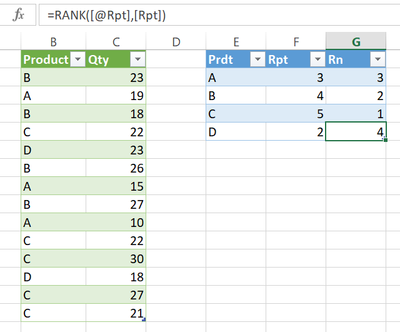
Excel worksheet formula is enough
| Thanks to the great efforts by MS engineers to simplify syntax of DAX! Most beginners are SUCCESSFULLY MISLED to think that they could easily master DAX; but it turns out that the intricacy of the most frequently used RANKX() is still way beyond their comprehension! |
DAX is simple, but NOT EASY! |
- Mark as New
- Bookmark
- Subscribe
- Mute
- Subscribe to RSS Feed
- Permalink
- Report Inappropriate Content
Hi @rbustamante
First, create column / measure for the count of category:
Measure / Column = CALCULATE ( COUNTROWS ( 'Table' ) , ALLEXCEPT ( 'Table' , Table[Product] ) )
Rank = RANKX ( 'Table' , Table[Column] )Measure =
VAR _1 = CALCULATE ( COUNTROWS ( 'Table' ) , ALLEXCEPT ( 'Table' , Table[Product] ) )
VAR _2 = RANKX ( 'Table' , 'Table'[Rank] )
RETURN
_2
RANKX ( 'Table' , 'Table'[Column] , , ASC , Dense )If I have posted a response that resolves your question, please accept it as a solution to formally close the post.
Also, if you are as passionate about Power BI, DAX and data as I am, please feel free to reach out if you have any questions, queries, or if you simply want to connect and talk to another data geek!
Want to connect?www.linkedin.com/in/theoconias
- Mark as New
- Bookmark
- Subscribe
- Mute
- Subscribe to RSS Feed
- Permalink
- Report Inappropriate Content
Hi,
Write these measures:
Instances = countrows(Data)Rank = RANKX(ALL(Data[Product]),[Instances])Hope this helps.
Regards,
Ashish Mathur
http://www.ashishmathur.com
https://www.linkedin.com/in/excelenthusiasts/
- Mark as New
- Bookmark
- Subscribe
- Mute
- Subscribe to RSS Feed
- Permalink
- Report Inappropriate Content
Hi @rbustamante
First, create column / measure for the count of category:
Measure / Column = CALCULATE ( COUNTROWS ( 'Table' ) , ALLEXCEPT ( 'Table' , Table[Product] ) )
Rank = RANKX ( 'Table' , Table[Column] )Measure =
VAR _1 = CALCULATE ( COUNTROWS ( 'Table' ) , ALLEXCEPT ( 'Table' , Table[Product] ) )
VAR _2 = RANKX ( 'Table' , 'Table'[Rank] )
RETURN
_2
RANKX ( 'Table' , 'Table'[Column] , , ASC , Dense )If I have posted a response that resolves your question, please accept it as a solution to formally close the post.
Also, if you are as passionate about Power BI, DAX and data as I am, please feel free to reach out if you have any questions, queries, or if you simply want to connect and talk to another data geek!
Want to connect?www.linkedin.com/in/theoconias

Helpful resources

Power BI Dataviz World Championships
The Power BI Data Visualization World Championships is back! Get ahead of the game and start preparing now!

Power BI Monthly Update - December 2025
Check out the December 2025 Power BI Holiday Recap!

FabCon Atlanta 2026
Join us at FabCon Atlanta, March 16-20, for the ultimate Fabric, Power BI, AI and SQL community-led event. Save $200 with code FABCOMM.

| User | Count |
|---|---|
| 39 | |
| 38 | |
| 38 | |
| 28 | |
| 27 |


| User | Count |
|---|---|
| 124 | |
| 88 | |
| 73 | |
| 66 | |
| 65 |


