FabCon is coming to Atlanta
Join us at FabCon Atlanta from March 16 - 20, 2026, for the ultimate Fabric, Power BI, AI and SQL community-led event. Save $200 with code FABCOMM.
Register now!- Power BI forums
- Get Help with Power BI
- Desktop
- Service
- Report Server
- Power Query
- Mobile Apps
- Developer
- DAX Commands and Tips
- Custom Visuals Development Discussion
- Health and Life Sciences
- Power BI Spanish forums
- Translated Spanish Desktop
- Training and Consulting
- Instructor Led Training
- Dashboard in a Day for Women, by Women
- Galleries
- Data Stories Gallery
- Themes Gallery
- Contests Gallery
- QuickViz Gallery
- Quick Measures Gallery
- Visual Calculations Gallery
- Notebook Gallery
- Translytical Task Flow Gallery
- TMDL Gallery
- R Script Showcase
- Webinars and Video Gallery
- Ideas
- Custom Visuals Ideas (read-only)
- Issues
- Issues
- Events
- Upcoming Events
The Power BI Data Visualization World Championships is back! Get ahead of the game and start preparing now! Learn more
- Power BI forums
- Forums
- Get Help with Power BI
- Desktop
- Re: How to calculate Average per type per month an...
- Subscribe to RSS Feed
- Mark Topic as New
- Mark Topic as Read
- Float this Topic for Current User
- Bookmark
- Subscribe
- Printer Friendly Page


- Mark as New
- Bookmark
- Subscribe
- Mute
- Subscribe to RSS Feed
- Permalink
- Report Inappropriate Content
How to calculate Average per type per month and year
Hi Team,
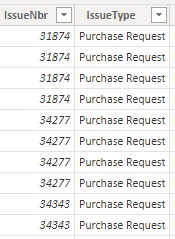
I have below data columns (Issue number, RespTimeMins, month and year) in Table 1 and (Issue number and Issue Type) columns in Table 2. I want to calculate Average of Response Time by Type per month and year. Can you please help me how I can get this?
Table 1

Table 2
Thankyou,
- Mark as New
- Bookmark
- Subscribe
- Mute
- Subscribe to RSS Feed
- Permalink
- Report Inappropriate Content
Hello Burno,
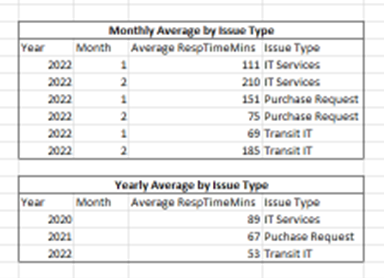
So I am looking for Average of RespTimeMins as per Issue Type - Monthly and Yearly. below is expected output:


- Mark as New
- Bookmark
- Subscribe
- Mute
- Subscribe to RSS Feed
- Permalink
- Report Inappropriate Content
Hi again,
Are the tabel 1 connected to table 2 ?
if yes, creat a simple average ( Avg Time = Average('table1'[Avg Response time]) ) and pull the atribute as the exemple that you have send.
Did I answer your question? Mark my post as a solution! Appreciate your Kudos!! ;-
Best Regards
BC
Best regards
Bruno Costa | Super User
Did I help you to answer your question? Accepted my post as a solution! Appreciate your Kudos!!
Take a look at the blog: PBI Portugal
- Mark as New
- Bookmark
- Subscribe
- Mute
- Subscribe to RSS Feed
- Permalink
- Report Inappropriate Content
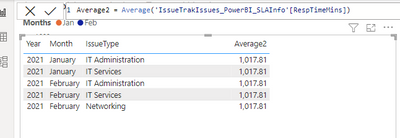
Hi, I tried but it didnt work. It gives the total average for all issue types which I dont want. I want seperate Average Response time for each issue.
please check below screenshot.
- Mark as New
- Bookmark
- Subscribe
- Mute
- Subscribe to RSS Feed
- Permalink
- Report Inappropriate Content
Hi again,
Are the tabel 1 connected to table 2 ?
Can you share the relationship between the two tables.
BR
Bruno Costa
Best regards
Bruno Costa | Super User
Did I help you to answer your question? Accepted my post as a solution! Appreciate your Kudos!!
Take a look at the blog: PBI Portugal
- Mark as New
- Bookmark
- Subscribe
- Mute
- Subscribe to RSS Feed
- Permalink
- Report Inappropriate Content
Hi @onurbmiguel_ ,
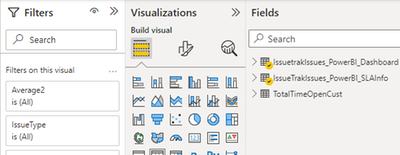
They are in same report in power BI, under same report and I can link them to each other.
please check below screenshot.
- Mark as New
- Bookmark
- Subscribe
- Mute
- Subscribe to RSS Feed
- Permalink
- Report Inappropriate Content
Hi again,
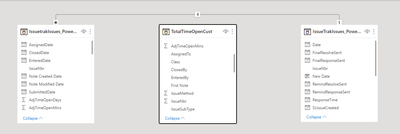
I need to understang the model,
can you share how you connect the two tabels between them?
go to model and see the relationship:


BR
Bruno
Best regards
Bruno Costa | Super User
Did I help you to answer your question? Accepted my post as a solution! Appreciate your Kudos!!
Take a look at the blog: PBI Portugal
- Mark as New
- Bookmark
- Subscribe
- Mute
- Subscribe to RSS Feed
- Permalink
- Report Inappropriate Content
- Mark as New
- Bookmark
- Subscribe
- Mute
- Subscribe to RSS Feed
- Permalink
- Report Inappropriate Content
Hi again,
You need to creat a relationship from TotalTimeOpenCust to the others tabels , try to use the IssueNbr.
Did I answer your question? Mark my post as a solution! Appreciate your Kudos!! ;-
Best Regards
BC
Best regards
Bruno Costa | Super User
Did I help you to answer your question? Accepted my post as a solution! Appreciate your Kudos!!
Take a look at the blog: PBI Portugal
- Mark as New
- Bookmark
- Subscribe
- Mute
- Subscribe to RSS Feed
- Permalink
- Report Inappropriate Content
Hi @onurbmiguel_ I have created the relationship between all the tables. Can you help me with Average Syntax now !!
Thanks.
- Mark as New
- Bookmark
- Subscribe
- Mute
- Subscribe to RSS Feed
- Permalink
- Report Inappropriate Content
I am not using this table for this report actually. so i think that will work. but can you share he revised syntax for calculating Average as per type please.
Thanks.
- Mark as New
- Bookmark
- Subscribe
- Mute
- Subscribe to RSS Feed
- Permalink
- Report Inappropriate Content
Hello again,
If the relationship between the tables are correctly , you can use the previous measures:
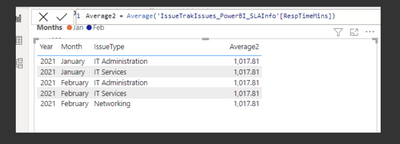
if not please send me a pbix with dummy values so i can help you.
Did I answer your question? Mark my post as a solution! Appreciate your Kudos!! ;-
Best Regards
BC
Best regards
Bruno Costa | Super User
Did I help you to answer your question? Accepted my post as a solution! Appreciate your Kudos!!
Take a look at the blog: PBI Portugal
- Mark as New
- Bookmark
- Subscribe
- Mute
- Subscribe to RSS Feed
- Permalink
- Report Inappropriate Content
Hi @onurbmiguel_ thanks, but this syntax is giving the total average, which I dont want. I am looking for individual average for each Issue Type seperately. for example,
For Jan;
Average of RespTimeMinutes of IT Admintration
Average of RespTimeMinutes of IT Services
Average of RespTimeMinutes of Networking
- Mark as New
- Bookmark
- Subscribe
- Mute
- Subscribe to RSS Feed
- Permalink
- Report Inappropriate Content
Hello Nazish,
Send me a pbix with dummy values so i can take a look.
A need to see the data to understand.
BR
Bruno
Best regards
Bruno Costa | Super User
Did I help you to answer your question? Accepted my post as a solution! Appreciate your Kudos!!
Take a look at the blog: PBI Portugal
- Mark as New
- Bookmark
- Subscribe
- Mute
- Subscribe to RSS Feed
- Permalink
- Report Inappropriate Content
hi @onurbmiguel_ can you reply to my pbix i shared. I am waiting for the responce.
thanks,
- Mark as New
- Bookmark
- Subscribe
- Mute
- Subscribe to RSS Feed
- Permalink
- Report Inappropriate Content
Hi @onurbmiguel_ please find link of the pbix below. let me know if you can edit and have access to it?
- Mark as New
- Bookmark
- Subscribe
- Mute
- Subscribe to RSS Feed
- Permalink
- Report Inappropriate Content
Hello Nazish,
What should be the intended result?
Can you simulated the output ?
BR
Bruno Costa
Best regards
Bruno Costa | Super User
Did I help you to answer your question? Accepted my post as a solution! Appreciate your Kudos!!
Take a look at the blog: PBI Portugal

Helpful resources

Power BI Dataviz World Championships
The Power BI Data Visualization World Championships is back! Get ahead of the game and start preparing now!

Power BI Monthly Update - November 2025
Check out the November 2025 Power BI update to learn about new features.

FabCon Atlanta 2026
Join us at FabCon Atlanta, March 16-20, for the ultimate Fabric, Power BI, AI and SQL community-led event. Save $200 with code FABCOMM.

| User | Count |
|---|---|
| 59 | |
| 43 | |
| 42 | |
| 23 | |
| 17 |


| User | Count |
|---|---|
| 190 | |
| 122 | |
| 96 | |
| 66 | |
| 47 |


