Join us at FabCon Atlanta from March 16 - 20, 2026, for the ultimate Fabric, Power BI, AI and SQL community-led event. Save $200 with code FABCOMM.
Register now!The Power BI Data Visualization World Championships is back! Get ahead of the game and start preparing now! Learn more
Hello Team,
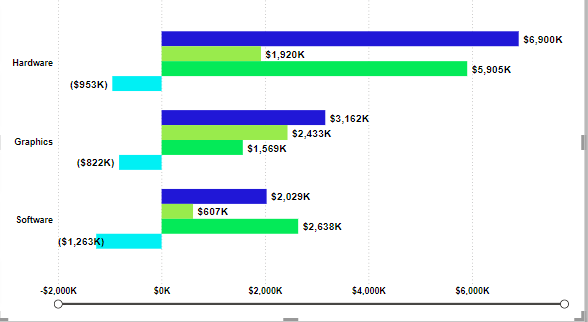
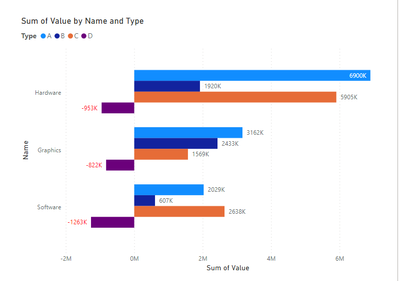
I'm encountering an issue where I've utilized a clustered bar chart to represent some data. I need assistance with a specific requirement: for negative values in the chart, I want the bars to be displayed in red color. Can someone provide guidance on how to achieve this? Your help would be greatly appreciated. I have included a visual representation for reference.
Solved! Go to Solution.
Hi @jay3vedi ,
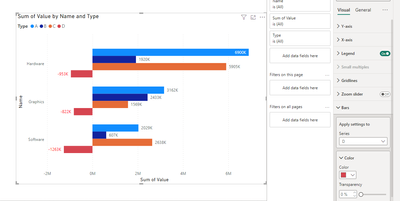
According to your description and the example screenshot provided, you are using a clustered bar chart. And in this example screenshot you have categorized these. As you can see on the chart, the negative numbers are in the same category, and if you want to change the color, go to -> Format ->Bars->Appply setting to targrt type->Change color to red
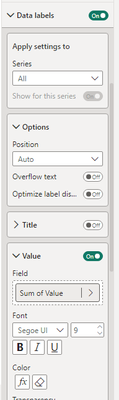
But from your description then you are trying to turn all the negative bars red. This is not possible because your category determines the color of your series of bars. But you can achieve the effect you want by changing the color of the data lable. First create a measure, then go to Format -> Data labels ->value ->apply measure to conditional formatting
Fianl output
Best regards,
Albert He
If this post helps, then please consider Accept it as the solution to help the other members find it more quickly
Hi @jay3vedi ,
According to your description and the example screenshot provided, you are using a clustered bar chart. And in this example screenshot you have categorized these. As you can see on the chart, the negative numbers are in the same category, and if you want to change the color, go to -> Format ->Bars->Appply setting to targrt type->Change color to red
But from your description then you are trying to turn all the negative bars red. This is not possible because your category determines the color of your series of bars. But you can achieve the effect you want by changing the color of the data lable. First create a measure, then go to Format -> Data labels ->value ->apply measure to conditional formatting
Fianl output
Best regards,
Albert He
If this post helps, then please consider Accept it as the solution to help the other members find it more quickly
Hi @jay3vedi
Refer this video below
https://www.youtube.com/watch?v=MItQGef79Lc
I hope this resolves your issue!
Hi @jay3vedi
Or you can try with measure
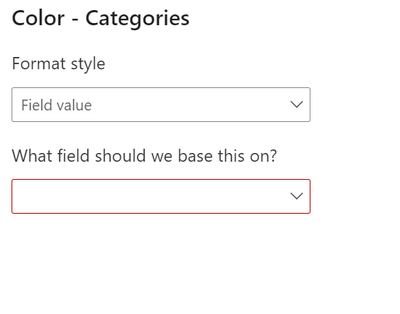
Color= if(sum(sales)<0, "red")
use this color measure in conditional formatting of column color
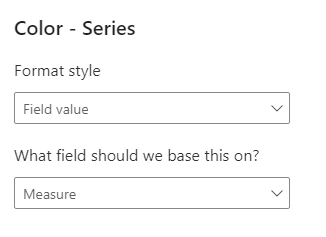
select filed value and measure color under setting of column color.
Check out the November 2025 Power BI update to learn about new features.
Advance your Data & AI career with 50 days of live learning, contests, hands-on challenges, study groups & certifications and more!