cancel
Showing results for 
Search instead for 
Did you mean: 

The Power BI Data Visualization World Championships is back! Get ahead of the game and start preparing now! Learn more

Reply
D_PBI
Post Partisan
Post Partisan

How to add (sum) a measure value to each row value?

Hi all,
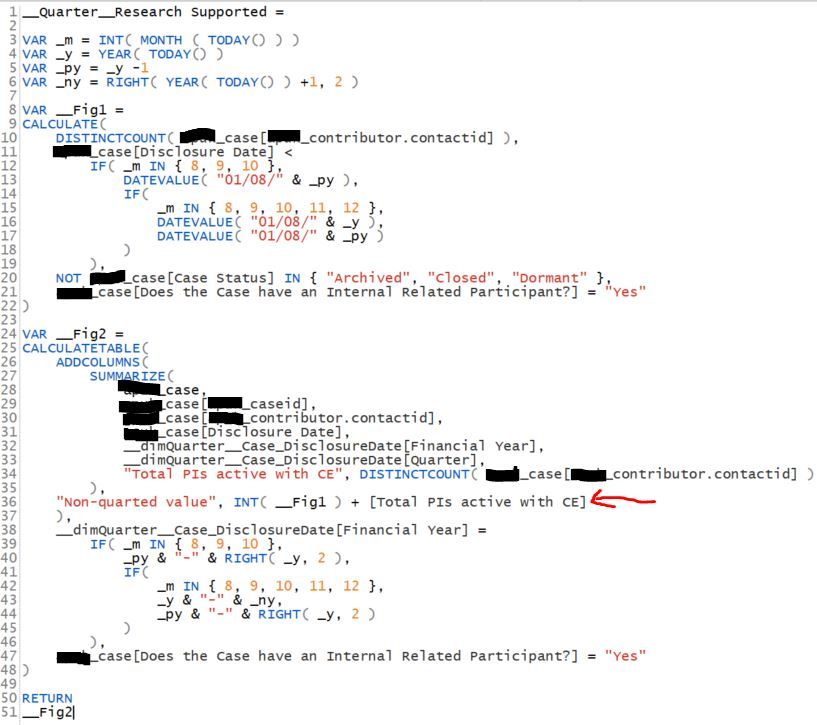
I have create a table that contains a CALCULATE that returns a single value, and a CALCULATETABLE query that summarizes a table creating a DISTINCTCOUNT column.
I am attempting to use ADDCOLUMNS to create an additional column that is the sum of the CALCULATE single value the summarized DISTINCTCOUNT value - but I cannot seem to do this.

Please see the below screenshot of the code (not sure how to provide in a nice structure other than a screenshot). It is the line with the red arrow (highlighted bit) that I am thinking I can add the CALCULATE measure (i.e. _FIG1) with the end result from the DISTINCTCOUNT.
I do know individually the summarized rows are correct and so it the single measure value. I know this as when I don't attempt to add them but just bring into a table visual in separate columns that show the correct figures. I just don't seem to be able to add them together.
Please help??  Thanks.

Code.JPG

3 REPLIES 3
Anonymous
Not applicable

Hi @D_PBI ,

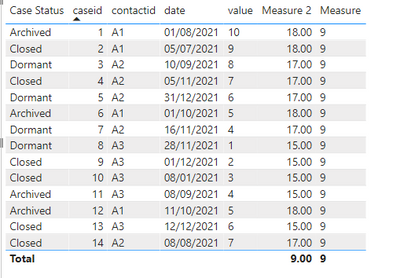
I have created a simple sample. Please refer to my pbix file to see if it helps you.

Create a measure.

Measure 2 = var max_value=CALCULATE(MAX('Table'[value]),FILTER(ALL('Table'),'Table'[contactid]=SELECTEDVALUE('Table'[contactid])))
return 
max_value+[Measure]

vpollymsft_0-1646119340404.png

If you still want calculate the formula in fig_2, please try to var the measure.

If I have misunderstood your meaning, please provide your pbix file without privacy information(or some sample data)  and desired output.


Best Regards

Community Support Team _ Polly


If this post helps, then please consider Accept it as the solution to help the other members find it more quickly.


D_PBI
Post Partisan
Post Partisan

If this is the case, are you able to advise how I can achieve my aim?  Thanks.

lgordon
Frequent Visitor

I believe your issue is that filter context in fig1 isn't being applied to the table in fig2

Helpful resources

Announcements
Power BI DataViz World Championships

Power BI Dataviz World Championships

The Power BI Data Visualization World Championships is back! Get ahead of the game and start preparing now!

November Power BI Update Carousel

Power BI Monthly Update - November 2025

Check out the November 2025 Power BI update to learn about new features.

FabCon Atlanta 2026 carousel

FabCon Atlanta 2026

Join us at FabCon Atlanta, March 16-20, for the ultimate Fabric, Power BI, AI and SQL community-led event. Save $200 with code FABCOMM.