Join us at FabCon Atlanta from March 16 - 20, 2026, for the ultimate Fabric, Power BI, AI and SQL community-led event. Save $200 with code FABCOMM.
Register now!The Power BI Data Visualization World Championships is back! Get ahead of the game and start preparing now! Learn more
Hello All
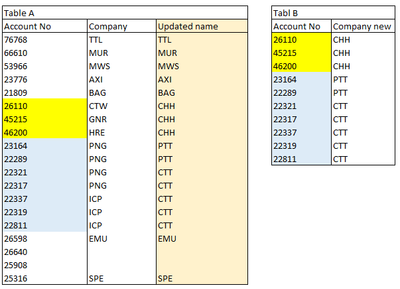
I have a table A with all customers accounts and company names. However, due to acquisition/merging/demerging, some company names are changed. Table B has all the changed company names. As shown below.
because of reporting requirements, I don't want to replace the company name in Table A. I want to add a new column "Updated name" in Table A, on condition that if account # in table B, take the company name in Table B, otherwise keep the company name in table A. Unfortunately there are empty company name in Table A.
Is it achievable without merging tables? I used CONTAINSSTRING
Updated name = if( CONTAINSSTRING('Table A'[Account No], 'Table B'[Account No]), 'Table B'[Account new], 'Table A'[Company])
But I got error "A single value for column 'Account No' in table B cannot be determined."
Can anybody help me solve the issue. Many thanks in advance.
Solved! Go to Solution.
Hi @Anonymous
Download PBIX file with example below
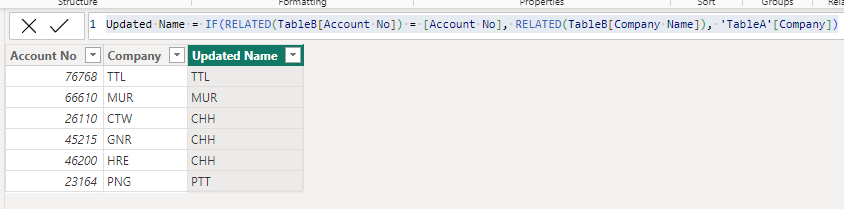
This will create the column in TableA
Updated Name = IF(RELATED(TableB[Account No]) = [Account No], RELATED(TableB[Company Name]), 'TableA'[Company])
Regards
Phil
Proud to be a Super User!
Hi @Anonymous
Download PBIX file with example below
This will create the column in TableA
Updated Name = IF(RELATED(TableB[Account No]) = [Account No], RELATED(TableB[Company Name]), 'TableA'[Company])
Regards
Phil
Proud to be a Super User!
It works perfectly. Thank you very much.
The Power BI Data Visualization World Championships is back! Get ahead of the game and start preparing now!
Check out the November 2025 Power BI update to learn about new features.
| User | Count |
|---|---|
| 59 | |
| 43 | |
| 42 | |
| 23 | |
| 17 |
| User | Count |
|---|---|
| 190 | |
| 122 | |
| 96 | |
| 66 | |
| 47 |