Don't miss your chance to take the Fabric Data Engineer (DP-600) exam for FREE! Find out how by attending the DP-600 session on April 23rd (pacific time), live or on-demand.
Learn moreNext up in the FabCon + SQLCon recap series: The roadmap for Microsoft SQL and Maximizing Developer experiences in Fabric. All sessions are available on-demand after the live show. Register now
I'm trying to create a slicer where you select different columns and those columns appear inside a slicer and you can select which columns are shown on the report. Currnently I can only find a way of selecting one column to go inside a slicer and then the data within that column appears as the different options.
Solved! Go to Solution.
Hi @HelpAccount,
I try to reproduce your scenario as follows.
I create the sample data table named Test.
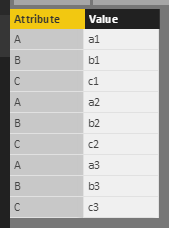
Slicer is used to filter rows. So I right click the table->Edit Query, select all the columns->click Unpivot columns under Transfer on home page. Select Close&Apply, you will get the following table.
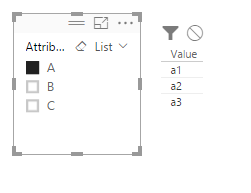
Create a slicer including Attribute column, and a table visual including value column. When you select the A, it will return all values under A field. When you select B, it will changes automatically.
If you have other issues, please feel free to ask.
Best Regards,
Angelia
Hi @HelpAccount,
I try to reproduce your scenario as follows.
I create the sample data table named Test.
Slicer is used to filter rows. So I right click the table->Edit Query, select all the columns->click Unpivot columns under Transfer on home page. Select Close&Apply, you will get the following table.
Create a slicer including Attribute column, and a table visual including value column. When you select the A, it will return all values under A field. When you select B, it will changes automatically.
If you have other issues, please feel free to ask.
Best Regards,
Angelia
Thanks that works great!
One more questions. Imagine in your example I have letters that go all the way to Z so the list is very large. Is there a way to add hierarchies so I can group some of the letters together. Or alternatively add additional columns at the top which are a sum of multiple letters?
Example: A-E becomes one option, F-P another, Q-Z another. Then either you have the individual letters below this or even better you can expand the above 3 options?
Hi @HelpAccount,
Please add a calculated column to calculate groups, please reference to this similar case.
Then select the new calculated column and value->unpivot, you will get expected result.
Best Regards,
Angelia
I used SUM to combine multiple columns. Is the correct calculated column? It appears in the report view but not the data view. I cannot find an option for value/ unpivot.
If you have recently started exploring Fabric, we'd love to hear how it's going. Your feedback can help with product improvements.
A new Power BI DataViz World Championship is coming this June! Don't miss out on submitting your entry.
Share feedback directly with Fabric product managers, participate in targeted research studies and influence the Fabric roadmap.
| User | Count |
|---|---|
| 48 | |
| 45 | |
| 41 | |
| 20 | |
| 17 |
| User | Count |
|---|---|
| 69 | |
| 64 | |
| 32 | |
| 31 | |
| 27 |