Share feedback directly with Fabric product managers, participate in targeted research studies and influence the Fabric roadmap.
Sign up nowGet Fabric certified for FREE! Don't miss your chance! Learn more
Dear all,
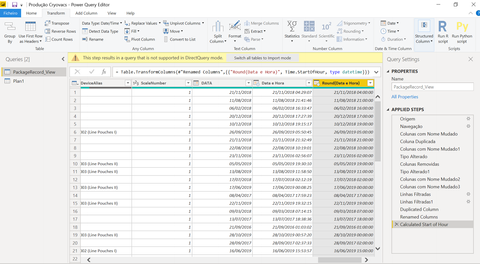
I need to round current time to the start hour, but i'm working in direct query.
When i try do this on "edit query" tell me that's not supported in direct query mode.
I need to work whith direct query, i cant export all data.
It is possible to do it in another way?
Thanks!
Solved! Go to Solution.
Hi @Anonymous ,
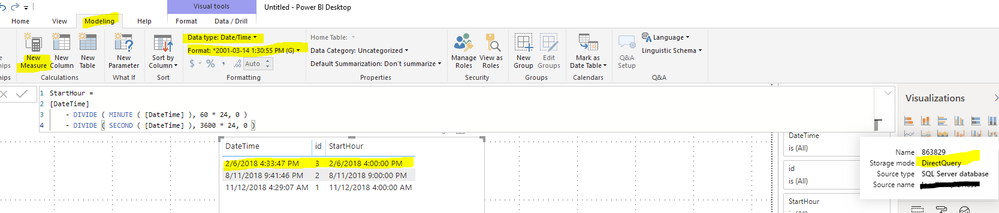
We can create a calculated column to meet your requirement:
StartHour =
[DateTime]
- DIVIDE ( MINUTE ( [DateTime] ), 60 * 24, 0 )
- DIVIDE ( SECOND ( [DateTime] ), 3600 * 24, 0 )
Best regards,
Hi @Anonymous ,
We can create a calculated column to meet your requirement:
StartHour =
[DateTime]
- DIVIDE ( MINUTE ( [DateTime] ), 60 * 24, 0 )
- DIVIDE ( SECOND ( [DateTime] ), 3600 * 24, 0 )
Best regards,
Hi @Anonymous ,
Glad to hear that you have resolved your problem.
Best regards,
It is because time is not only in seconds.
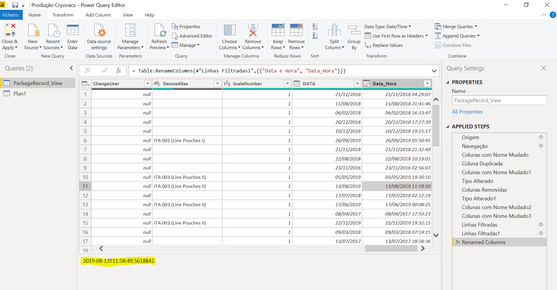
Is it possible to round the date to seconds?
One more thing you do that with new mesure or new column?
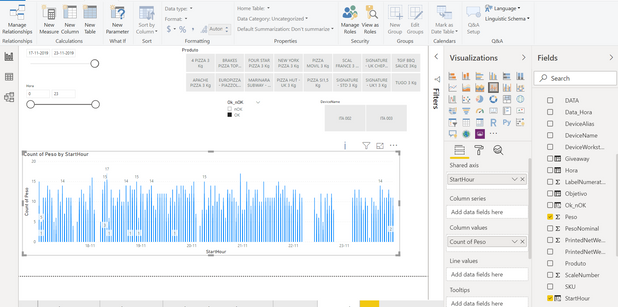
I only can do it with a new column, but i noticed when i try to count all values they give me wrong results
I have values in the order of tens and should have in the thousands.
Try to use relationships with the calendar, but get the same results.
Thank you
Works it, thanks
If you love stickers, then you will definitely want to check out our Community Sticker Challenge!
Check out the January 2026 Power BI update to learn about new features.
| User | Count |
|---|---|
| 61 | |
| 58 | |
| 45 | |
| 21 | |
| 18 |
| User | Count |
|---|---|
| 120 | |
| 117 | |
| 37 | |
| 35 | |
| 30 |