Join us at FabCon Atlanta from March 16 - 20, 2026, for the ultimate Fabric, Power BI, AI and SQL community-led event. Save $200 with code FABCOMM.
Register now!Vote for your favorite vizzies from the Power BI Dataviz World Championship submissions. Vote now!
Hi,
I added a new column referencing to two different tables using LOOKUPVALUE but it won't show in PowerQuery.
Any tips on how I can replicate LOOKUPVALUE but in PowerQuery?
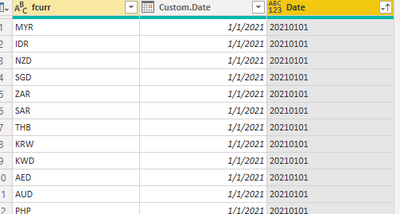
I have Table A containing Currency & Date. I want to reference to Table B, match it according to Currency & Date, then return the Exchange Rate value.
Reason why I need to do it in PowerQuery is because I need to fill the dates with null exchange rates.
Thanks! Any help will be appreciated 🙂
Solved! Go to Solution.
Hi @sophie23
Use Merge Queies to create a new table with all Rows from TableA and the Exchange Rate from TableB where the date and Currency match. Where's there's no match you'll get a null.
In the Merge dialog box you want to choose the Join Kind : Left Outer
Regards
Phil
Proud to be a Super User!
Hi @sophie23 ,
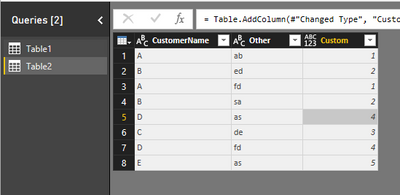
Please refer to this example:
(let currentCustomer = [CustomerName] in Table.SelectRows(Table1, each [CustomerName] = currentCustomer)){0}[CustomerID]![]()
Reference: Solved: How to lookup values in another table in the Query... - Microsoft Power BI Community
Best Regards,
Icey
If this post helps, then please consider Accept it as the solution to help the other members find it more quickly.
Hi @sophie23 ,
Please refer to this example:
(let currentCustomer = [CustomerName] in Table.SelectRows(Table1, each [CustomerName] = currentCustomer)){0}[CustomerID]![]()
Reference: Solved: How to lookup values in another table in the Query... - Microsoft Power BI Community
Best Regards,
Icey
If this post helps, then please consider Accept it as the solution to help the other members find it more quickly.
Hi @sophie23
Use Merge Queies to create a new table with all Rows from TableA and the Exchange Rate from TableB where the date and Currency match. Where's there's no match you'll get a null.
In the Merge dialog box you want to choose the Join Kind : Left Outer
Regards
Phil
Proud to be a Super User!
@sophie23 , refer if this blog can help
https://eriksvensen.wordpress.com/2019/02/28/powerquery-replicate-doing-an-excel-vlookup-in-m/
Vote for your favorite vizzies from the Power BI World Championship submissions!
If you love stickers, then you will definitely want to check out our Community Sticker Challenge!
Check out the January 2026 Power BI update to learn about new features.
| User | Count |
|---|---|
| 64 | |
| 56 | |
| 43 | |
| 20 | |
| 17 |
| User | Count |
|---|---|
| 123 | |
| 108 | |
| 44 | |
| 32 | |
| 26 |