cancel
Showing results for 
Search instead for 
Did you mean: 

July 28 - August 9 | Final Round of the Power BI Dataviz World Championships. This is your chance. Learn more

Reply
sarafenwick
Frequent Visitor

How to Exclude Field from RANKX function

I am trying to use the RANKX function to show my top 300 items by sales value. I also need to show this broken out by store and product division. 


The catch is, I need it to adjust it's ranking so each store location has a top 300 items by sales value, but the product division does not change the rankings. So each Location would have 300 top selling skus, that I could see the number of by Division, but that division doesn't affect the rankings


My rankx formula is: 


Top 300 SkusB = rankx(allselected('2016844 Ontario Ltd$Replen_ Item Quantity'[Item No_]),calculate(sum('2016844 Ontario Ltd$Value Entry$VSIFT$4'[Sales Amount (Actual)])))


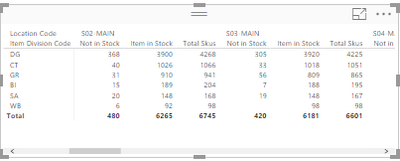
Is there a way to have the division code excluded from the rankings when I put it in the ideal layout as shown below?


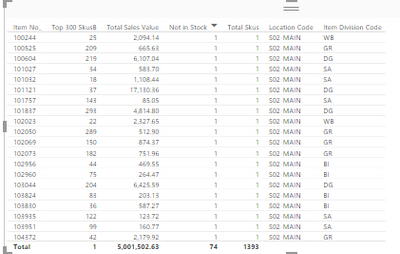
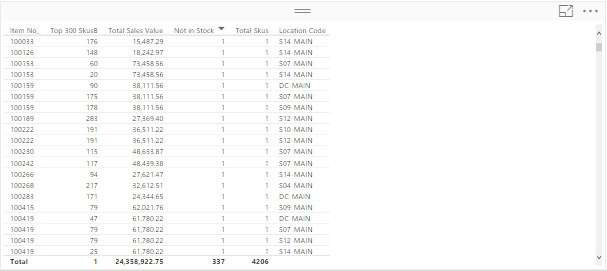
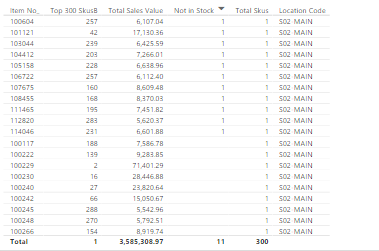
Top 300 for 1 location with division - want the total skus to be 300Top 300 for 1 location with division - want the total skus to be 300top 300 all locations - this is correcttop 300 all locations - this is correcttop 300 skus one locationtop 300 skus one locationIdeal Table LayoutIdeal Table Layout

4 REPLIES 4
v-qiuyu-msft
Community Support
Community Support

@sarafenwick Any dummy data and desired results shared is appreciated.

Community Support Team _ Qiuyun Yu
If this post helps, then please consider Accept it as the solution to help the other members find it more quickly.

See below for sample data. The desired result would rank as follows below... it would rank each location separately but not each division. So ideally I could show the out of stocks by location for the top 300 grossing skus, but be able to show which divisions those skus come from without showing the top 300 grossing skus by location by division. 


Item No_Total Sales ValueNot in StockTotal SkusLocation CodeItem Division Code
1000122530.9711S14-MAINGR
1000135130.66 1S03-MAINGR
1000135130.66 1S04-MAINGR
1000135130.66 1S05-MAINGR
1000135130.66 1S06-MAINGR
1000135130.66 1S07-MAINGR
1000135130.66 1S08-MAINGR
1000135130.66 1S09-MAINGR
1000135130.66 1S10-MAINGR
1000135130.66 1S11-MAINGR
1000135130.66 1S12-MAINGR
1000135130.66 1S13-MAINGR
1000145433.83 1DC-MAINGR
1000145433.83 1S02-MAINGR
1000145433.83 1S03-MAINGR
1000145433.83 1S04-MAINGR
1000145433.83 1S05-MAINGR
1000145433.83 1S06-MAINGR
1000145433.83 1S07-MAINGR
1000145433.83 1S08-MAINGR
1000145433.83 1S09-MAINGR
1000145433.83 1S10-MAINGR
1000145433.83 1S11-MAINGR
1000145433.83 1S12-MAINGR
1000145433.83 1S13-MAINGR
10003315487.2911S14-MAINDG
10003315487.29 1DC-MAINDG
10005122407.1911S13-MAINDG
10005122407.19 1S02-MAINDG
10005122407.19 1S03-MAINDG
10005122407.19 1S04-MAINDG
10005122407.19 1S05-MAINDG
10005122407.19 1S06-MAINDG
10005122407.19 1S07-MAINDG
10005122407.19 1S08-MAINDG
10005122407.19 1S09-MAINDG
10005122407.19 1S10-MAINDG
10005122407.19 1S11-MAINDG
10005122407.19 1S12-MAINDG


Desired Result Ranking: 

Item No_Total Sales ValueNot in StockTotal SkusLocation CodeItem Division CodeDesired Rank Outcome
10003315487.29 1DC-MAINDG1
1000145433.83 1DC-MAINGR2
10005122407.19 1S02-MAINDG1
1000145433.83 1S02-MAINGR2
10005122407.19 1S03-MAINDG1
1000145433.83 1S03-MAINGR2
1000135130.66 1S03-MAINGR3
10005122407.19 1S04-MAINDG1
1000145433.83 1S04-MAINGR2
1000135130.66 1S04-MAINGR3
10005122407.19 1S05-MAINDG1
1000145433.83 1S05-MAINGR2
1000135130.66 1S05-MAINGR3
10005122407.19 1S06-MAINDG1
1000145433.83 1S06-MAINGR2
1000135130.66 1S06-MAINGR3
10005122407.19 1S07-MAINDG1
1000145433.83 1S07-MAINGR2
1000135130.66 1S07-MAINGR3
10005122407.19 1S08-MAINDG1
1000145433.83 1S08-MAINGR2
1000135130.66 1S08-MAINGR3
10005122407.19 1S09-MAINDG1
1000145433.83 1S09-MAINGR2
1000135130.66 1S09-MAINGR3
10005122407.19 1S10-MAINDG1
1000145433.83 1S10-MAINGR2
1000135130.66 1S10-MAINGR3
10005122407.19 1S11-MAINDG1
1000145433.83 1S11-MAINGR2
1000135130.66 1S11-MAINGR3
10005122407.19 1S12-MAINDG1
1000145433.83 1S12-MAINGR2
1000135130.66 1S12-MAINGR3
10005122407.1911S13-MAINDG1
1000145433.83 1S13-MAINGR2
1000135130.66 1S13-MAINGR3
10003315487.2911S14-MAINDG1
1000122530.9711S14-MAINGR2


@sarafenwick


Try with this:


Ranking = CALCULATE(RANKX(ALLSELECTED(Table1[Item No_]);CALCULATE(SUM(Table1[Total Sales Value])));ALLEXCEPT(Table1;Table1[Item No_];Table1[Location Code]))


Lima - Peru

This is very close. I can now get it in a table like below and it does rank properly... the issue is when i try to summarize the data by division and location in a matrix. 


I want to filter the rank to top 300. Which is fine for the table, but in the matrix it is showing all values and not taking the 300 filter into account. Any thoughts? As you can see in the table the total skus are 300 which is right, the matrix has 6768 but should total to only 300.


Table of Top 300Table of Top 300Matrix of Top 300Matrix of Top 300


Helpful resources

Announcements
FabCon and SQLCon Barcelona 2026

FabCon & SQLCon – Barcelona 2026

Join us in Barcelona for FabCon and SQLCon, the Fabric, Power BI, SQL, and AI community event. Save €200 with code FABCMTY200.

Fabric Community Sticker Design Challenge Barcelona Carousel

Fabric Community Sticker Challenge - Barcelona 2026

If you love stickers, then you will definitely want to check out our community sticker challenge, Barcelona edition!

July Power BI Update Carousel

Power BI Monthly Update - July 2026

Check out the July 2026 Power BI update to learn about new features.

Power BI DataViz World Championships carousel

Power BI DataViz World Championships - June 2026

A new Power BI DataViz World Championship is coming this June! Don't miss out on submitting your entry.