cancel
Showing results for 
Search instead for 
Did you mean: 

Get Fabric certified for FREE! Don't miss your chance! Learn more

Reply
Noppadon
Frequent Visitor

How to Create Measure for Count by Condition

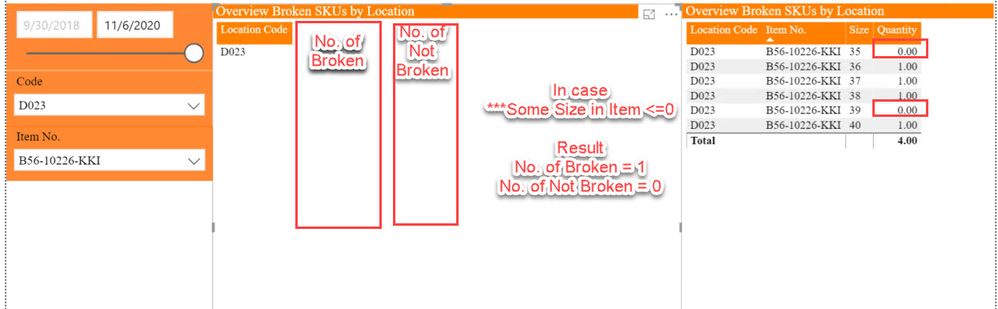
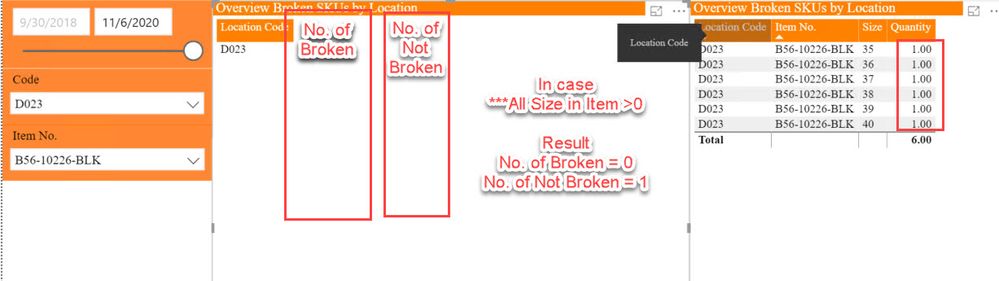
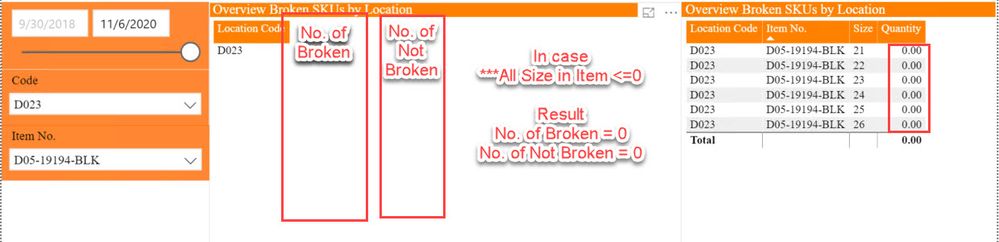
How to Create Measure for Count No. of Broken and No. of not Broken by Item Size Quantity Condition. In Case

CaseNo. of BrokenNo. of not Broken
All Size Quantity in Item as 000
Some Size Quantity in Item less than or equal 010
All Size Quantity in Item Quantity > 001


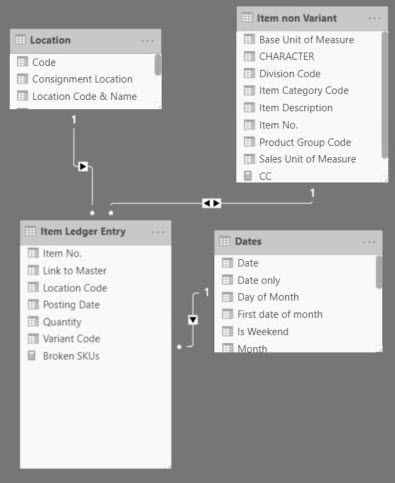
Example Result as attach Picture.1.jpg2.jpg3.jpg4.jpg

1 ACCEPTED SOLUTION
Anonymous
Not applicable

HI @Noppadon,

Currently, Dax formulas not able to respond with common language condition strings.
I think you need to wire measure formulas with switch function and trace current case, then you can write multiple expressions for different case calculate.

Measure =
VAR currCase =
    SELECTEDVALUE ( Table[Case] )
RETURN
    SWITCH (
        currCase,
        "All Size Quantity in Item as 0", 'expression 1',
        "Some Size Quantity in Item less than or equal 0", 'expression 2',
        "All Size Quantity in Item Quantity > 0", 'expression 3',
        'default process'
    )

Write Conditional Statement Using SWITCH in DAX and Power BI 

Regards,

Xiaoxin Sheng

View solution in original post

3 REPLIES 3
Noppadon
Frequent Visitor

I want to create 2 Measure for Count No. of Item. by Summary Quantity Condition. I Draft Example Output in pbix file as attach Link.

https://drive.google.com/file/d/1pl-SdqgVo0HwgcNJfESfP-CjU4t9dpg9/view?usp=sharing

Anonymous
Not applicable

HI @Noppadon,

Currently, Dax formulas not able to respond with common language condition strings.
I think you need to wire measure formulas with switch function and trace current case, then you can write multiple expressions for different case calculate.

Measure =
VAR currCase =
    SELECTEDVALUE ( Table[Case] )
RETURN
    SWITCH (
        currCase,
        "All Size Quantity in Item as 0", 'expression 1',
        "Some Size Quantity in Item less than or equal 0", 'expression 2',
        "All Size Quantity in Item Quantity > 0", 'expression 3',
        'default process'
    )

Write Conditional Statement Using SWITCH in DAX and Power BI 

Regards,

Xiaoxin Sheng

amitchandak
Super User
Super User

@Noppadon ,The information you have provided is not making the problem clear to me. Can you please explain with an example.
Can you share sample data and sample output in table format? Or a sample pbix after removing sensitive data.
Appreciate your Kudos.

Share with Power BI Enthusiasts: Full Power BI Video (20 Hours) YouTube
Microsoft Fabric Series 60+ Videos YouTube
Microsoft Fabric Hindi End to End YouTube

Helpful resources

Announcements
Join our Fabric User Panel

Join our Fabric User Panel

Share feedback directly with Fabric product managers, participate in targeted research studies and influence the Fabric roadmap.

Sticker Challenge 2026 Carousel

Join our Community Sticker Challenge 2026

If you love stickers, then you will definitely want to check out our Community Sticker Challenge!

January Power BI Update Carousel

Power BI Monthly Update - January 2026

Check out the January 2026 Power BI update to learn about new features.

FabCon Atlanta 2026 carousel

FabCon Atlanta 2026

Join us at FabCon Atlanta, March 16-20, for the ultimate Fabric, Power BI, AI and SQL community-led event. Save $200 with code FABCOMM.