cancel
Showing results for 
Search instead for 
Did you mean: 

Learn from the best! Meet the four finalists headed to the FINALS of the Power BI Dataviz World Championships! Register now

Reply
SantoshKumar
Microsoft Employee
Microsoft Employee

How to Convert SQL Query to DAX query


Hi All,

I have a below requirement to Convert an Sql Query to DAX query (result can be a new column or new measure).

note: as i am bound to data protection policy so could not provide the actual sql query.


Background of Query:

 1.there are two tables Table-A and Table-B, out of which Column1 is same for Both the tables and  other columns are different.

2. I am looking to extract Column1 values by applying the below mentioned conditions.


select TABLE-A.Column1
from TABLE-A inner join TABLE-B
on TABLE-A.Column1 = TABLE-B.Column1
where TABLE-B.Column2 = 'XYZ'
and TABLE-A.Column3 = 'ABC' and TABLE-A.Column4 not like '%ASD%'
and TABLE-A.Column4 not like '%QWE%' and TABLE-A.Column4 not like '%JKLNM%'


As per my  knowledge, i have used LookUp , FILTER , search options of Power Biindividually  but could not able to figure out to use them in a combination

It would be a great help if anyone provides any solution to my request.


Thanks

Santosh

1 ACCEPTED SOLUTION
Icey
Community Support
Community Support

Hi @SantoshKumar ,


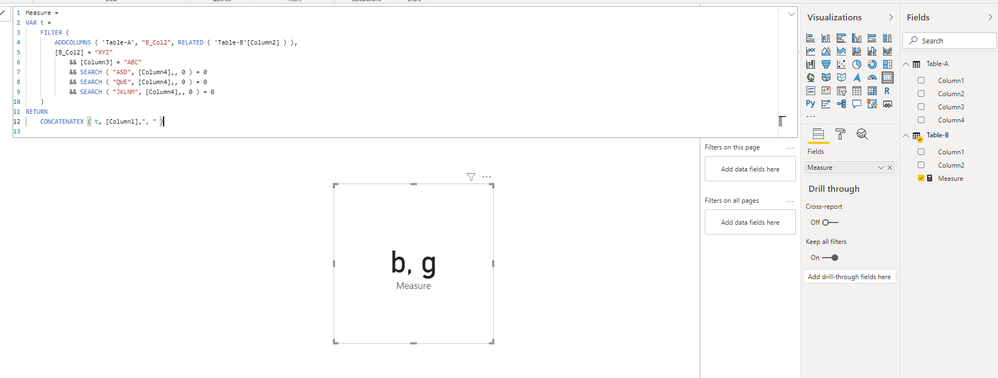
Kindly check the attachment whether help.

COLUMN1.PNG

Measure = 
VAR t =
    FILTER (
        ADDCOLUMNS ( 'Table-A', "B_Col2", RELATED ( 'Table-B'[Column2] ) ),
        [B_Col2] = "XYZ"
            && [Column3] = "ABC"
            && SEARCH ( "ASD", [Column4],, 0 ) = 0
            && SEARCH ( "QWE", [Column4],, 0 ) = 0
            && SEARCH ( "JKLNM", [Column4],, 0 ) = 0
    )
RETURN
    CONCATENATEX ( t, [Column1],", " )


Best Regards,

Icey


If this post helps, then please consider Accept it as the solution to help the other members find it more quickly.

View solution in original post

5 REPLIES 5
Icey
Community Support
Community Support

Hi @SantoshKumar ,


Kindly check the attachment whether help.

COLUMN1.PNG

Measure = 
VAR t =
    FILTER (
        ADDCOLUMNS ( 'Table-A', "B_Col2", RELATED ( 'Table-B'[Column2] ) ),
        [B_Col2] = "XYZ"
            && [Column3] = "ABC"
            && SEARCH ( "ASD", [Column4],, 0 ) = 0
            && SEARCH ( "QWE", [Column4],, 0 ) = 0
            && SEARCH ( "JKLNM", [Column4],, 0 ) = 0
    )
RETURN
    CONCATENATEX ( t, [Column1],", " )


Best Regards,

Icey


If this post helps, then please consider Accept it as the solution to help the other members find it more quickly.

@Icey 

Thank you, Your Solution worked for me with small minor changes as per my requirement.


Regards

Santosh

@Icey
Sorry but i have not got the required solution from your response. i will update some data in your pbi file and try to explain my requirement again.

amitchandak
Super User
Super User

@SantoshKumar , you need to join both tables and column1 and then create a measure to count column1 and plot it with column1 un summarized

example

calculate(count(TABLE-A[Column1]),TABLE-B[Column2] = "XYZ" , TABLE-A[Column3] = "ABC" ,CONTAINSSTRING(TABLE-A[Column4],"ASD")
,not(CONTAINSSTRING(TABLE-A[Column4],"QWE")) ,not(CONTAINSSTRING(TABLE-A[Column4],"JKLNM")))

Share with Power BI Enthusiasts: Full Power BI Video (20 Hours) YouTube
Microsoft Fabric Series 60+ Videos YouTube
Microsoft Fabric Hindi End to End YouTube

@amitchandak 

Hi Amit,

I got your point about joining the tables and when i tried to do so, it is making changing to my Table-A as per the conditions i applied.

Here Table-A is used to show so other details in my report and when i apply this conditons, i will loose some data which i dont want to.

is der any other options to get the job done?


Thanks

Santosh


Helpful resources

Announcements
New to Fabric survey Carousel

New to Fabric Survey

If you have recently started exploring Fabric, we'd love to hear how it's going. Your feedback can help with product improvements.

Power BI DataViz World Championships carousel

Power BI DataViz World Championships - June 2026

A new Power BI DataViz World Championship is coming this June! Don't miss out on submitting your entry.

Join our Fabric User Panel

Join our Fabric User Panel

Share feedback directly with Fabric product managers, participate in targeted research studies and influence the Fabric roadmap.

March Power BI Update Carousel

Power BI Community Update - March 2026

Check out the March 2026 Power BI update to learn about new features.