cancel
Showing results for 
Search instead for 
Did you mean: 

Get Fabric Certified for FREE during Fabric Data Days. Don't miss your chance! Request now

Reply
DeepDive
Helper IV
Helper IV

How to Calculate Mode on Value coloumn of summarized table ?

Hi Experts,


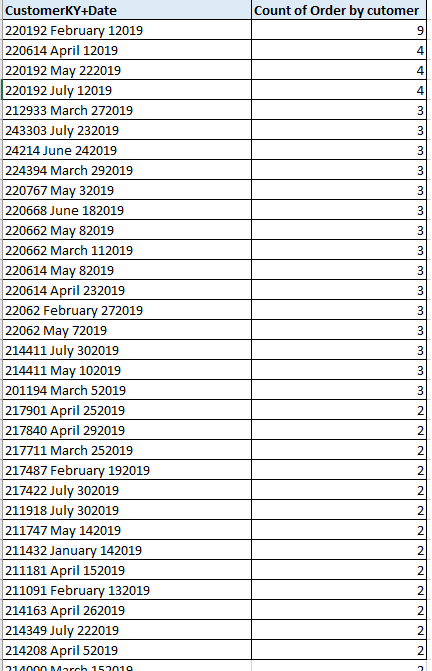
I want to calculate mode of value column of summarized table : For example am using below dax to get the table summarized, summarized dax and summarized table is below.. now I want to calcualte mode  " Count of order by customer"


summarized_Table = summarize('Sales','Sales'[CustomerKY+Date]),"Count_Freq",CALCULATE(COUNT('Sales'[CustomerKY+Date]),
ALLEXCEPT('Sales','Sales'[CustomerKY+Date]),FILTER('Sales','Sales'[SalesValue]>0))


Mode.png


1 ACCEPTED SOLUTION
v-yuta-msft
Community Support
Community Support

@DeepDive ,


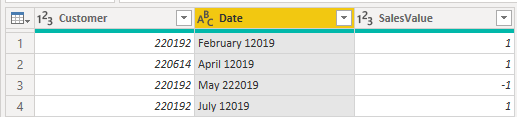
Click query editor-> transform-> split columns by the left most space like below:

1.PNG 


Then you can achieve the Customer and Date columns:

2.PNG 


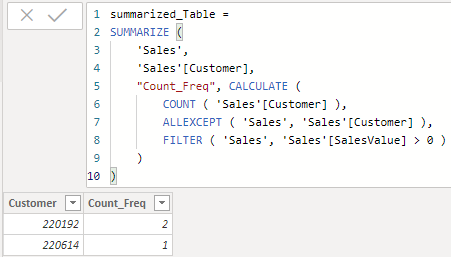
Finally modify the dax like below:

summarized_Table = 
SUMMARIZE (
    'Sales',
    'Sales'[Customer],
    "Count_Freq", CALCULATE (
        COUNT ( 'Sales'[Customer] ),
        ALLEXCEPT ( 'Sales', 'Sales'[Customer] ),
        FILTER ( 'Sales', 'Sales'[SalesValue] > 0 )
    )
)

3.PNG 


Community Support Team _ Jimmy Tao

If this post helps, then please consider Accept it as the solution to help the other members find it more quickly.


View solution in original post

2 REPLIES 2
v-yuta-msft
Community Support
Community Support

@DeepDive ,


Click query editor-> transform-> split columns by the left most space like below:

1.PNG 


Then you can achieve the Customer and Date columns:

2.PNG 


Finally modify the dax like below:

summarized_Table = 
SUMMARIZE (
    'Sales',
    'Sales'[Customer],
    "Count_Freq", CALCULATE (
        COUNT ( 'Sales'[Customer] ),
        ALLEXCEPT ( 'Sales', 'Sales'[Customer] ),
        FILTER ( 'Sales', 'Sales'[SalesValue] > 0 )
    )
)

3.PNG 


Community Support Team _ Jimmy Tao

If this post helps, then please consider Accept it as the solution to help the other members find it more quickly.


jdbuchanan71
Super User
Super User

@DeepDive 

Here is a good article on statistical-patterns.  Mode is towards the top of the aticle.

https://www.daxpatterns.com/statistical-patterns/

Helpful resources

Announcements
November Power BI Update Carousel

Power BI Monthly Update - November 2025

Check out the November 2025 Power BI update to learn about new features.

Fabric Data Days Carousel

Fabric Data Days

Advance your Data & AI career with 50 days of live learning, contests, hands-on challenges, study groups & certifications and more!

FabCon Atlanta 2026 carousel

FabCon Atlanta 2026

Join us at FabCon Atlanta, March 16-20, for the ultimate Fabric, Power BI, AI and SQL community-led event. Save $200 with code FABCOMM.

Top Solution Authors
Top Kudoed Authors