cancel
Showing results for 
Search instead for 
Did you mean: 

View all the Fabric Data Days sessions on demand. View schedule

Reply
DeepDive
Helper IV
Helper IV

How to Calculate Mode on Value coloumn of summarized table ?

Hi Experts,


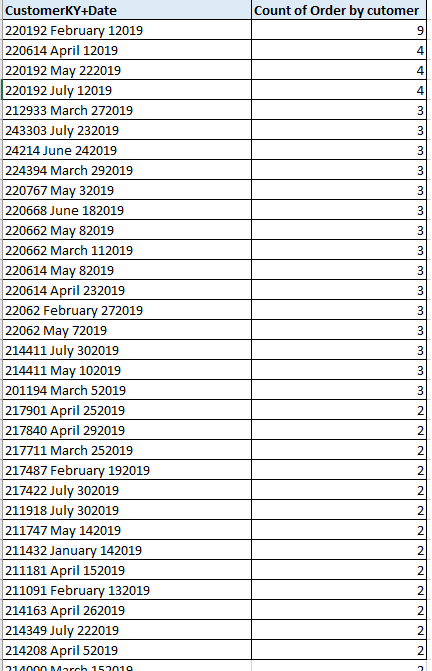
I want to calculate mode of value column of summarized table : For example am using below dax to get the table summarized, summarized dax and summarized table is below.. now I want to calcualte mode  " Count of order by customer"


summarized_Table = summarize('Sales','Sales'[CustomerKY+Date]),"Count_Freq",CALCULATE(COUNT('Sales'[CustomerKY+Date]),
ALLEXCEPT('Sales','Sales'[CustomerKY+Date]),FILTER('Sales','Sales'[SalesValue]>0))


Mode.png


1 ACCEPTED SOLUTION
v-yuta-msft
Community Support
Community Support

@DeepDive ,


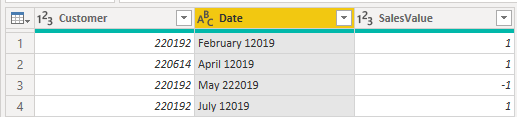
Click query editor-> transform-> split columns by the left most space like below:

1.PNG 


Then you can achieve the Customer and Date columns:

2.PNG 


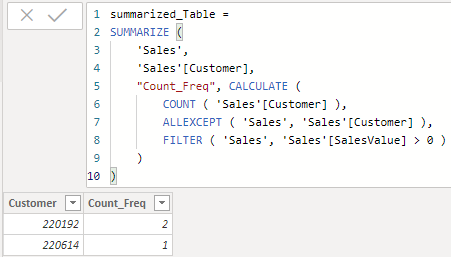
Finally modify the dax like below:

summarized_Table = 
SUMMARIZE (
    'Sales',
    'Sales'[Customer],
    "Count_Freq", CALCULATE (
        COUNT ( 'Sales'[Customer] ),
        ALLEXCEPT ( 'Sales', 'Sales'[Customer] ),
        FILTER ( 'Sales', 'Sales'[SalesValue] > 0 )
    )
)

3.PNG 


Community Support Team _ Jimmy Tao

If this post helps, then please consider Accept it as the solution to help the other members find it more quickly.


View solution in original post

2 REPLIES 2
v-yuta-msft
Community Support
Community Support

@DeepDive ,


Click query editor-> transform-> split columns by the left most space like below:

1.PNG 


Then you can achieve the Customer and Date columns:

2.PNG 


Finally modify the dax like below:

summarized_Table = 
SUMMARIZE (
    'Sales',
    'Sales'[Customer],
    "Count_Freq", CALCULATE (
        COUNT ( 'Sales'[Customer] ),
        ALLEXCEPT ( 'Sales', 'Sales'[Customer] ),
        FILTER ( 'Sales', 'Sales'[SalesValue] > 0 )
    )
)

3.PNG 


Community Support Team _ Jimmy Tao

If this post helps, then please consider Accept it as the solution to help the other members find it more quickly.


jdbuchanan71
Super User
Super User

@DeepDive 

Here is a good article on statistical-patterns.  Mode is towards the top of the aticle.

https://www.daxpatterns.com/statistical-patterns/

Helpful resources

Announcements
November Power BI Update Carousel

Power BI Monthly Update - November 2025

Check out the November 2025 Power BI update to learn about new features.

Fabric Data Days Carousel

Fabric Data Days

Advance your Data & AI career with 50 days of live learning, contests, hands-on challenges, study groups & certifications and more!

FabCon Atlanta 2026 carousel

FabCon Atlanta 2026

Join us at FabCon Atlanta, March 16-20, for the ultimate Fabric, Power BI, AI and SQL community-led event. Save $200 with code FABCOMM.

Top Solution Authors
Top Kudoed Authors