cancel
Showing results for 
Search instead for 
Did you mean: 

Vote for your favorite vizzies from the Power BI Dataviz World Championship submissions. Vote now!

Reply
Anonymous
Not applicable

How to Achieve Complex Matrix

Hi All,


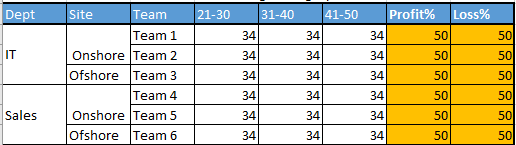
I am trying to achieve something in visualization but unable at the moment. Trying to get similar to the below image in Matrix.

Matrix.PNG

First 3 columns are Dept, Site and Team. 

3rd , 4th and 5th columns are Age category and i have put this under "Columns" under visualization pane.Actually it is only one column called Age category and it is getting split into 3 columns since i put this in matrix.

Till here i can able to achieve perfectly.

Now Profit% and Loss% is a measure which i am calculating and i want this to be placed after Age Category. How to Put this?Espesially how to put measures into matrix?


Thanks in Advance

Prakash

2 REPLIES 2
ad3tutu
New Member

Hello Prakash,

Did you eventually find a solution to this? I am trying to achieve something very similar

amitchandak
Super User
Super User

@Anonymous , seem like a hybrid display, not supported. Work around

if you are looking for a Hybrid display with Matrix Column and measure
https://community.powerbi.com/t5/Community-Blog/Creating-a-custom-or-hybrid-matrix-in-PowerBI/ba-p/1354591
https://community.powerbi.com/t5/Quick-Measures-Gallery/The-New-Hotness-Custom-Matrix-Hierarchy/m-p/963588#M428

vote for Hybrid Table
https://ideas.powerbi.com/ideas/idea/?ideaid=9bc32b23-1eb1-4e74-8b34-349887b37ebc

Share with Power BI Enthusiasts: Full Power BI Video (20 Hours) YouTube
Microsoft Fabric Series 60+ Videos YouTube
Microsoft Fabric Hindi End to End YouTube

Helpful resources

Announcements
Power BI DataViz World Championships

Power BI Dataviz World Championships

Vote for your favorite vizzies from the Power BI World Championship submissions!

Sticker Challenge 2026 Carousel

Join our Community Sticker Challenge 2026

If you love stickers, then you will definitely want to check out our Community Sticker Challenge!

January Power BI Update Carousel

Power BI Monthly Update - January 2026

Check out the January 2026 Power BI update to learn about new features.

FabCon Atlanta 2026 carousel

FabCon Atlanta 2026

Join us at FabCon Atlanta, March 16-20, for the ultimate Fabric, Power BI, AI and SQL community-led event. Save $200 with code FABCOMM.