Join us at FabCon Atlanta from March 16 - 20, 2026, for the ultimate Fabric, Power BI, AI and SQL community-led event. Save $200 with code FABCOMM.
Register now!Vote for your favorite vizzies from the Power BI Dataviz World Championship submissions. Vote now!
Hi All,
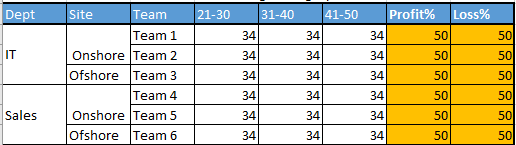
I am trying to achieve something in visualization but unable at the moment. Trying to get similar to the below image in Matrix.
First 3 columns are Dept, Site and Team.
3rd , 4th and 5th columns are Age category and i have put this under "Columns" under visualization pane.Actually it is only one column called Age category and it is getting split into 3 columns since i put this in matrix.
Till here i can able to achieve perfectly.
Now Profit% and Loss% is a measure which i am calculating and i want this to be placed after Age Category. How to Put this?Espesially how to put measures into matrix?
Thanks in Advance
Prakash
Hello Prakash,
Did you eventually find a solution to this? I am trying to achieve something very similar
@Anonymous , seem like a hybrid display, not supported. Work around
if you are looking for a Hybrid display with Matrix Column and measure
https://community.powerbi.com/t5/Community-Blog/Creating-a-custom-or-hybrid-matrix-in-PowerBI/ba-p/1354591
https://community.powerbi.com/t5/Quick-Measures-Gallery/The-New-Hotness-Custom-Matrix-Hierarchy/m-p/963588#M428
vote for Hybrid Table
https://ideas.powerbi.com/ideas/idea/?ideaid=9bc32b23-1eb1-4e74-8b34-349887b37ebc
If you love stickers, then you will definitely want to check out our Community Sticker Challenge!
Check out the January 2026 Power BI update to learn about new features.
| User | Count |
|---|---|
| 65 | |
| 64 | |
| 45 | |
| 21 | |
| 18 |
| User | Count |
|---|---|
| 115 | |
| 114 | |
| 38 | |
| 36 | |
| 26 |