Get Fabric or SQL Certified for Free.
Get certified for free when you join Fabric Data Days 2026 and dive into Fabric, Power BI, SQL, AI, and other essential data skills.
Join now- Power BI forums
- Get Help with Power BI
- Desktop
- Service
- Report Server
- Power Query
- Mobile Apps
- Developer
- DAX Commands and Tips
- Custom Visuals Development Discussion
- Health and Life Sciences
- Power BI Spanish forums
- Translated Spanish Desktop
- Training and Consulting
- Instructor Led Training
- Dashboard in a Day for Women, by Women
- Galleries
- Data Stories Gallery
- Themes Gallery
- Contests Gallery
- QuickViz Gallery
- Quick Measures Gallery
- Visual Calculations Gallery
- Fabric Apps Gallery
- Notebook Gallery
- Translytical Task Flow Gallery
- TMDL Gallery
- R Script Showcase
- Webinars and Video Gallery
- Ideas
- Custom Visuals Ideas (read-only)
- Issues
- Issues
- Events
- Upcoming Events
July 28 - August 9 | Final Round of the Power BI Dataviz World Championships. This is your chance. Learn more
- Power BI forums
- Forums
- Get Help with Power BI
- Desktop
- Re: How make a colored button?
- Subscribe to RSS Feed
- Mark Topic as New
- Mark Topic as Read
- Float this Topic for Current User
- Bookmark
- Subscribe
- Printer Friendly Page


- Mark as New
- Bookmark
- Subscribe
- Mute
- Subscribe to RSS Feed
- Permalink
- Report Inappropriate Content
How make a colored button?
Hello all,
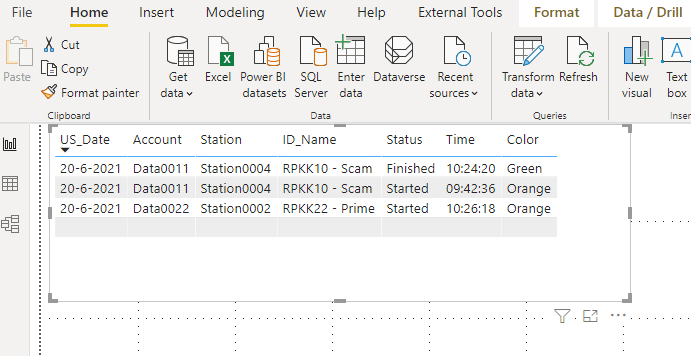
I have a problem to make a button/shape or something that can change when the data give a Orange/Green (Started/Finished) instuction in the .csv data file when it is updated like here under.
So i think there is a green button/shape for row 1 and 2 because station004 gives back it is Finished (Green is the latest update)
And a button for row 3 station002 is the button/shape Orange because the file gives back that it is started (Orange is the latest update)
How can i make something that the color is change if the data is changed?
Solved! Go to Solution.


- Mark as New
- Bookmark
- Subscribe
- Mute
- Subscribe to RSS Feed
- Permalink
- Report Inappropriate Content
- Mark as New
- Bookmark
- Subscribe
- Mute
- Subscribe to RSS Feed
- Permalink
- Report Inappropriate Content
Hi @Frixel !
You can set the Button background property or Fill color property set the property to be based on conditional formatting & set the Fomrat by to Field Value and provid ethe color column.
Regards,
Hasham


- Mark as New
- Bookmark
- Subscribe
- Mute
- Subscribe to RSS Feed
- Permalink
- Report Inappropriate Content
Hey @Frixel ,
you can use the conditional formatting to change the background of that rolumn based on the value. This would then also dynamically adapt. Check out the following article on how to that:
If you need any help please let me know.
If I answered your question I would be happy if you could mark my post as a solution ✔️ and give it a thumbs up 👍
Best regards
Denis
Blog: WhatTheFact.bi
Follow me: twitter.com/DenSelimovic
- Mark as New
- Bookmark
- Subscribe
- Mute
- Subscribe to RSS Feed
- Permalink
- Report Inappropriate Content
Hi @selimovd
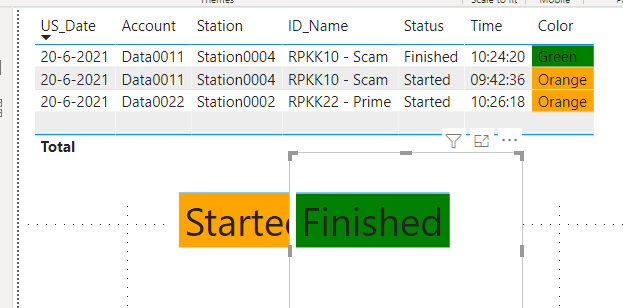
Yes i have found that article and have make this.
But how make i that when Finished the Started not more visible is?
- Mark as New
- Bookmark
- Subscribe
- Mute
- Subscribe to RSS Feed
- Permalink
- Report Inappropriate Content
Hi @Frixel !
There are multiple ways to solve this, You can create a measure to get teh latest status and you can only populate latets status based on that measure.
You create another flag measure which can be used to hide/unhide card visuals based on status.
Regards,
Hasham
- Mark as New
- Bookmark
- Subscribe
- Mute
- Subscribe to RSS Feed
- Permalink
- Report Inappropriate Content
Hi @HashamNiaz
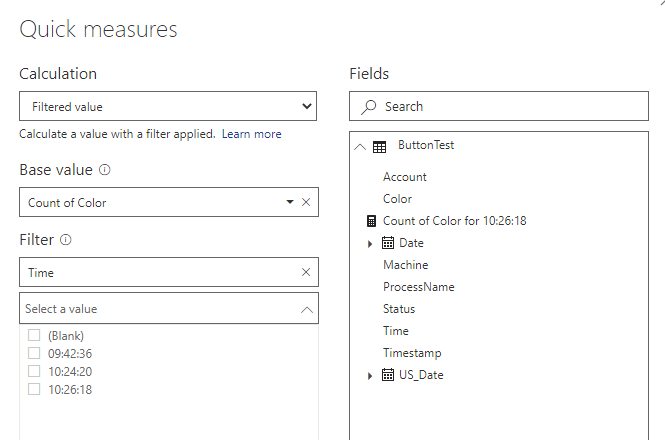
Oke, i think i understand it but i can`t choise 'the latest" by the filter.
Can i then also the new messure connect to a shape for color changing?
- Mark as New
- Bookmark
- Subscribe
- Mute
- Subscribe to RSS Feed
- Permalink
- Report Inappropriate Content
Hi @Frixel !
You can creat a Latest Status measur eusing following DAX;
LatestStatus =
  VAR _LastDate = CALCULATE(MAX(AccountStatus[DateTime]), ALLEXCEPT(AccountStatus, AccountStatus[Account]))
RETURN
    CALCULATE(MAX(AccountStatus[Status]),  FILTER(AccountStatus, AccountStatus[DateTime] = _LastDate))
You can replace AccountStatus as your Table name & respectively choose the column name.
Regards,
Hasham
- Mark as New
- Bookmark
- Subscribe
- Mute
- Subscribe to RSS Feed
- Permalink
- Report Inappropriate Content
Hi @HashamNiaz
When i changed it then i have this error.
I filter in the report on Today so what i wil see is then the latest "Time"

- Mark as New
- Bookmark
- Subscribe
- Mute
- Subscribe to RSS Feed
- Permalink
- Report Inappropriate Content
- Mark as New
- Bookmark
- Subscribe
- Mute
- Subscribe to RSS Feed
- Permalink
- Report Inappropriate Content
Thanks @HashamNiaz the last ')' was the issue.
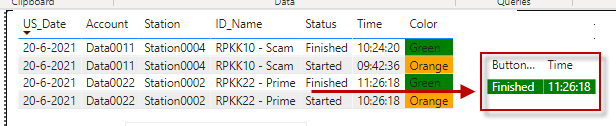
Now i have this result but that is based on the 'Table' is it possible to 'connect' it with or as a visual like a button or shape?
When i choise a shape then i don`t have the options of the fields for the shape.
How do i do that?
- Mark as New
- Bookmark
- Subscribe
- Mute
- Subscribe to RSS Feed
- Permalink
- Report Inappropriate Content
Hi @Frixel !
You can place this measure on Card Visual and overlay a button image over it using selection pane.
Regards,
Hasham
- Mark as New
- Bookmark
- Subscribe
- Mute
- Subscribe to RSS Feed
- Permalink
- Report Inappropriate Content
Hi @HashamNiaz
Sorry but I don`t know what you mean with: overlay a button image over it using selection pane.
Can you explain that for me?

Helpful resources

FabCon & SQLCon – Barcelona 2026
Join us in Barcelona for FabCon and SQLCon, the Fabric, Power BI, SQL, and AI community event. Save €200 with code FABCMTY200.

Fabric Community Sticker Challenge - Barcelona 2026
If you love stickers, then you will definitely want to check out our community sticker challenge, Barcelona edition!

Power BI Monthly Update - July 2026
Check out the July 2026 Power BI update to learn about new features.

Power BI DataViz World Championships - June 2026
A new Power BI DataViz World Championship is coming this June! Don't miss out on submitting your entry.

| User | Count |
|---|---|
| 26 | |
| 24 | |
| 23 | |
| 19 | |
| 17 |


| User | Count |
|---|---|
| 30 | |
| 28 | |
| 21 | |
| 19 | |
| 17 |


