cancel
Showing results for 
Search instead for 
Did you mean: 

Did you hear? There's a new SQL AI Developer certification (DP-800). Start preparing now and be one of the first to get certified. Register now

Reply
DSmith4
Helper II
Helper II

How does scheduled refresh work?

Hi, I have my reports set to auto refresh at 4am every morning.

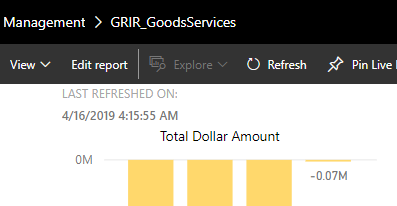
In the web, I can clearly see this happening,


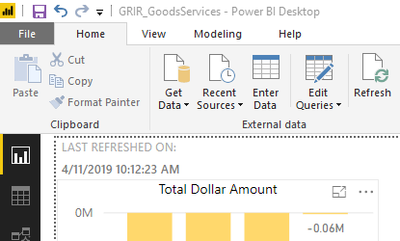
I'm wondering why though, when I open my file in PBI Desktop, I dont see the refresh there?

It shows my last manual refresh.


Wondering why? Does PBI Web save a seperate file somewhere that it updates?

WebWeb

DesktopDesktop


1 ACCEPTED SOLUTION

Hey,


please be aware that the Power BI data model contained in the PBI Desktop file is not the same that you pbulished to the Power BI Services.


There are two data models, one inside your Power BI Desktop and one in Power BI Service. The data model inside Power BI Service will be refreshed automatically be the defined refresh schedule.

The refresh of a data model inside Power BI Service will not affect the model inside the Poewer BI Desktop file. Data models inside a Power BI Desktop file have to refreshed manually.

This is how Power BI works.


Regards,

To


Did I answer your question? Mark my post as a solution, this will help others!

Proud to be a Super User!
I accept Kudos 😉
Hamburg, Germany

View solution in original post

5 REPLIES 5
TomMartens
Super User
Super User

Hey,


I'm wondering what file you open in Power BI Desktop, the file you once used to publish the report to the PBI Service or from did you export the PBIX file from the Power BI App Workspace inside the PBI Service.


Regards,

Tom


Did I answer your question? Mark my post as a solution, this will help others!

Proud to be a Super User!
I accept Kudos 😉
Hamburg, Germany

Yes, it is the same file that I used to upload. I used the "Publish" button in PBI Desktop.


I uploaded the file on the 10th. Manually refreshed (from desktop) the 11th, and on the 12th I added auto refresh.


Thanks

Hey,


please be aware that the Power BI data model contained in the PBI Desktop file is not the same that you pbulished to the Power BI Services.


There are two data models, one inside your Power BI Desktop and one in Power BI Service. The data model inside Power BI Service will be refreshed automatically be the defined refresh schedule.

The refresh of a data model inside Power BI Service will not affect the model inside the Poewer BI Desktop file. Data models inside a Power BI Desktop file have to refreshed manually.

This is how Power BI works.


Regards,

To


Did I answer your question? Mark my post as a solution, this will help others!

Proud to be a Super User!
I accept Kudos 😉
Hamburg, Germany

I have a follow-up question,


If I make a change in desktop version, save it, do I need to re-publish it?

Or will the auto refresh pickup the changes made?

Hey,


whenever you make change to the pbix file (PBI Desktop), you have to republish the file to the Power BI Service.


Regards,

Tom


Did I answer your question? Mark my post as a solution, this will help others!

Proud to be a Super User!
I accept Kudos 😉
Hamburg, Germany

Helpful resources

Announcements
April Power BI Update Carousel

Power BI Monthly Update - April 2026

Check out the April 2026 Power BI update to learn about new features.

New to Fabric survey Carousel

New to Fabric Survey

If you have recently started exploring Fabric, we'd love to hear how it's going. Your feedback can help with product improvements.

Power BI DataViz World Championships carousel

Power BI DataViz World Championships - June 2026

A new Power BI DataViz World Championship is coming this June! Don't miss out on submitting your entry.