Join us at FabCon Atlanta from March 16 - 20, 2026, for the ultimate Fabric, Power BI, AI and SQL community-led event. Save $200 with code FABCOMM.
Register now!The Power BI Data Visualization World Championships is back! Get ahead of the game and start preparing now! Learn more
Hello -
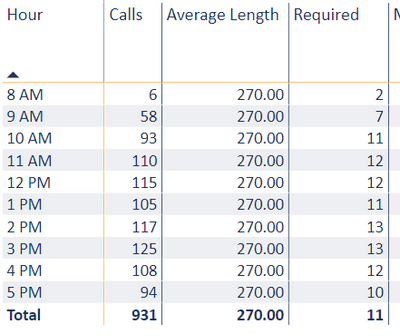
I have a Measure that is calculating the number of staff required based on call volumes and length of calls and am looking to aggregate that measure as a total for the day and eventually week.
My measure currently shows the daily staff required for the day's average by hour instead of the total for the day . Is there a way to take the sum of this measure? 2+7+11+12+12+11+13+13+12+10 = 93 required instead of 11
In the above example i just need the bottom row to show the total for the day similar to how the # of calls is displayed.
Solved! Go to Solution.
@Anonymous , Try measure like
sumx(values(Table[Hour]),[Required])
or
sumx(summarize(Table[Hour], "_1",[Required]),[_1])
The Power BI Data Visualization World Championships is back! Get ahead of the game and start preparing now!
Check out the November 2025 Power BI update to learn about new features.
| User | Count |
|---|---|
| 59 | |
| 43 | |
| 42 | |
| 23 | |
| 17 |
| User | Count |
|---|---|
| 190 | |
| 122 | |
| 96 | |
| 66 | |
| 47 |