Join us at FabCon Atlanta from March 16 - 20, 2026, for the ultimate Fabric, Power BI, AI and SQL community-led event. Save $200 with code FABCOMM.
Register now!Get Fabric Certified for FREE during Fabric Data Days. Don't miss your chance! Request now
Hello -
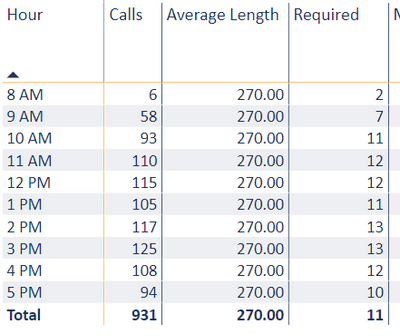
I have a Measure that is calculating the number of staff required based on call volumes and length of calls and am looking to aggregate that measure as a total for the day and eventually week.
My measure currently shows the daily staff required for the day's average by hour instead of the total for the day . Is there a way to take the sum of this measure? 2+7+11+12+12+11+13+13+12+10 = 93 required instead of 11
In the above example i just need the bottom row to show the total for the day similar to how the # of calls is displayed.
Solved! Go to Solution.
@Anonymous , Try measure like
sumx(values(Table[Hour]),[Required])
or
sumx(summarize(Table[Hour], "_1",[Required]),[_1])
Check out the November 2025 Power BI update to learn about new features.
Advance your Data & AI career with 50 days of live learning, contests, hands-on challenges, study groups & certifications and more!