Don't miss your chance to take the Fabric Data Engineer (DP-600) exam for FREE! Find out how by watching the DP-600 session on-demand now through April 28th.
Learn moreJoin the FabCon + SQLCon recap series. Up next: Power BI, Real-Time Intelligence, IQ and AI, and Data Factory take center stage. All sessions are available on-demand after the live show. Register now
Hi
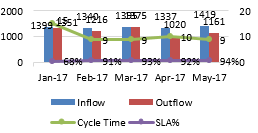
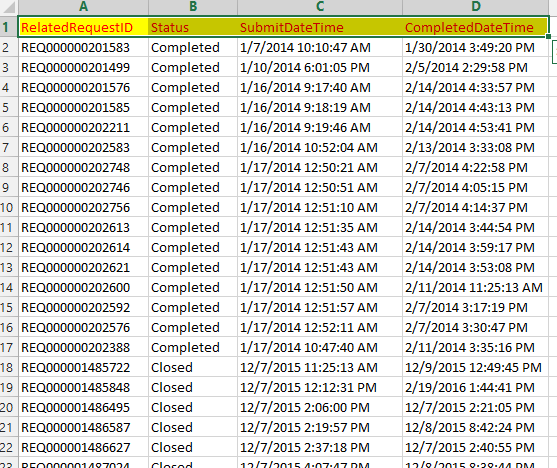
I have requirement that, in a table we have capturing requests made by user so in Request Id column ids will create and in status column status of the rquests like Assigned,pending,completed etc.,will store, my requirement is i want to create a column where i have to mention all the created requests(Even completed to be captured) as Inflow and the requests which are completed(Only completed out of all) as Outflow in new column.
Thanks in Advance
Solved! Go to Solution.
HI @Anonymous,
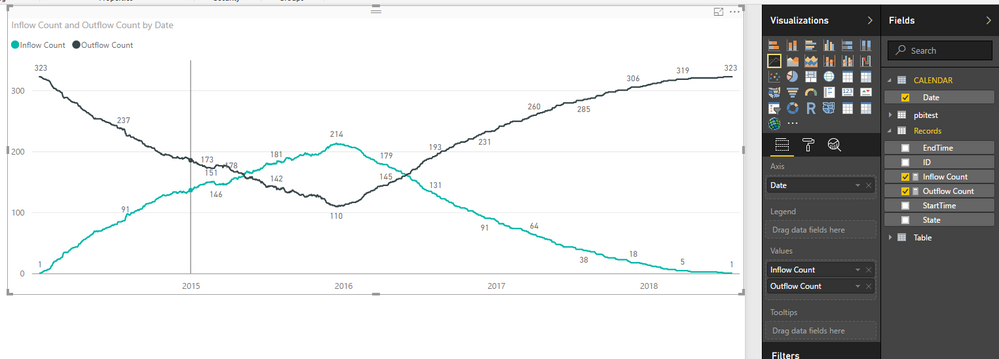
You can try to use below formula calculate the inflow and outflow count:
Prerequisite: you need a calendar table as the axis.
Inflow Count = COUNTX(FILTER(ALLSELECTED(Records),[SubmitDateTime]<=MAX('CALENDAR'[Date])&&[CompletedDateTime]>MAX('CALENDAR'[Date])),[ID])
Outflow Count = COUNTX(FILTER(ALLSELECTED(Records),[SubmitDateTime]>MAX('CALENDAR'[Date])||[CompletedDateTime]<MAX('CALENDAR'[Date])),[ID])
Regards,
Xiaoxin Sheng
@Anonymous its very difficult to read and easily understand what you are asking
please provide a table of the information with an example of what you want.
ta
Proud to be a Super User!
Hi vanessafvg
Below screenshot is my requirement and i have mentioned the Data link below.
Thanks
Hi @Anonymous,
Can you please share some sample date test? I have can't open your sharepoint link.
Regards,
Xiaoxin Sheng
Hi
I can Able to load only screenshoot
HI @Anonymous,
You can try to use below formula calculate the inflow and outflow count:
Prerequisite: you need a calendar table as the axis.
Inflow Count = COUNTX(FILTER(ALLSELECTED(Records),[SubmitDateTime]<=MAX('CALENDAR'[Date])&&[CompletedDateTime]>MAX('CALENDAR'[Date])),[ID])
Outflow Count = COUNTX(FILTER(ALLSELECTED(Records),[SubmitDateTime]>MAX('CALENDAR'[Date])||[CompletedDateTime]<MAX('CALENDAR'[Date])),[ID])
Regards,
Xiaoxin Sheng
Check out the April 2026 Power BI update to learn about new features.
If you have recently started exploring Fabric, we'd love to hear how it's going. Your feedback can help with product improvements.
A new Power BI DataViz World Championship is coming this June! Don't miss out on submitting your entry.
| User | Count |
|---|---|
| 42 | |
| 37 | |
| 34 | |
| 21 | |
| 16 |
| User | Count |
|---|---|
| 65 | |
| 62 | |
| 31 | |
| 26 | |
| 25 |