Get Fabric or SQL Certified for Free.
Get certified for free when you join Fabric Data Days 2026 and dive into Fabric, Power BI, SQL, AI, and other essential data skills.
Join now- Power BI forums
- Get Help with Power BI
- Desktop
- Service
- Report Server
- Power Query
- Mobile Apps
- Developer
- DAX Commands and Tips
- Custom Visuals Development Discussion
- Health and Life Sciences
- Power BI Spanish forums
- Translated Spanish Desktop
- Training and Consulting
- Instructor Led Training
- Dashboard in a Day for Women, by Women
- Galleries
- Data Stories Gallery
- Themes Gallery
- Contests Gallery
- QuickViz Gallery
- Quick Measures Gallery
- Visual Calculations Gallery
- Fabric Apps Gallery
- Notebook Gallery
- Translytical Task Flow Gallery
- TMDL Gallery
- R Script Showcase
- Webinars and Video Gallery
- Ideas
- Custom Visuals Ideas (read-only)
- Issues
- Issues
- Events
- Upcoming Events
July 7 - July 17 | Round 2 of the Power BI Dataviz World Championships. Don't miss your chance! Learn more
- Power BI forums
- Forums
- Get Help with Power BI
- Desktop
- Re: How do i create a date table ?
- Subscribe to RSS Feed
- Mark Topic as New
- Mark Topic as Read
- Float this Topic for Current User
- Bookmark
- Subscribe
- Printer Friendly Page

- Mark as New
- Bookmark
- Subscribe
- Mute
- Subscribe to RSS Feed
- Permalink
- Report Inappropriate Content
How do i create a date table ?
I was trying to create a date table for filtering.. And ran across this DAX (below) ... thinking it looked useful.
However when I went to create the table and use it.. Didn't seem to work..
example
Date =
ADDCOLUMNS (
CALENDAR (DATE (2000, 1, 1), DATE (2025, 12, 31);
“DateAsInteger”; FORMAT ( [Date]; “YYYYMMDD” );
“Year”; YEAR ( [Date] );
“Monthnumber”; FORMAT ( [Date]; “MM” );
“YearMonthnumber”; FORMAT ( [Date]; “YYYY/MM” );
“YearMonthShort”; FORMAT ( [Date]; “YYYY/mmm” );
“MonthNameShort”; FORMAT ( [Date]; “mmm” );
“MonthNameLong”; FORMAT ( [Date]; “mmmm” );
“DayOfWeekNumber”; WEEKDAY ( [Date] );
“DayOfWeek”; FORMAT ( [Date]; “dddd” );
“DayOfWeekShort”; FORMAT ( [Date]; “dddd” );
“Quarter”; “Q” & FORMAT ( [Date]; “Q” );
“YearQuarter”; FORMAT ( [Date]; “YYYY” ) & “/Q” & FORMAT ( [Date]; “Q” )
)
I took it from this dude site.. .. Anyone have any suggestions for me on how I can quickly create the date table ..

- Mark as New
- Bookmark
- Subscribe
- Mute
- Subscribe to RSS Feed
- Permalink
- Report Inappropriate Content
we can't calculate our fiscal year from this formula
Quarter = "Q" & ROUNDUP(MONTH(DateKey[Date])/3,0)
My fiscal year start from April & end with March
Date Range = "Datekey = CALENDAR(DATE(2014, 04, 01),DATE(2017, 03, 31))"
Please suggest me.
Thanks


- Mark as New
- Bookmark
- Subscribe
- Mute
- Subscribe to RSS Feed
- Permalink
- Report Inappropriate Content
Hi Giles,
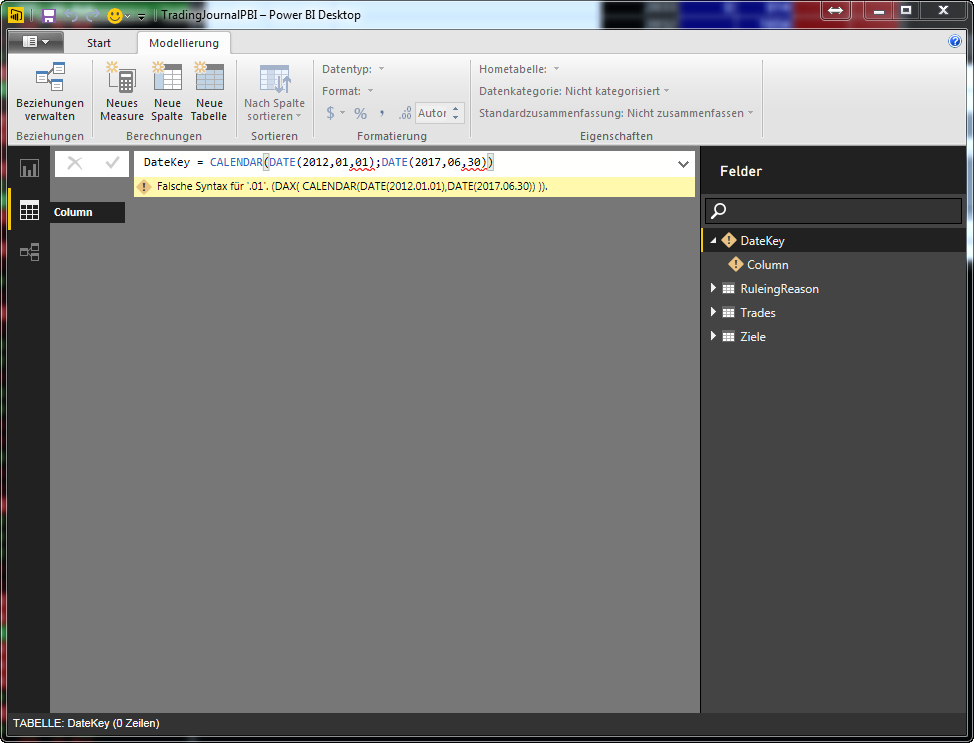
Thanks for your Suggestion. I get with the first step the first error - Wrong Syntax.
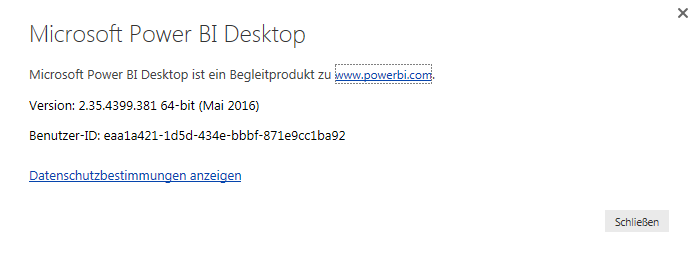
I am using the actual PowerBI Desktop Version. Thanks for a Hint 😉
Kind Regards, Peter
- Mark as New
- Bookmark
- Subscribe
- Mute
- Subscribe to RSS Feed
- Permalink
- Report Inappropriate Content
@PeterBI You have a semi-colon where you should have a comma before "DATE(". In addition, to create this you need to click on "Modeling" - "New Table" and input the code in Table = CALENDAR(DATE(2012,01,01),DATE(2017,06,30))
- Mark as New
- Bookmark
- Subscribe
- Mute
- Subscribe to RSS Feed
- Permalink
- Report Inappropriate Content
Hello,
I have created the date table following your tips and instructions. However when I use the DateKey table in Quick Measure Calculations I receive following error:
Net Revenue YoY% =
IF(
ISFILTERED('DateKey'[Date]),
ERROR("Time intelligence quick measures can only be grouped or filtered by the Power BI-provided date hierarchy or primary date column."),
VAR __PREV_YEAR =
CALCULATE(
SUM('Project Details_USD'[Net Revenue]),
DATEADD('DateKey'[Date].[Date], -3, YEAR)
)
RETURN
DIVIDE(
SUM('Project Details_USD'[Net Revenue]) - __PREV_YEAR,
__PREV_YEAR
)
)
Where do I go wrong? I am not a DAX person, so I copy/paste formulas. I really need to get he Power BI-provided date hierarchy going as I do a lot of reporting using Time Intelligence. I was using Pivot Tables and Tableau Quick Table Calculations.
Thank you in advance,
Petek


- Mark as New
- Bookmark
- Subscribe
- Mute
- Subscribe to RSS Feed
- Permalink
- Report Inappropriate Content
Depending on your regional settings you will need to replace the , with ;
So try this instead: DateKey = CALENDAR(DATE(2012;01;01); DATE(2017;06;30))
if that works you should do the same with all the other steps.
- Mark as New
- Bookmark
- Subscribe
- Mute
- Subscribe to RSS Feed
- Permalink
- Report Inappropriate Content
Hi sdjensen,
this was the solution. Every comma has to be a semicolon in Germany. We have a decimal comma.
PowerBI changes some commas automatic and some not. You have to look very carefully, because some formulas work and some need manual work.
Thanks, Peter
- Mark as New
- Bookmark
- Subscribe
- Mute
- Subscribe to RSS Feed
- Permalink
- Report Inappropriate Content
Thanks Giles , this is awesome and very helpful .. 🙂
one more question ..
of all of these filters below i am getting the following error :
+/- 1 months = IF(AND(DateKey[Financial month number]>=[Current financial month]-1,DateKey[Financial month number]<=[Current financial month]),1,0)
"A single value for column 'Date' in table 'DateKey' cannot be determined. This can happen when a measure formula refers to a column that contains many values without specifying an aggregation such as min, max, count, or sum to get a single result."


- Mark as New
- Bookmark
- Subscribe
- Mute
- Subscribe to RSS Feed
- Permalink
- Report Inappropriate Content
@sbowles Are you entering the formula as a measure or a column? It needs to be inserted as a column, I think this may be the issue.

Helpful resources

FabCon & SQLCon – Barcelona 2026
Join us in Barcelona for FabCon and SQLCon, the Fabric, Power BI, SQL, and AI community event. Save €200 with code FABCMTY200.

Power BI Monthly Update - July 2026
Check out the July 2026 Power BI update to learn about new features.

Data Days 2026
Join Data Days 2026: 60 days of free live/on-demand sessions, challenges, study groups, and certification opportunities.

Power BI DataViz World Championships - June 2026
A new Power BI DataViz World Championship is coming this June! Don't miss out on submitting your entry.

| User | Count |
|---|---|
| 30 | |
| 25 | |
| 23 | |
| 22 | |
| 13 |


| User | Count |
|---|---|
| 50 | |
| 33 | |
| 21 | |
| 20 | |
| 18 |


