cancel
Showing results for 
Search instead for 
Did you mean: 

We've captured the moments from FabCon & SQLCon that everyone is talking about, and we are bringing them to the community, live and on-demand. Starts on April 14th. Register now

Reply
Anonymous
Not applicable

How do I not display calculated metric values at higher levels of aggregation in hierarchy?

Hi, 


  • I'm creating a measure called "no_days_on_promo" to calculate the number of days a product/sku is was on sale. 
  • I have a table, that has multiple levels of aggregation. 
    • Channel
    • Store
    • Sku
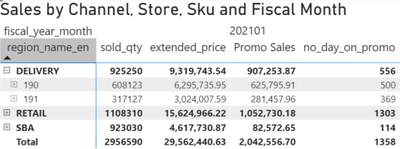
  • The metric is working at the sku level. However, when drilled up to Channel or Store level, I do not want to show the values at this level of aggregation. Is there a way to remove the values at these higher levels of aggregation?
    • If not, do you see anything in my code (below) that could summarize the data in a way that actually sums the # of days that all skus were on sale in that channel/store?


E.g. of the metric working at sku level

slacey7070_1-1622907274349.png


E.g. of the metric aggregating in a non-meaningful way at the channel and store levels, while also not summing properly (e.g. 500+369 != 556)
slacey7070_2-1622907558383.png


Calculated Metric DAX

no_days_on_promo = COUNTX( SUMMARIZE( FILTER(v_agg_date_store_sku_comp_filtered, v_agg_date_store_sku_comp_filtered[promo] = 1), v_agg_date_store_sku_comp_filtered[sku_no], v_agg_date_store_sku_comp_filtered[trans_date], "promo_sku_date", DISTINCTCOUNT(v_agg_date_store_sku_comp_filtered[promo])), COUNT([promo_sku_date]))


Thanks so much

1 ACCEPTED SOLUTION
Ashish_Mathur
Super User
Super User

Hi,

Try this measure

=if(hasonevalue(v_agg_date_store_sku_comp_filtered[sku_no]),[no_days_on_promo],blank())

Hope this helps.


Regards,
Ashish Mathur
http://www.ashishmathur.com
https://www.linkedin.com/in/excelenthusiasts/

View solution in original post

5 REPLIES 5
Ashish_Mathur
Super User
Super User

Hi,

Try this measure

=if(hasonevalue(v_agg_date_store_sku_comp_filtered[sku_no]),[no_days_on_promo],blank())

Hope this helps.


Regards,
Ashish Mathur
http://www.ashishmathur.com
https://www.linkedin.com/in/excelenthusiasts/

Hi Ashish

I am hoping you can help me. I have the opposite problem to what is above. How do I not display the returned value of a calcaluated measure at the detail level? I only want to show it at the higher level. 

The reason for this is because it is duplicating the result at the detail level and reads misleading. The account manager is only going to receive $5000. Example below.


NMEG_0-1692066032049.png

Thank you in advance

NG


You will have to IF(), HASONEVALUE() functions.


Regards,
Ashish Mathur
http://www.ashishmathur.com
https://www.linkedin.com/in/excelenthusiasts/
Anonymous
Not applicable

Thank you Ashish, your solution worked perfect!

You are welcome.


Regards,
Ashish Mathur
http://www.ashishmathur.com
https://www.linkedin.com/in/excelenthusiasts/

Helpful resources

Announcements
New to Fabric survey Carousel

New to Fabric Survey

If you have recently started exploring Fabric, we'd love to hear how it's going. Your feedback can help with product improvements.

Power BI DataViz World Championships carousel

Power BI DataViz World Championships - June 2026

A new Power BI DataViz World Championship is coming this June! Don't miss out on submitting your entry.

Join our Fabric User Panel

Join our Fabric User Panel

Share feedback directly with Fabric product managers, participate in targeted research studies and influence the Fabric roadmap.

March Power BI Update Carousel

Power BI Community Update - March 2026

Check out the March 2026 Power BI update to learn about new features.