cancel
Showing results for 
Search instead for 
Did you mean: 

Next up in the FabCon + SQLCon recap series: The roadmap for Microsoft SQL and Maximizing Developer experiences in Fabric. All sessions are available on-demand after the live show. Register now

Reply
MalikMahamoor
Regular Visitor

How do I create dynamic variance calculation based on continuously updating date criteria?

I've got a dataset which has the same data (identical format, just updated figures), which is extracted every hour.


These tables are extracted from my ERP system via text file which schedules the extracts into a sharepoint online folder every hour.

From here, I take a combination of all text files into my Power Query.


With each extract I have a column which I've created as the 'Extraction Date' which is a date/time field and has the date and hour of extraction.


What I'm looking to do is to calculate the variance between (based on the extraction date/time):


1. The most current report against the previous most current report (the variance in the last hour)

2. The 9am report from today against the 9am report from yesterday


There are multiple figures I'd be calculating the variance for, so what I'm looking for is for Power Bi to dynamically recognise the required data (based on the 2 variables above) and give me the variances accordingly.


Is this possible?


1 REPLY 1
MFelix
Super User
Super User

Hi @MalikMahamoor ,


Without further information is difficult to give the correct answer but you need to do something around this.


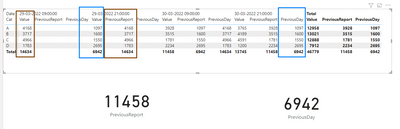
I created two measures:

PreviousReport =
CALCULATE (
    SUM ( 'Table'[Value] ),
    TOPN (
        1,
        FILTER ( ALL ( 'Table'[Date] ), 'Table'[Date] < MAX ( 'Table'[Date] ) ),
        'Table'[Date], DESC
    )
)

PreviousDay = 
CALCULATE (
    SUM ( 'Table'[Value] ),
    TOPN (
        1,
        FILTER ( ALL ( 'Table'[Date] ), 'Table'[Date] = MAX ( 'Table'[Date] ) - 1  ),
        'Table'[Date], DESC
    )
)


In this case I'm just picking up the values but you can then make variations:

MFelix_0-1648648205517.png

To make it easier to calculate you can use calculation groups and a slicer to select wich value you need.


Regards

Miguel Félix


Did I answer your question? Mark my post as a solution!

Proud to be a Super User!

Check out my blog: Power BI em Português


Helpful resources

Announcements
New to Fabric survey Carousel

New to Fabric Survey

If you have recently started exploring Fabric, we'd love to hear how it's going. Your feedback can help with product improvements.

Power BI DataViz World Championships carousel

Power BI DataViz World Championships - June 2026

A new Power BI DataViz World Championship is coming this June! Don't miss out on submitting your entry.

Join our Fabric User Panel

Join our Fabric User Panel

Share feedback directly with Fabric product managers, participate in targeted research studies and influence the Fabric roadmap.

March Power BI Update Carousel

Power BI Community Update - March 2026

Check out the March 2026 Power BI update to learn about new features.