Join us at FabCon Atlanta from March 16 - 20, 2026, for the ultimate Fabric, Power BI, AI and SQL community-led event. Save $200 with code FABCOMM.
Register now!Get Fabric Certified for FREE during Fabric Data Days. Don't miss your chance! Request now
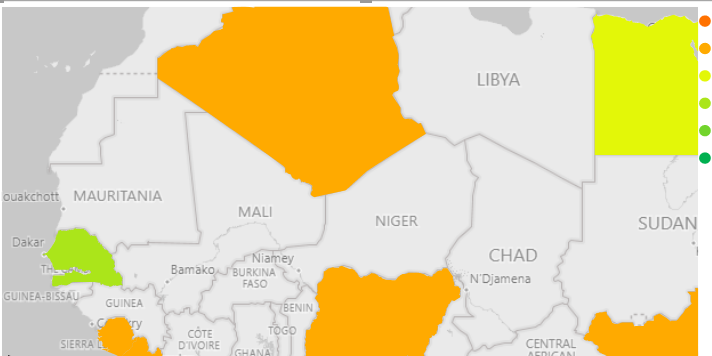
Running into a new issue with a choropleth map. I've created many others in the past and haven't run into this problem.
The colors are not transparent, so the regions and countries never show up through the colors, regardless of zoom level.
I can't figure out what is different about this map vs. others. Any ideas why my colors might be lacking any transparency at all?
Thanks in advance.
Hello. Were you able to solve the transparency of colors?
I have the same problem.
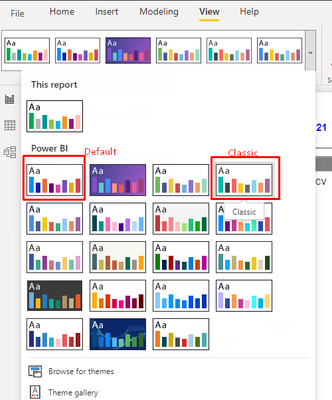
Apparently, it is a problem with the Default theme in Power BI. Microsoft is apparently aware of the problem and is supposedly escalating it. In the meantime, I circumvented it by applying the "Classic" theme and adjusting from there.
Hi @paulmorgan ,
You could check the Issues forum here:
https://community.powerbi.com/t5/Issues/idb-p/Issues
If it is not there, then you could post it.
If you have Pro account you could try to open a support ticket. If you have a Pro account it is free. Go to https://support.powerbi.com. Scroll down and click "CREATE SUPPORT TICKET".
Best Regards,
Jay
Check out the November 2025 Power BI update to learn about new features.
Advance your Data & AI career with 50 days of live learning, contests, hands-on challenges, study groups & certifications and more!