
This is best Fabric, Power BI, SQL and AI community event. How do we know? The last event sold out! Save €200 with code FABCMTY200.
Register nowThe Fabric community is upgrading! Read all of the details including the timeline and what you can expect. Learn more
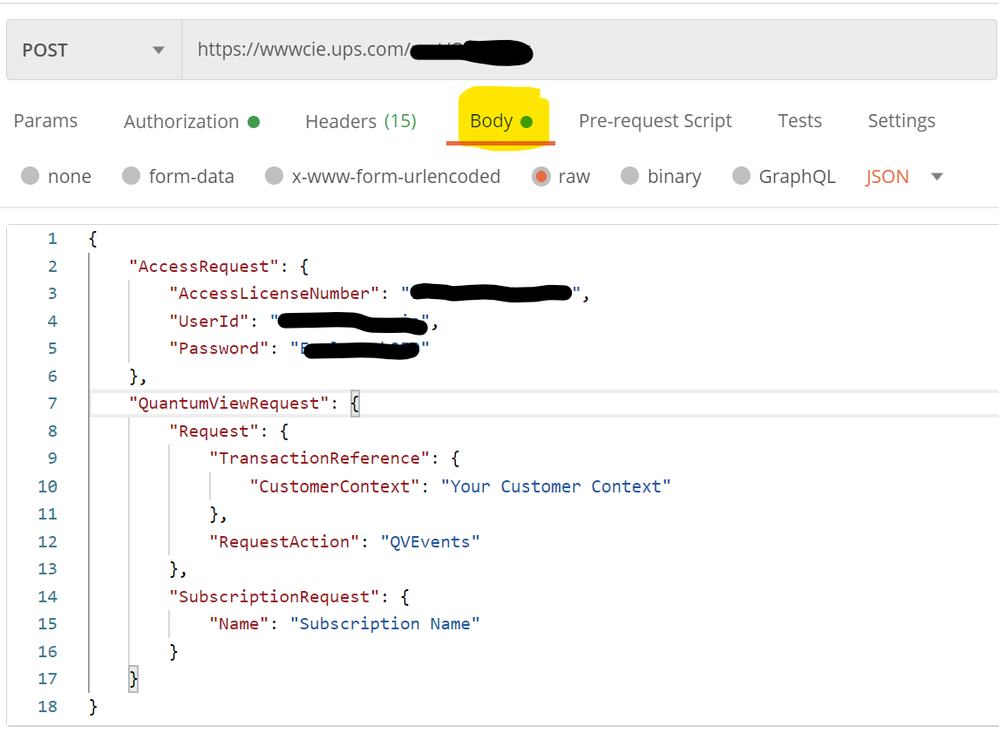
I'm trying to connect to UPS Quantum View API. It works well via POST MAN but I'm not getting data from Power BI since it requires my ups login information in the body of the API call.
Body from PostMAN
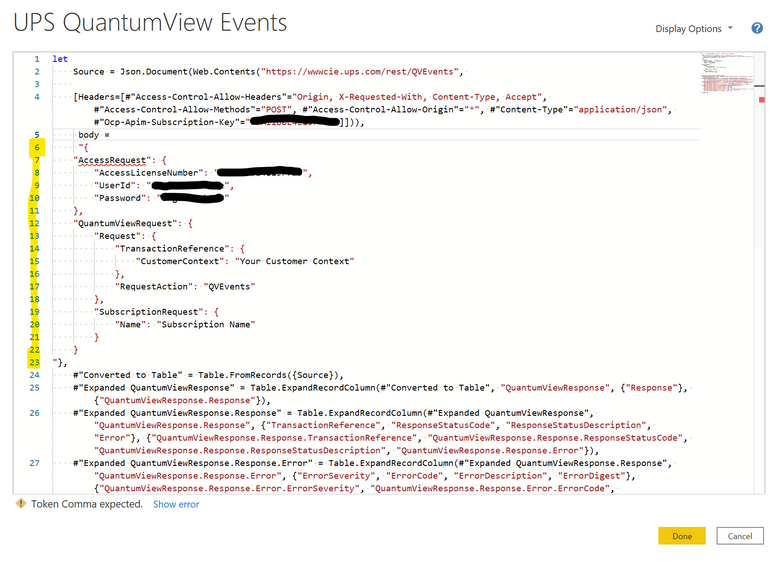
Current connection to the API in Power BI, but missing the body from above. How can I insert it and where do I paste it? I don't understand the syntax required to insert the body into Power BI. There are no clear instructions anywhere that I can find...
Thanks for your guidance. MS has to improve this process to truly make Power BI accessible for more people.
Hi Pat,
I had already look at those articles before coming to this forum and unfortunately, they don't provide much help. Also, I'm not a developer. I posted a screenshot to better show what is going on. I pasted the body I'm using from Postman into Power BI advanced editor and I'm not having any luck Most likely a syntax/formatting problem. I just don't know where to insert the text string highlited in yellow in the image below. I'm baffled as to why MS doesn't make Power BI easier to connect to APIs since it's supposed to help "low code" or "citizen developers" to get to data soures.
Hopefully, some can tell where to move that text string or provide guidance on the syntax required.
Hi @VFXPro ,
Check a reference below which may help:
https://docs.microsoft.com/en-us/azure/data-factory/connector-rest
Best Regards,
Kelly
Did I answer your question? Mark my post as a solution!
Please see this articles for how to send a body with your POST requests.
Easy POST requests with Power BI and Power Query using Json.FromValue – The BIccountant
Pat
To learn more about Power BI, follow me on Twitter or subscribe on YouTube.
Join us in Barcelona for FabCon and SQLCon, the Fabric, Power BI, SQL, and AI community event. Save €200 with code FABCMTY200.
| User | Count |
|---|---|
| 24 | |
| 22 | |
| 20 | |
| 18 | |
| 14 |
| User | Count |
|---|---|
| 29 | |
| 23 | |
| 22 | |
| 20 | |
| 20 |