FabCon is coming to Atlanta
Join us at FabCon Atlanta from March 16 - 20, 2026, for the ultimate Fabric, Power BI, AI and SQL community-led event. Save $200 with code FABCOMM.
Register now!- Power BI forums
- Get Help with Power BI
- Desktop
- Service
- Report Server
- Power Query
- Mobile Apps
- Developer
- DAX Commands and Tips
- Custom Visuals Development Discussion
- Health and Life Sciences
- Power BI Spanish forums
- Translated Spanish Desktop
- Training and Consulting
- Instructor Led Training
- Dashboard in a Day for Women, by Women
- Galleries
- Data Stories Gallery
- Themes Gallery
- Contests Gallery
- QuickViz Gallery
- Quick Measures Gallery
- Visual Calculations Gallery
- Notebook Gallery
- Translytical Task Flow Gallery
- TMDL Gallery
- R Script Showcase
- Webinars and Video Gallery
- Ideas
- Custom Visuals Ideas (read-only)
- Issues
- Issues
- Events
- Upcoming Events
The Power BI Data Visualization World Championships is back! Get ahead of the game and start preparing now! Learn more
- Power BI forums
- Forums
- Get Help with Power BI
- Desktop
- How can I detect how many times a promissed date w...
- Subscribe to RSS Feed
- Mark Topic as New
- Mark Topic as Read
- Float this Topic for Current User
- Bookmark
- Subscribe
- Printer Friendly Page

- Mark as New
- Bookmark
- Subscribe
- Mute
- Subscribe to RSS Feed
- Permalink
- Report Inappropriate Content
How can I detect how many times a promissed date was changed?
Hello, I am very noob using Power Bi, but so far I've manage to create some simple reports.
I was in a meeting today and one of the managers asked me how many times a committed date was changed? I didn't have the answer at that moment, but I believe that the data where I create my Power BI report has the answer. As you can see in the picture below for example, the item PDL-5VF (which is the produc) from the order number 13428254 did not change the schedule date (which is the committed date) from 18-Mar to 29-Mar (time this order was open). However, the item CJH6X88TGAW from the order 13439627 changed the schedule ship date two times, first it was 22-Mar and then 30-Mar.
I would like to tell them how many times an order was changed or how many times an Item number was modified in order to create a Top list of Failures. Any suggestions?

Solved! Go to Solution.


- Mark as New
- Bookmark
- Subscribe
- Mute
- Subscribe to RSS Feed
- Permalink
- Report Inappropriate Content
Hi @Brainer13
Wouldn't just throwing the Item # in a table visual and then a simple measure:
Measure = DISTINCTCOUNT( Table1[ScheduledDate])
do the trick? You might have to include the Order # in the visual too if it is not uniquely determined by the Item #
|
|
Please accept the solution when done and consider giving a thumbs up if posts are helpful. Contact me privately for support with any larger-scale BI needs, tutoring, etc. |

- Mark as New
- Bookmark
- Subscribe
- Mute
- Subscribe to RSS Feed
- Permalink
- Report Inappropriate Content
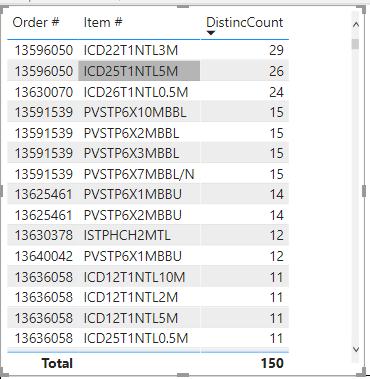
Thank you so much AIB for your fast reply. It works😀
I have one more question if you don't mind. How can I see the distinctcount for the orders and items that are still open (pending to send). For example in the top list I got, the first line is already closed, so I want to focus only in the orders that are actually open. If I filter the print date today, the measure changes to 1, so I suppose there should be some way to unfilter the distinctcount.
- Mark as New
- Bookmark
- Subscribe
- Mute
- Subscribe to RSS Feed
- Permalink
- Report Inappropriate Content
Hello Just figure it out how to solve it. I add a calendar table and used the function, CALCULAT('DistinctCountp,ALL('Calendar')
Thank you
- Mark as New
- Bookmark
- Subscribe
- Mute
- Subscribe to RSS Feed
- Permalink
- Report Inappropriate Content
What exactly in your data defines an order as open? You can use that filter in a slicer. I need more details
|
|
Please accept the solution when done and consider giving a thumbs up if posts are helpful. Contact me privately for support with any larger-scale BI needs, tutoring, etc. |
- Mark as New
- Bookmark
- Subscribe
- Mute
- Subscribe to RSS Feed
- Permalink
- Report Inappropriate Content
Hi @Brainer13
Wouldn't just throwing the Item # in a table visual and then a simple measure:
Measure = DISTINCTCOUNT( Table1[ScheduledDate])
do the trick? You might have to include the Order # in the visual too if it is not uniquely determined by the Item #
|
|
Please accept the solution when done and consider giving a thumbs up if posts are helpful. Contact me privately for support with any larger-scale BI needs, tutoring, etc. |
- Mark as New
- Bookmark
- Subscribe
- Mute
- Subscribe to RSS Feed
- Permalink
- Report Inappropriate Content
Thank you so much AIB for your fast reply. It works😀
I have one more question if you don't mind. How can I see the distinctcount for the orders and items that are still open (pending to send). For example in the top list I got, the first line is already closed, so I want to focus only in the orders that are actually open. If I filter the print date today, the measure changes to 1, so I suppose there should be some way to unfilter the distinctcount.
- Mark as New
- Bookmark
- Subscribe
- Mute
- Subscribe to RSS Feed
- Permalink
- Report Inappropriate Content
Hello Just figure it out how to solve it. I add a calendar table and used the function, CALCULAT('DistinctCountp,ALL('Calendar')
Thank you

Helpful resources

Power BI Monthly Update - November 2025
Check out the November 2025 Power BI update to learn about new features.

Fabric Data Days
Advance your Data & AI career with 50 days of live learning, contests, hands-on challenges, study groups & certifications and more!

FabCon Atlanta 2026
Join us at FabCon Atlanta, March 16-20, for the ultimate Fabric, Power BI, AI and SQL community-led event. Save $200 with code FABCOMM.


