Join us at FabCon Atlanta from March 16 - 20, 2026, for the ultimate Fabric, Power BI, AI and SQL community-led event. Save $200 with code FABCOMM.
Register now!The Power BI Data Visualization World Championships is back! Get ahead of the game and start preparing now! Learn more
Being a total rookie, I am unsure if there is a setting/toggle I can flick to get at this, but I am trying to display a 'card' with the max value AND the date of that value. Getting the MAX value is easy, of course, but can't figure out how to get the date of that value...assuming I would use two cards and overlay them to achieve the style I am going for, but just not sure of the DAX necessary to get the date.
In Excel, I would use MATCH/OFFSET or vlookups to find the max value, offset to get the corresponding date header, and use that value. In PowerBI, I am clueless.
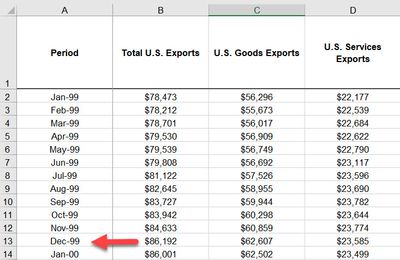
Example:
So I have a card that shows the max value of the 'Total U.S. Exports' column; for the timeperiod in the screenshot, it would display "$86,192". I would then like to show the date of this 'record-setting/highest' value.
Is there an inherent measure that gets at this, or do I need to seek a little DAX to do this?
Solved! Go to Solution.
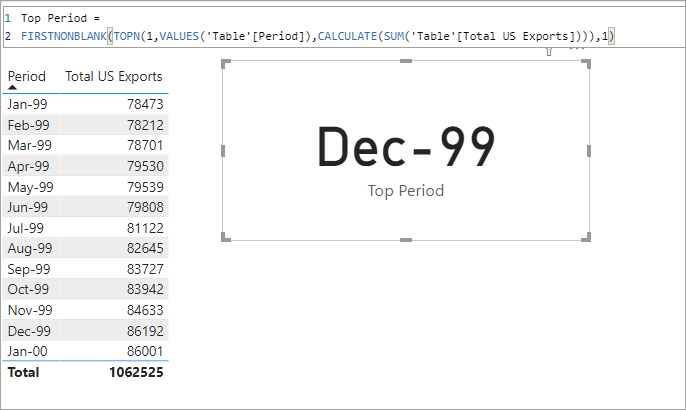
Try it with something like this measure.
Top Period =
FIRSTNONBLANK(TOPN(1,VALUES('Table'[Period]),CALCULATE(SUM('Table'[Total US Exports]))),1)
If I could ask a follow-up, as the FIRSTNONBLANK usage just hit me; this works ONLY because I have the date/period in the first column, correct? If the period were in the middle of all the other columns, this approach wouldn't work?
(I'll play with that now, but thought I would ask in hopes of better understanding some of these functions while I wait for a book on DAX to arrive). 🙂
Thanks again.
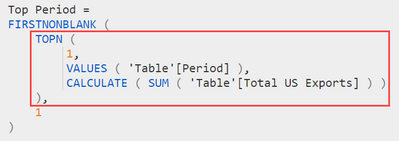
Not really, no. The first part of the measure
TOPN (
1,
VALUES ( 'Table'[Period] ),
CALCULATE ( SUM ( 'Table'[Total US Exports] ) )
)
Gives us the top values from a table based on an expression.
How many values? 1
What table? VALUES('Table'[Period]) gives us a table of the unique items in the [Period] column.
What expression? SUM('Table'[Total US Exports]).
Thank you. Thank you. Thank you!
It was a long road to get there, but once I followed your example more closely, I got it to work. 🙂
I originally had...
VALUES('Table'[Period].[Month])...and it was returning a month (albeit the wrong month), so I tried to add a compound value to get the month and the year, but no luck.
So I created a new measure to return the year and it worked fine. HOWEVER, I then noticed the [period].[month] was returning the WRONG month! I could not figure out why, but finally looked more closely as your example, removed the [month] from the code, and all was well! I got the month AND year with one measure now....good to go.
I don't understand why the use of 'FIRSTNONBLANK', but I won't question it...and 'FIRSTNONBLANK' will solve another probablem I have been thinking about (how to return the last/most recent value, so charts update and reflect the latest data without me going in and changing the filter to the last month for which I have data).
Thanks again!
The outlined portion of the measure returns a table of values. In this case it is a table with 1 row but DAX doesn't care and gives the error 'a table of multiple values was supplied..' FIRSTNOBLANK converts that into a scalar value based on the expression, in this case just 1 so it just gives us the single row in the outlined table.
Try it with something like this measure.
Top Period =
FIRSTNONBLANK(TOPN(1,VALUES('Table'[Period]),CALCULATE(SUM('Table'[Total US Exports]))),1)
The Power BI Data Visualization World Championships is back! Get ahead of the game and start preparing now!
| User | Count |
|---|---|
| 40 | |
| 38 | |
| 36 | |
| 29 | |
| 28 |
| User | Count |
|---|---|
| 127 | |
| 88 | |
| 78 | |
| 66 | |
| 65 |