Hi Guru's,
I have dirty data that contains mac addresses in Power BI and have learnt R today so that I can use a regular expression to extract them. I can get everything working but it only returns the first mac address it finds. If the data contains multiple (which they all do) they don't get returned.
I would like to return all the mac addresses into a new column as a list so that within Power query I can extract them to new lines.
Here is my Power Query code form within Power Query Editor.
# 'dataset' holds the input data for this script

# Variables
pattern <- "([0-9A-Fa-f]{2}[:-]){5}([0-9A-Fa-f]{2})|([0-9a-fA-F]{4}\\.[0-9a-fA-F]{4}\\.[0-9a-fA-F]{4})"

# Functions
getMacs <- function(x) {paste(unlist(regmatches(x, gregexpr(pattern, x))))}

# Return
output <- within(dataset,{MACs1=getMacs(dataset$NICs)})
What I get returned into my new Macs1 column is the very first mac address from the NICs column of each row. I can't for the life of me figure out how to return all of the mac addresses as a list.
I have verified using Visual Studio Code that the regular expression works and that the R code does return all mac addresses as a character vector.
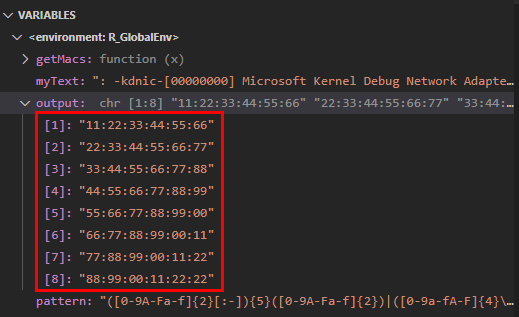
Doing some research I believe I need to convert the character vector to a data.frame before returning it to Power BI. I tried amending the following lines without success.
output <- within(dataset,{MACs1=as.list(getMacs(dataset$NICs))})
output <- within(dataset,{MACs1=as.data.frame(getMacs(dataset$NICs))})
I know it's going to be some #newbieFail but I just can't seem to figure it out. Appreciate any pointers or advice.
Thanks in advance. Cheers


