Join us at FabCon Atlanta from March 16 - 20, 2026, for the ultimate Fabric, Power BI, AI and SQL community-led event. Save $200 with code FABCOMM.
Register now!The Power BI Data Visualization World Championships is back! It's time to submit your entry. Live now!
Hello,
I have read through many of the other messages, but I can't seem to get this one to work.
I have sensor data (Please, find it posted) and want to create two measures over 24 hours:
1-) The first measure is a rolling a verage of sensor values over 24 hours
2-) The second measure is a count of the sensor values 24 hours rolling average which exceeded 4. That is, I want to count only those sensor values of the newly created measure that exceeded 4. If there is no exceedance, it should return 0.
Thank you 🙂
Date /Time Sensor Values
| 01.01.2021 00:00 | 0,38 |
| 01.01.2021 01:00 | 0,30 |
| 01.01.2021 02:00 | 0,30 |
| 01.01.2021 03:00 | 0,31 |
| 01.01.2021 04:00 | 0,31 |
| 01.01.2021 05:00 | 0,32 |
| 01.01.2021 06:00 | 0,32 |
| 01.01.2021 07:00 | 0,31 |
| 01.01.2021 08:00 | 0,31 |
| 01.01.2021 09:00 | 0,31 |
| 01.01.2021 10:00 | 0,30 |
| 01.01.2021 11:00 | 0,31 |
| 01.01.2021 12:00 | 0,31 |
| 01.01.2021 13:00 | 0,32 |
| 01.01.2021 14:00 | 0,33 |
| 01.01.2021 15:00 | 0,33 |
| 01.01.2021 16:00 | 0,34 |
| 01.01.2021 17:00 | 0,33 |
| 01.01.2021 18:00 | 0,33 |
| 01.01.2021 19:00 | 0,34 |
| 01.01.2021 20:00 | 0,35 |
| 01.01.2021 21:00 | 0,35 |
| 01.01.2021 22:00 | 0,34 |
| 01.01.2021 23:00 | 0,34 |
| 02.01.2021 00:00 | 0,34 |
| 02.01.2021 01:00 | 0,33 |
| 02.01.2021 02:00 | 0,33 |
| 02.01.2021 03:00 | 0,32 |
| 02.01.2021 04:00 | 0,32 |
| 02.01.2021 05:00 | 0,32 |
| 02.01.2021 06:00 | 0,33 |
| 02.01.2021 07:00 | 0,34 |
| 02.01.2021 08:00 | 0,34 |
| 02.01.2021 09:00 | 0,34 |
| 02.01.2021 10:00 | 0,35 |
| 02.01.2021 11:00 | 0,35 |
| 02.01.2021 12:00 | 0,35 |
| 02.01.2021 13:00 | 0,35 |
| 02.01.2021 14:00 | 0,35 |
| 02.01.2021 15:00 | 0,37 |
| 02.01.2021 16:00 | 0,37 |
| 02.01.2021 17:00 | 0,37 |
| 02.01.2021 18:00 | 0,37 |
| 02.01.2021 19:00 | 0,35 |
| 02.01.2021 20:00 | 0,36 |
| 02.01.2021 21:00 | 0,36 |
| 02.01.2021 22:00 | 0,36 |
| 02.01.2021 23:00 | 0,35 |
| 03.01.2021 00:00 | 0,34 |
| 03.01.2021 01:00 | 0,35 |
| 03.01.2021 02:00 | 0,35 |
| 03.01.2021 03:00 | 0,35 |
| 03.01.2021 04:00 | 0,33 |
| 03.01.2021 05:00 | 0,32 |
| 03.01.2021 06:00 | 0,33 |
| 03.01.2021 07:00 | 0,33 |
| 03.01.2021 08:00 | 0,31 |
| 03.01.2021 09:00 | 0,30 |
| 03.01.2021 10:00 | 0,29 |
| 03.01.2021 11:00 | 0,30 |
| 03.01.2021 12:00 | 0,29 |
| 03.01.2021 13:00 | 0,29 |
| 03.01.2021 14:00 | 0,29 |
| 03.01.2021 15:00 | 0,30 |
| 03.01.2021 16:00 | 0,29 |
| 03.01.2021 17:00 | 0,30 |
| 03.01.2021 18:00 | 0,29 |
| 03.01.2021 19:00 | 0,29 |
| 03.01.2021 20:00 | 0,29 |
| 03.01.2021 21:00 | 0,29 |
| 03.01.2021 22:00 | 0,28 |
| 03.01.2021 23:00 | 0,28 |
| 04.01.2021 00:00 | 0,28 |
| 04.01.2021 01:00 | 0,27 |
| 04.01.2021 02:00 | 0,26 |
| 04.01.2021 03:00 | 0,27 |
| 04.01.2021 04:00 | 0,27 |
| 04.01.2021 05:00 | 0,29 |
| 04.01.2021 06:00 | 0,30 |
| 04.01.2021 07:00 | 0,31 |
| 04.01.2021 08:00 | 0,32 |
| 04.01.2021 09:00 | 0,32 |
| 04.01.2021 10:00 | 0,32 |
| 04.01.2021 11:00 | 0,33 |
| 04.01.2021 12:00 | 0,32 |
| 04.01.2021 13:00 | 0,33 |
| 04.01.2021 14:00 | 0,43 |
| 04.01.2021 15:00 | 0,34 |
| 04.01.2021 16:00 | 0,34 |
| 04.01.2021 17:00 | 0,32 |
| 04.01.2021 18:00 | 0,31 |
| 04.01.2021 19:00 | 0,31 |
| 04.01.2021 20:00 | 0,28 |
| 04.01.2021 21:00 | 0,29 |
| 04.01.2021 22:00 | 0,29 |
| 04.01.2021 23:00 | 0,29 |
| 05.01.2021 00:00 | 0,51 |
| 05.01.2021 01:00 | 0,28 |
| 05.01.2021 02:00 | 0,29 |
| 05.01.2021 03:00 | 0,29 |
| 05.01.2021 04:00 | 0,30 |
| 05.01.2021 05:00 | 0,30 |
| 05.01.2021 06:00 | 0,31 |
| 05.01.2021 07:00 | 0,31 |
| 05.01.2021 08:00 | 0,32 |
| 05.01.2021 09:00 | 0,32 |
| 05.01.2021 10:00 | 0,31 |
| 05.01.2021 11:00 | 0,31 |
| 05.01.2021 12:00 | 0,31 |
| 05.01.2021 13:00 | 0,30 |
| 05.01.2021 14:00 | 0,30 |
| 05.01.2021 15:00 | 0,33 |
| 05.01.2021 16:00 | 0,32 |
| 05.01.2021 17:00 | 0,33 |
| 05.01.2021 18:00 | 0,33 |
| 05.01.2021 19:00 | 0,33 |
| 05.01.2021 20:00 | 0,32 |
| 05.01.2021 21:00 | 0,32 |
| 05.01.2021 22:00 | 0,32 |
| 05.01.2021 23:00 | 0,30 |
Solved! Go to Solution.
Hi @Anonymous ,
According to your description, here's my solution.
Create two measures.
Average =
AVERAGEX (
FILTER (
ALL ( 'Table' ),
DATEVALUE ( 'Table'[Date /Time] ) = DATEVALUE ( MAX ( 'Table'[Date /Time] ) )
&& 'Table'[Date /Time] <= MAX ( 'Table'[Date /Time] )
),
'Table'[Sensor Values]
)
Count = COUNTX ( FILTER ( ALL ( 'Table' ), [Average] > 4 ), 'Table'[Date /Time] )
In my sample, I modify the value of 1/1/21 23:00 to 100, and the count get 1.
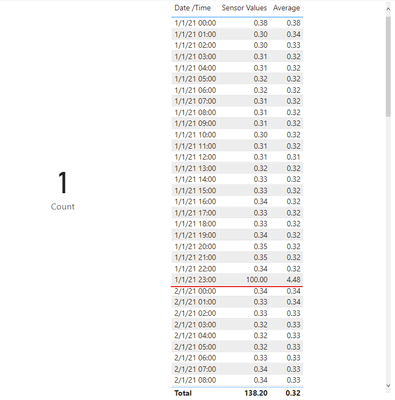
I attach my sample below for reference.
Best Regards,
Community Support Team _ kalyj
If this post helps, then please consider Accept it as the solution to help the other members find it more quickly.
Hi @Anonymous ,
According to your description, here's my solution.
Create two measures.
Average =
AVERAGEX (
FILTER (
ALL ( 'Table' ),
DATEVALUE ( 'Table'[Date /Time] ) = DATEVALUE ( MAX ( 'Table'[Date /Time] ) )
&& 'Table'[Date /Time] <= MAX ( 'Table'[Date /Time] )
),
'Table'[Sensor Values]
)
Count = COUNTX ( FILTER ( ALL ( 'Table' ), [Average] > 4 ), 'Table'[Date /Time] )
In my sample, I modify the value of 1/1/21 23:00 to 100, and the count get 1.
I attach my sample below for reference.
Best Regards,
Community Support Team _ kalyj
If this post helps, then please consider Accept it as the solution to help the other members find it more quickly.
@Anonymous , Try
Avg Measure =calculate(Average(Table[Sensor Values]), filter(table, table[datetime] <=now() && table[datetime] >=now() -time(24,0,0)))
Count GT 4 = calculate(count(Table[Sensor Values]), filter(table, table[datetime] <=now() && table[datetime] >=now() -time(24,0,0) && Table[Sensor Values] >4 ))
Thank you for your reply 🙂
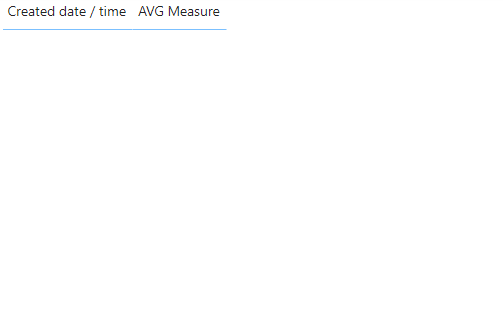
I tried these measures, but the date/time disappears when I drag the Avg measure to the table visualisation(see photos attached), any idea?Before adding AVG measure
after adding AVG measure
| User | Count |
|---|---|
| 51 | |
| 37 | |
| 31 | |
| 21 | |
| 19 |
| User | Count |
|---|---|
| 138 | |
| 102 | |
| 59 | |
| 36 | |
| 35 |