cancel
Showing results for 
Search instead for 
Did you mean: 

Data Days is here! Join us now for 60+ days of learning, challenges, and connection. Learn more

Reply
Anonymous
Not applicable

How To Combine Two Columns Into One Column

Hi all! I'll start of by saying I'm new to Power BI, my skills are at a beginner level...


I have a table with two different columns, "Service" and "Configuration Item."

An Example:

ServiceConfiguration Item
1A
2B
3C
4D
5E


I would like to combine the two columns into one new column so it looks like this (there may be duplicates, which would need to be removed):

Service and CI
1
2
3
4
5
A
B
C
D


After some Googling, I can only find information on "merging columns," but the results are not what I need. For example:

Incorrect Result
1 A
2 B
3 C
4 D
5 E


Is there a DAX command for this?

1 ACCEPTED SOLUTION
Anonymous
Not applicable

Hi @Anonymous ,


It seems to be easy to achieve.

Please try what I do below.

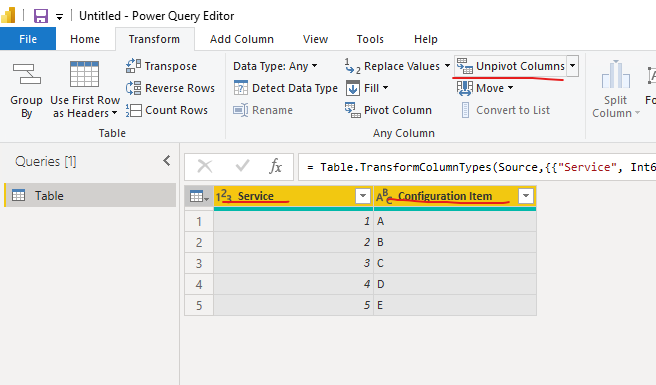
Select two columns at the same time, and then click 'Unpivot Columns'.

vstephenmsft_0-1658221248536.png

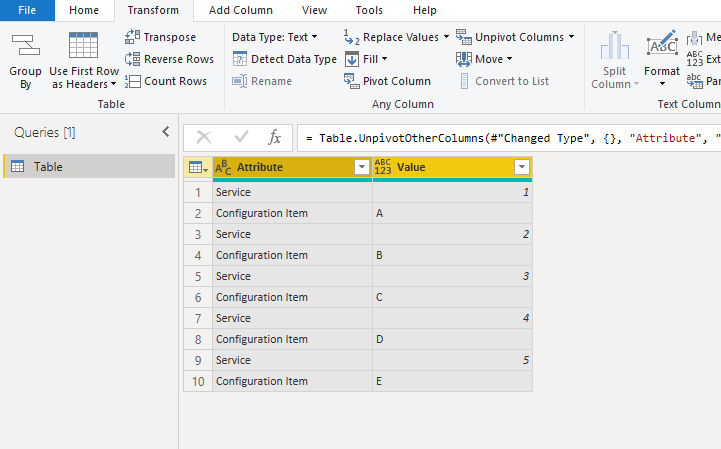
You'll get the column you want.

vstephenmsft_1-1658221301832.png

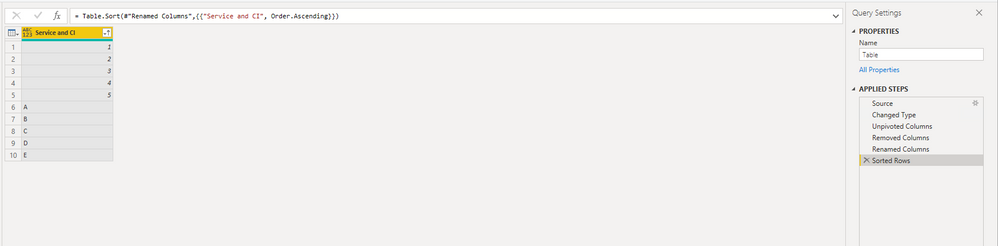
Rename the Value column and remove the Attribute column. Below is the result.

vstephenmsft_3-1658221397069.png


Best Regards,

Stephen Tao


If this post helps, then please consider Accept it as the solution to help the other members find it more quickly.

View solution in original post

4 REPLIES 4
Anonymous
Not applicable

Hi @Anonymous ,


It seems to be easy to achieve.

Please try what I do below.

Select two columns at the same time, and then click 'Unpivot Columns'.

vstephenmsft_0-1658221248536.png

You'll get the column you want.

vstephenmsft_1-1658221301832.png

Rename the Value column and remove the Attribute column. Below is the result.

vstephenmsft_3-1658221397069.png


Best Regards,

Stephen Tao


If this post helps, then please consider Accept it as the solution to help the other members find it more quickly.

Hi @Anonymous .  Thank you so much for the genius simplicity of your solution!  Much gratitude.

amitchandak
Super User
Super User

@Anonymous , In a new blank query create this list and return it

List.Combine(Table[Service], Table[Configuration Item])


refer video if needed - https://youtu.be/yySRoH51Sb0

Share with Power BI Enthusiasts: Full Power BI Video (20 Hours) YouTube
Microsoft Fabric Series 60+ Videos YouTube
Microsoft Fabric Hindi End to End YouTube
Anonymous
Not applicable

Hi thanks, but I don't understand. I'm a beginner and can't work out how to list that command and your video is difficult to follow.

Helpful resources

Announcements
Fabric Data Days is here Carousel

Fabric Data Days 2026

Don't miss out on Data Days, June 15 through August 7. Learn Fabric, Power BI, SQL, AI and more.

May Power BI Update Carousel

Power BI Monthly Update - May 2026

Check out the May 2026 Power BI update to learn about new features.

Power BI DataViz World Championships carousel

Power BI DataViz World Championships - June 2026

A new Power BI DataViz World Championship is coming this June! Don't miss out on submitting your entry.