Get certified for free when you join Fabric Data Days 2026 and dive into Fabric, Power BI, SQL, AI, and other essential data skills.
Join nowData Days is here! Join us now for 60+ days of learning, challenges, and connection. Learn more
Hi I need to compare 2 tables and put those values in a seperate table.
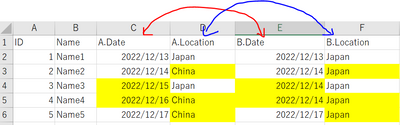
Right now for a simple overview I created 2 tables and a mockup:
Table A'
Table B'
I would like to know how to highlight the difference after merging them.
@Anonymous , One is you can merge them in power query and can create column with diff and use that in conditional formatting
Another to have common dimensions and then have measure to highlight and color
Merge Tables (Power Query) : https://www.youtube.com/watch?v=zNrmbagO0Oo&list=PLPaNVDMhUXGaaqV92SBD5X2hk3TMNlHhb&index=16
Power BI- DAX: When I asked you to create common tables: https://youtu.be/a2CrqCA9geM
How to do conditional formatting by measure and apply it on pie?
https://www.youtube.com/watch?v=RqBb5eBf_I4&list=PLPaNVDMhUXGYo50Ajmr4SgSV9HIQLxc8L
https://community.powerbi.com/t5/Community-Blog/Power-BI-Conditional-formatting-the-Pie-Visual/ba-p/...
https://amitchandak.medium.com/power-bi-where-is-the-conditional-formatting-option-in-new-format-pan...
Hi @amitchandak
Thank you for your reply.
Could you please kindly tell how to write the measure?
>>>>Another to have common dimensions and then have measure to highlight and color
Don't miss out on Data Days, June 15 through August 7. Learn Fabric, Power BI, SQL, AI and more.
Check out the May 2026 Power BI update to learn about new features.
| User | Count |
|---|---|
| 22 | |
| 21 | |
| 20 | |
| 17 | |
| 13 |
| User | Count |
|---|---|
| 58 | |
| 50 | |
| 36 | |
| 30 | |
| 26 |