FabCon is coming to Atlanta
Join us at FabCon Atlanta from March 16 - 20, 2026, for the ultimate Fabric, Power BI, AI and SQL community-led event. Save $200 with code FABCOMM.
Register now!- Power BI forums
- Get Help with Power BI
- Desktop
- Service
- Report Server
- Power Query
- Mobile Apps
- Developer
- DAX Commands and Tips
- Custom Visuals Development Discussion
- Health and Life Sciences
- Power BI Spanish forums
- Translated Spanish Desktop
- Training and Consulting
- Instructor Led Training
- Dashboard in a Day for Women, by Women
- Galleries
- Data Stories Gallery
- Themes Gallery
- Contests Gallery
- QuickViz Gallery
- Quick Measures Gallery
- Visual Calculations Gallery
- Notebook Gallery
- Translytical Task Flow Gallery
- TMDL Gallery
- R Script Showcase
- Webinars and Video Gallery
- Ideas
- Custom Visuals Ideas (read-only)
- Issues
- Issues
- Events
- Upcoming Events
Get Fabric Certified for FREE during Fabric Data Days. Don't miss your chance! Request now
- Power BI forums
- Forums
- Get Help with Power BI
- Desktop
- Re: Highlight max and min values in a visual
- Subscribe to RSS Feed
- Mark Topic as New
- Mark Topic as Read
- Float this Topic for Current User
- Bookmark
- Subscribe
- Printer Friendly Page

- Mark as New
- Bookmark
- Subscribe
- Mute
- Subscribe to RSS Feed
- Permalink
- Report Inappropriate Content
Highlight max and min values in a visual
Hi,
I tried to use conditional formatting to display the min and max values of a measure in a matrix; I did not find how to do so.
I followed this topic but it does not allow to highlight both min and max.
In my case, I have 4 regions and a measure containing the sales. I want to display the cells in green where sales are max for a region and in red where sales are min for a region.
Could you explain me how to do this?
Thanks
EDIT: the topic I linked allows to highlight min and max (if you create var 'min' and var 'max'). But is this method the only way to have this result?
Solved! Go to Solution.


- Mark as New
- Bookmark
- Subscribe
- Mute
- Subscribe to RSS Feed
- Permalink
- Report Inappropriate Content
Hello @Anonymous
You can use a measure like this to feed the color to the conditional formatting.
FormatMeasure =
VAR MaxAmount = CALCULATE(MAXX(VALUES('Table'[Region]),[Sales Amount]),ALL('Table'[Region]))
VAR MinAmount = CALCULATE(MINX(VALUES('Table'[Region]),[Sales Amount]),ALL('Table'[Region]))
VAR LineAmonut = [Sales Amount]
RETURN
SWITCH (
    TRUE(),
    LineAmonut = MaxAmount, "GREEN",
    LineAmonut = MinAmount, "RED"
    )
In my example I format [Sales Amount] based on the Field value of the [FormatMeasure]:
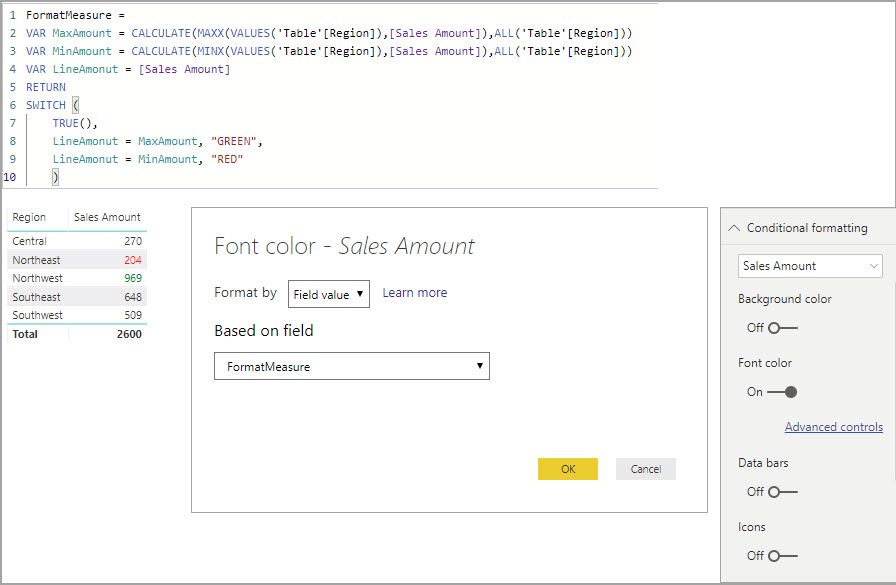
This will format only the hightest and lowest out of all the regions meaning, if you welect Central, Southeast and Southwest none of them would be formatted because none of those are the highest or lowest.
If you want it to highlight the hightest and lowest out of all the visable regions it would look like so.
FormatMeasure =
VAR SelectedRegions = ALLSELECTED('Table'[Region])
VAR MaxAmount = CALCULATE(MAXX(SelectedRegions,[Sales Amount]),SelectedRegions)
VAR MinAmount = CALCULATE(MINX(SelectedRegions,[Sales Amount]),SelectedRegions)
VAR LineAmonut = [Sales Amount]
RETURN
SWITCH (
    TRUE(),
    LineAmonut = MaxAmount, "GREEN",
    LineAmonut = MinAmount, "RED"
    )
- Mark as New
- Bookmark
- Subscribe
- Mute
- Subscribe to RSS Feed
- Permalink
- Report Inappropriate Content
Hello @Anonymous
You can use a measure like this to feed the color to the conditional formatting.
FormatMeasure =
VAR MaxAmount = CALCULATE(MAXX(VALUES('Table'[Region]),[Sales Amount]),ALL('Table'[Region]))
VAR MinAmount = CALCULATE(MINX(VALUES('Table'[Region]),[Sales Amount]),ALL('Table'[Region]))
VAR LineAmonut = [Sales Amount]
RETURN
SWITCH (
    TRUE(),
    LineAmonut = MaxAmount, "GREEN",
    LineAmonut = MinAmount, "RED"
    )
In my example I format [Sales Amount] based on the Field value of the [FormatMeasure]:
This will format only the hightest and lowest out of all the regions meaning, if you welect Central, Southeast and Southwest none of them would be formatted because none of those are the highest or lowest.
If you want it to highlight the hightest and lowest out of all the visable regions it would look like so.
FormatMeasure =
VAR SelectedRegions = ALLSELECTED('Table'[Region])
VAR MaxAmount = CALCULATE(MAXX(SelectedRegions,[Sales Amount]),SelectedRegions)
VAR MinAmount = CALCULATE(MINX(SelectedRegions,[Sales Amount]),SelectedRegions)
VAR LineAmonut = [Sales Amount]
RETURN
SWITCH (
    TRUE(),
    LineAmonut = MaxAmount, "GREEN",
    LineAmonut = MinAmount, "RED"
    )


- Mark as New
- Bookmark
- Subscribe
- Mute
- Subscribe to RSS Feed
- Permalink
- Report Inappropriate Content
Isn't this only applicable when you try to color the max or min for a "column" not a "measure"?
- Mark as New
- Bookmark
- Subscribe
- Mute
- Subscribe to RSS Feed
- Permalink
- Report Inappropriate Content
No, the MAXX pulls the highest amount for the measure over the defined iteration table, VALUES('Table'[Region]) in this case, and compares that to the value of the measure in the visual.
- Mark as New
- Bookmark
- Subscribe
- Mute
- Subscribe to RSS Feed
- Permalink
- Report Inappropriate Content
What I am saying is that in your code, the sales amount is a column. What you are trying to do here is to find the max sales amount in the region table. But what if sales amount is a measure? The value function can only take column, not measure.
VAR MaxAmount = CALCULATE(MAXX(VALUES('Table'[Region]),[Sales Amount]),ALL('Table'[Region]))- Mark as New
- Bookmark
- Subscribe
- Mute
- Subscribe to RSS Feed
- Permalink
- Report Inappropriate Content
- Mark as New
- Bookmark
- Subscribe
- Mute
- Subscribe to RSS Feed
- Permalink
- Report Inappropriate Content
I see what you mean here. Sorry. My bad
Helpful resources

Power BI Monthly Update - November 2025
Check out the November 2025 Power BI update to learn about new features.

Fabric Data Days
Advance your Data & AI career with 50 days of live learning, contests, hands-on challenges, study groups & certifications and more!

FabCon Atlanta 2026
Join us at FabCon Atlanta, March 16-20, for the ultimate Fabric, Power BI, AI and SQL community-led event. Save $200 with code FABCOMM.


