Share feedback directly with Fabric product managers, participate in targeted research studies and influence the Fabric roadmap.
Sign up nowGet Fabric certified for FREE! Don't miss your chance! Learn more
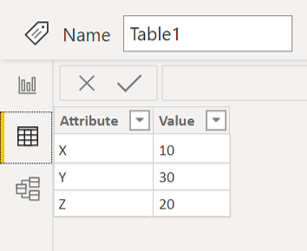
I have the following table in my data model:
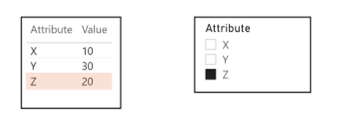
I have created a Table visual and a slicer based on Table1, and a slicer based on the Attribute column. I have turned off visual interactions between the slicer and the Table visual so that all rows in the table are always displayed. However, I would like to highlight the selected row in the Table visual as indicated below. Does anyone know whether this is possible?
Many thanks
Steve
Solved! Go to Solution.
To my knowledge it's not possible to work around the edit interactions functionality, as if there is a relationship there will be no trace of the sliced values when calculating in the table visual.
I would work around this with a unrelated table, I don't know if this could work for you but take a look at the pbix attached and see if it might help:
To my knowledge it's not possible to work around the edit interactions functionality, as if there is a relationship there will be no trace of the sliced values when calculating in the table visual.
I would work around this with a unrelated table, I don't know if this could work for you but take a look at the pbix attached and see if it might help:
That will work for me - perfect! 👍
If you love stickers, then you will definitely want to check out our Community Sticker Challenge!
Check out the January 2026 Power BI update to learn about new features.
| User | Count |
|---|---|
| 65 | |
| 64 | |
| 49 | |
| 21 | |
| 18 |
| User | Count |
|---|---|
| 119 | |
| 117 | |
| 38 | |
| 36 | |
| 29 |