This time we’re going bigger than ever. Fabric, Power BI, SQL, AI and more. We're covering it all. You won't want to miss it.
Learn moreLevel up your Power BI skills this month - build one visual each week and tell better stories with data! Get started
Hi,
I have a historical data where on the report I used a table and it needs to change the background or font color on each column per group (which is community) per row. It should show be shown like this: This table a lot of columns with different data types, this is just of the few. Is this possible?
| BC_CODE | BC_DATE | COMMUNITY | COM_TYPE | Target | Last Name | OrientDate | Topic |
| 1097 | 12/14/2020 | 140-00041313 | 150 | ||||
| 1877 | 01/12/2021 | 140-00041313 | 150 | BERNAL | |||
| 2142 | 03/01/2021 | 140-00041313 | Housing | 150 | BERNAL | 01/14/2021 | kbmt |
| 2287 | 03/11/2021 | 140-00041313 | Housing | 150 | BERNAL | 01/14/2021 | kbmt |
| 1008 | 12/14/2020 | 140-00000627 | 218 | FARRALES | kbmt | ||
| 1551 | 02/01/2021 | 140-00000627 | 218 | FARRALES | kbmt | ||
| 2001 | 03/01/2021 | 140-00000627 | Housing | 218 | FARRALES | 01/28/2021 | kbmt |
| 2207 | 03/11/2021 | 140-00000627 | Housing | 218 | FARRALES | 01/28/2021 | kbmt |
| 1003 | 12/14/2020 | 140-00000434 | 249 | Gomez | 11/16/2020 | kbmt | |
| 1414 | 02/01/2021 | 140-00000434 | 249 | Gomez | 11/16/2020 | kbmt | |
| 1982 | 02/15/2021 | 140-00000434 | 250 | ALAGAR | 01/25/2021 | vf | |
| 2191 | 03/11/2021 | 140-00000434 | Housing | 250 | ALAGAR | 01/25/2021 | vf |
| 977 | 12/14/2020 | 140-00041248 | |||||
| 1333 | 02/03/2021 | 140-00041248 | Gomez | kbmt | |||
| 1898 | 03/01/2021 | 140-00041248 | Housing | 120 | Gomez | 02/11/2021 | kbmt |
| 2161 | 03/11/2021 | 140-00041248 | Fishing | 120 | Gomez | 02/11/2021 | kbmt |
Thanks in advance.
Solved! Go to Solution.
Hi @realiza ,
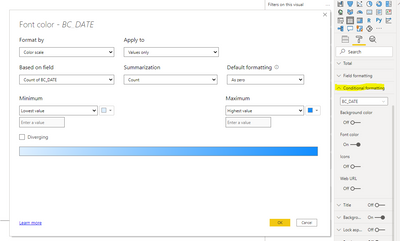
Depending on your question, you can set the color of a specific row field in Format-> Conditional formatting.
Here is the reference detail document link.Conditional table formatting in Power BI Desktop - Power BI | Microsoft Docs
If the problem is still not resolved, please provide detailed error information and let me know immediately. Looking forward to your reply.
Best Regards,
Henry
If this post helps, then please consider Accept it as the solution to help the other members find it more quickly.
Hi @realiza ,
Depending on your question, you can set the color of a specific row field in Format-> Conditional formatting.
Here is the reference detail document link.Conditional table formatting in Power BI Desktop - Power BI | Microsoft Docs
If the problem is still not resolved, please provide detailed error information and let me know immediately. Looking forward to your reply.
Best Regards,
Henry
If this post helps, then please consider Accept it as the solution to help the other members find it more quickly.
Hi @v-henryk-mstf
the changes per column may be lower or higher from the previous row, so the conditional formatting can't be applied here because of the min or max aggregate does not apply here.
Hi @realiza ,
Currently in powerbi desktop, for the above functions, only conditional judgments can be made on specific aggregated values and then the color can be changed. What are the judgment conditions for changing the color in each row and column of the above table?
Looking forward to your reply.
Best Regards,
Henry
If this post helps, then please consider Accept it as the solution to help the other members find it more quickly.
the table actually is a historical table, so if there is any changes (com-type to topic columns, but there are more columns) in the community column. The users input all activity evey now and then, that is why no condition to know what changes is inputted.
Check out the April 2026 Power BI update to learn about new features.
Sign up to receive a private message when registration opens and key events begin.
If you have recently started exploring Fabric, we'd love to hear how it's going. Your feedback can help with product improvements.
| User | Count |
|---|---|
| 39 | |
| 28 | |
| 28 | |
| 22 | |
| 18 |
| User | Count |
|---|---|
| 67 | |
| 37 | |
| 32 | |
| 27 | |
| 25 |