cancel
Showing results for 
Search instead for 
Did you mean: 

July 7 - July 17 | Round 2 of the Power BI Dataviz World Championships. Don't miss your chance! Learn more

Reply
realiza
Frequent Visitor

Highlight Values with Changes

Hi, 


I have a historical data where on the report I used a table and it needs to change the background or font color on each column per group (which is community) per row. It should show be shown like this: This table a lot of columns with different data types, this is just of the few. Is this possible? 

BC_CODEBC_DATECOMMUNITYCOM_TYPETargetLast NameOrientDateTopic
109712/14/2020140-00041313 150   
187701/12/2021140-00041313 150BERNAL  
214203/01/2021140-00041313Housing150BERNAL01/14/2021kbmt
228703/11/2021140-00041313Housing150BERNAL01/14/2021kbmt
100812/14/2020140-00000627 218FARRALES kbmt
155102/01/2021140-00000627 218FARRALES kbmt
200103/01/2021140-00000627Housing218FARRALES01/28/2021kbmt
220703/11/2021140-00000627Housing218FARRALES01/28/2021kbmt
100312/14/2020140-00000434 249Gomez11/16/2020kbmt
141402/01/2021140-00000434 249Gomez11/16/2020kbmt
198202/15/2021140-00000434 250ALAGAR01/25/2021vf
219103/11/2021140-00000434Housing250ALAGAR01/25/2021vf
97712/14/2020 140-00041248     
133302/03/2021 140-00041248  Gomez kbmt
189803/01/2021 140-00041248Housing120Gomez02/11/2021kbmt
216103/11/2021 140-00041248Fishing120Gomez02/11/2021kbmt


Thanks in advance. 


1 ACCEPTED SOLUTION
v-henryk-mstf
Community Support
Community Support

Hi @realiza ,


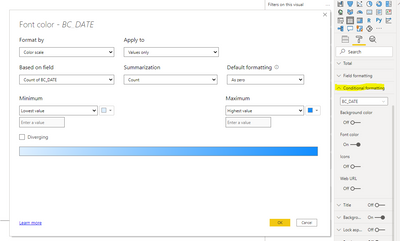
Depending on your question, you can set the color of a specific row field in Format-> Conditional formatting.

v-henryk-mstf_0-1619417497527.png


Here is the reference detail document link.Conditional table formatting in Power BI Desktop - Power BI | Microsoft Docs


If the problem is still not resolved, please provide detailed error information and let me know immediately. Looking forward to your reply.

Best Regards,
Henry

If this post helps, then please consider Accept it as the solution to help the other members find it more quickly.

View solution in original post

4 REPLIES 4
v-henryk-mstf
Community Support
Community Support

Hi @realiza ,


Depending on your question, you can set the color of a specific row field in Format-> Conditional formatting.

v-henryk-mstf_0-1619417497527.png


Here is the reference detail document link.Conditional table formatting in Power BI Desktop - Power BI | Microsoft Docs


If the problem is still not resolved, please provide detailed error information and let me know immediately. Looking forward to your reply.

Best Regards,
Henry

If this post helps, then please consider Accept it as the solution to help the other members find it more quickly.

Hi @v-henryk-mstf 

the changes per column may be lower or higher from the previous row, so the conditional formatting can't be applied here because of the min or max aggregate does not apply here. 

Hi @realiza ,


Currently in powerbi desktop, for the above functions, only conditional judgments can be made on specific aggregated values and then the color can be changed. What are the judgment conditions for changing the color in each row and column of the above table?


Looking forward to your reply.

Best Regards,
Henry

If this post helps, then please consider Accept it as the solution to help the other members find it more quickly.

hi @v-henryk-mstf 


the table actually is a historical table, so if there is any changes (com-type to topic columns, but there are more columns) in the community column. The users input all activity evey now and then, that is why no condition to know what changes is inputted. 

Helpful resources

Announcements
FabCon and SQLCon Barcelona 2026

FabCon & SQLCon – Barcelona 2026

Join us in Barcelona for FabCon and SQLCon, the Fabric, Power BI, SQL, and AI community event. Save €200 with code FABCMTY200.

Fabric Community Sticker Design Challenge Barcelona Carousel

Fabric Community Sticker Challenge - Barcelona 2026

If you love stickers, then you will definitely want to check out our community sticker challenge, Barcelona edition!

July Power BI Update Carousel

Power BI Monthly Update - July 2026

Check out the July 2026 Power BI update to learn about new features.

Power BI DataViz World Championships carousel

Power BI DataViz World Championships - June 2026

A new Power BI DataViz World Championship is coming this June! Don't miss out on submitting your entry.

Top Solution Authors