This time we’re going bigger than ever. Fabric, Power BI, SQL, AI and more. We're covering it all. You won't want to miss it.
Learn moreDid you hear? There's a new SQL AI Developer certification (DP-800). Start preparing now and be one of the first to get certified. Register now
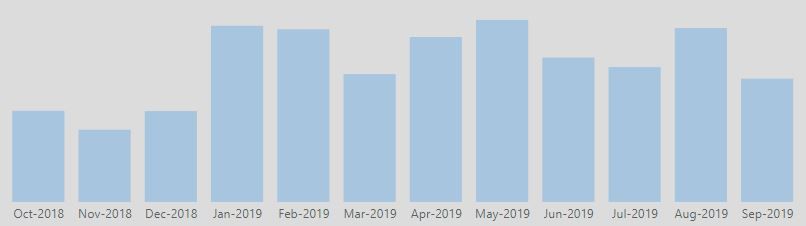
In the simple visualization below, I am hoping to emphasize a portion of the timeline, the last 3 months for instance, to emphasize a specific time period of focus, but also connecting the relevancy to earlier months.
So for instance, October through June may be a subtle color, while July - September would be emphasized with an alternative (brighter) color.
Anybody have a recommendation how to do this from a technique perspective? I am looking for a solution that can create the contrasting colors as the data changes...i.e. Highlight the last 3 mos, as opposed to highlight Jul, Aug, Sept if a conditional formatting is the recommended approach.
Thanks in advance.
Solved! Go to Solution.
Hi @Anonymous ,
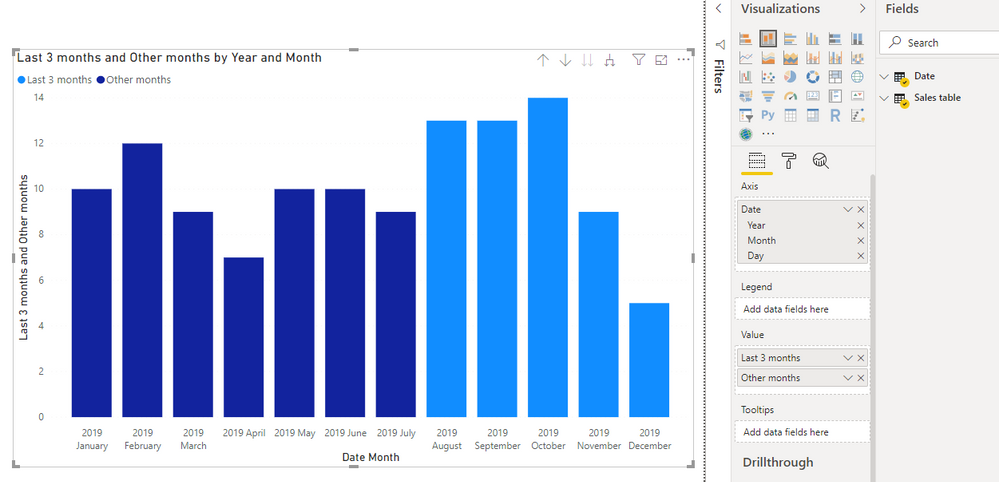
one approach would be to create to different measures and have them both in the same chart.
As the DATEADD-function only accepts columns as input, I prefer to create a year-month number in my date table like this:
YearMonthNumber =
( YEAR ( Date[Date] ) - 2016 ) * 12
+ MONTH ( Date[Date] )
Your last 3 months-measure would when then look like this
Last 3 months =
VAR currentYearMontNumber =
( YEAR ( TODAY () ) - 2016 ) * 12
+ MONTH ( TODAY () )
RETURN
CALCULATE (
SUM ( 'Sales table'[Sales] );
FILTER ( 'Date'; 'Date'[YearMonthNumber] > currentYearMontNumber - 3 )
)
and the other months like this:
Other months =
VAR currentYearMontNumber =
( YEAR ( TODAY () ) - 2016 ) * 12
+ MONTH ( TODAY () )
RETURN
CALCULATE (
SUM ( 'Sales table'[Sales] );
FILTER ( 'Date'; 'Date'[YearMonthNumber] <= currentYearMontNumber - 3 )
)
Then add both measures to a chart and it will look somethink like this
Cheers,
Sturla
If this post helps, then please consider Accepting it as the solution. Kudos are nice too.
Hi @Anonymous ,
one approach would be to create to different measures and have them both in the same chart.
As the DATEADD-function only accepts columns as input, I prefer to create a year-month number in my date table like this:
YearMonthNumber =
( YEAR ( Date[Date] ) - 2016 ) * 12
+ MONTH ( Date[Date] )
Your last 3 months-measure would when then look like this
Last 3 months =
VAR currentYearMontNumber =
( YEAR ( TODAY () ) - 2016 ) * 12
+ MONTH ( TODAY () )
RETURN
CALCULATE (
SUM ( 'Sales table'[Sales] );
FILTER ( 'Date'; 'Date'[YearMonthNumber] > currentYearMontNumber - 3 )
)
and the other months like this:
Other months =
VAR currentYearMontNumber =
( YEAR ( TODAY () ) - 2016 ) * 12
+ MONTH ( TODAY () )
RETURN
CALCULATE (
SUM ( 'Sales table'[Sales] );
FILTER ( 'Date'; 'Date'[YearMonthNumber] <= currentYearMontNumber - 3 )
)
Then add both measures to a chart and it will look somethink like this
Cheers,
Sturla
If this post helps, then please consider Accepting it as the solution. Kudos are nice too.
Check out the April 2026 Power BI update to learn about new features.
Sign up to receive a private message when registration opens and key events begin.
If you have recently started exploring Fabric, we'd love to hear how it's going. Your feedback can help with product improvements.
| User | Count |
|---|---|
| 34 | |
| 31 | |
| 30 | |
| 21 | |
| 16 |
| User | Count |
|---|---|
| 61 | |
| 50 | |
| 30 | |
| 23 | |
| 23 |