Join us at FabCon Atlanta from March 16 - 20, 2026, for the ultimate Fabric, Power BI, AI and SQL community-led event. Save $200 with code FABCOMM.
Register now!The Power BI Data Visualization World Championships is back! Get ahead of the game and start preparing now! Learn more
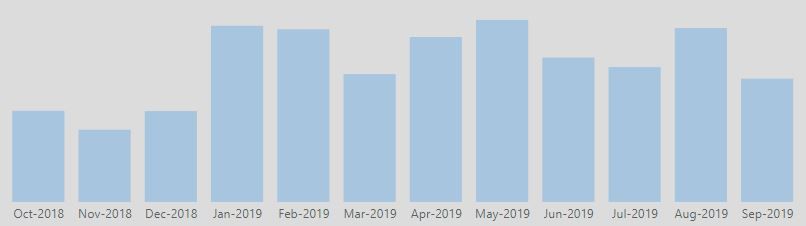
In the simple visualization below, I am hoping to emphasize a portion of the timeline, the last 3 months for instance, to emphasize a specific time period of focus, but also connecting the relevancy to earlier months.
So for instance, October through June may be a subtle color, while July - September would be emphasized with an alternative (brighter) color.
Anybody have a recommendation how to do this from a technique perspective? I am looking for a solution that can create the contrasting colors as the data changes...i.e. Highlight the last 3 mos, as opposed to highlight Jul, Aug, Sept if a conditional formatting is the recommended approach.
Thanks in advance.
Solved! Go to Solution.
Hi @Anonymous ,
one approach would be to create to different measures and have them both in the same chart.
As the DATEADD-function only accepts columns as input, I prefer to create a year-month number in my date table like this:
YearMonthNumber =
( YEAR ( Date[Date] ) - 2016 ) * 12
+ MONTH ( Date[Date] )
Your last 3 months-measure would when then look like this
Last 3 months =
VAR currentYearMontNumber =
( YEAR ( TODAY () ) - 2016 ) * 12
+ MONTH ( TODAY () )
RETURN
CALCULATE (
SUM ( 'Sales table'[Sales] );
FILTER ( 'Date'; 'Date'[YearMonthNumber] > currentYearMontNumber - 3 )
)
and the other months like this:
Other months =
VAR currentYearMontNumber =
( YEAR ( TODAY () ) - 2016 ) * 12
+ MONTH ( TODAY () )
RETURN
CALCULATE (
SUM ( 'Sales table'[Sales] );
FILTER ( 'Date'; 'Date'[YearMonthNumber] <= currentYearMontNumber - 3 )
)
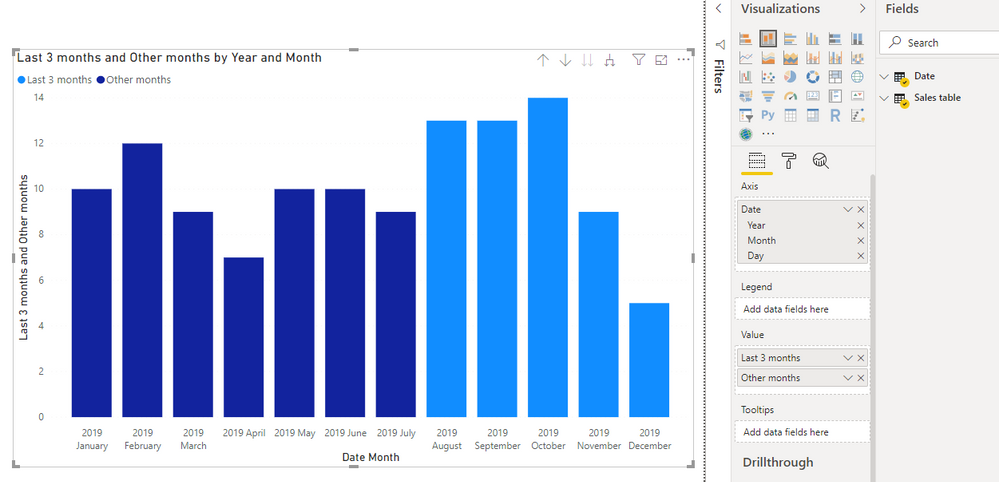
Then add both measures to a chart and it will look somethink like this
Cheers,
Sturla
If this post helps, then please consider Accepting it as the solution. Kudos are nice too.
Hi @Anonymous ,
one approach would be to create to different measures and have them both in the same chart.
As the DATEADD-function only accepts columns as input, I prefer to create a year-month number in my date table like this:
YearMonthNumber =
( YEAR ( Date[Date] ) - 2016 ) * 12
+ MONTH ( Date[Date] )
Your last 3 months-measure would when then look like this
Last 3 months =
VAR currentYearMontNumber =
( YEAR ( TODAY () ) - 2016 ) * 12
+ MONTH ( TODAY () )
RETURN
CALCULATE (
SUM ( 'Sales table'[Sales] );
FILTER ( 'Date'; 'Date'[YearMonthNumber] > currentYearMontNumber - 3 )
)
and the other months like this:
Other months =
VAR currentYearMontNumber =
( YEAR ( TODAY () ) - 2016 ) * 12
+ MONTH ( TODAY () )
RETURN
CALCULATE (
SUM ( 'Sales table'[Sales] );
FILTER ( 'Date'; 'Date'[YearMonthNumber] <= currentYearMontNumber - 3 )
)
Then add both measures to a chart and it will look somethink like this
Cheers,
Sturla
If this post helps, then please consider Accepting it as the solution. Kudos are nice too.
Check out the November 2025 Power BI update to learn about new features.
Advance your Data & AI career with 50 days of live learning, contests, hands-on challenges, study groups & certifications and more!
| User | Count |
|---|---|
| 59 | |
| 43 | |
| 42 | |
| 23 | |
| 17 |
| User | Count |
|---|---|
| 190 | |
| 122 | |
| 96 | |
| 66 | |
| 46 |