
cancel
Showing results for 
Search instead for 
Did you mean: 

July 28 - August 9 | Final Round of the Power BI Dataviz World Championships. This is your chance. Learn more

Reply
Anonymous
Not applicable

Hierarchy value when missing value

Hello I have this measure below


salman_ali_1-1603903044300.png

it gives me this output.  As you can see North Sydney Strorage below is giving me BLANK. 


What I would like is for any blank values as such, I would like to capture the value of the above hierarchy, in this case the value 1.00 from 343-Nova Scotia North.


salman_ali_0-1603903015255.png


am I providing all the details needed for you to help me?


1 ACCEPTED SOLUTION

Hi, @Anonymous 


You may try the following measure to see if it helps.

Result =
IF (
    ISINSCOPE ( 'Table'[Level4] ),
    SUM ( 'Table'[Val] ),
    IF (
        ISINSCOPE ( 'Table'[Level3] ),
        1,
        IF (
            ISINSCOPE ( 'Table'[Level2] )
                && MAX ( 'Table'[Level2] ) = "AT1",
            1.16,
            IF ( ISINSCOPE ( 'Table'[Level1] ) && MAX ( 'Table'[Level1] ) = "EST", 0.68 )
        )
    )
)


If it doesn't work, please show us some sample data with OneDrive for business. Do mask sensitive data before uploading.


Best Regards

Allan


If this post helps, then please consider Accept it as the solution to help the other members find it more quickly.

View solution in original post

3 REPLIES 3
v-alq-msft
Community Support
Community Support

Hi, @Anonymous 


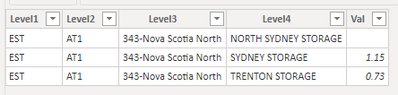
Based on your description, I assume that you want to do different calculations for different level. I created data to reproduce your scenario. The pbix file is attached in the end.

Table:

e1.png


You may create a measure as below.

Result = 
IF(
    ISINSCOPE('Table'[Level4]),
    SUM('Table'[Val]),
    IF(
        ISINSCOPE('Table'[Level3])&&MAX('Table'[Level3])="343-Nova Scotia North",
        1,
        IF(
            ISINSCOPE('Table'[Level2])&&MAX('Table'[Level2])="AT1",
            1.16,
            IF(
                ISINSCOPE('Table'[Level1])&&MAX('Table'[Level1])="EST",
                0.68
            )
        )
    )
)


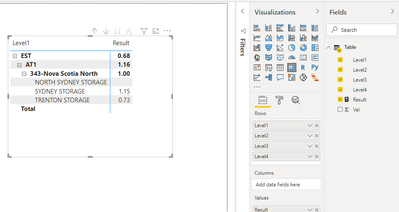
Result:

e2.png


For further information about 'isinscope', please refer to the following document.

isinscope 


Best Regards

Allan


If this post helps, then please consider Accept it as the solution to help the other members find it more quickly.


Anonymous
Not applicable

@v-alq-msft  Hi I see that your measure will be able to work, however is it possible for you to give me a more generic measure as opposed to have "343-Nova Scotia North" in measure? since I am working with varios other markets other than "343-Nova Scotia North" as well 

Hi, @Anonymous 


You may try the following measure to see if it helps.

Result =
IF (
    ISINSCOPE ( 'Table'[Level4] ),
    SUM ( 'Table'[Val] ),
    IF (
        ISINSCOPE ( 'Table'[Level3] ),
        1,
        IF (
            ISINSCOPE ( 'Table'[Level2] )
                && MAX ( 'Table'[Level2] ) = "AT1",
            1.16,
            IF ( ISINSCOPE ( 'Table'[Level1] ) && MAX ( 'Table'[Level1] ) = "EST", 0.68 )
        )
    )
)


If it doesn't work, please show us some sample data with OneDrive for business. Do mask sensitive data before uploading.


Best Regards

Allan


If this post helps, then please consider Accept it as the solution to help the other members find it more quickly.

Helpful resources

Announcements
Fabric Community Sticker Design Challenge Barcelona Carousel

Fabric Community Sticker Challenge - Barcelona 2026

If you love stickers, then you will definitely want to check out our community sticker challenge, Barcelona edition!

July Power BI Update Carousel

Power BI Monthly Update - July 2026

Check out the July 2026 Power BI update to learn about new features.

Power BI DataViz World Championships carousel

Power BI DataViz World Championships - June 2026

A new Power BI DataViz World Championship is coming this June! Don't miss out on submitting your entry.

Top Solution Authors