Join us at FabCon Atlanta from March 16 - 20, 2026, for the ultimate Fabric, Power BI, AI and SQL community-led event. Save $200 with code FABCOMM.
Register now!The Power BI Data Visualization World Championships is back! Get ahead of the game and start preparing now! Learn more
I have the below sample data and need to display hirearchial report with all the column fields based on that data.
Tables are linked in data model using foreignkey. Table A Table B TableC Table D.
Please help me in the approach I can take to acheive this. Any help is highly appreciable.
Solved! Go to Solution.
Hello @ksivaganesh99 ,
Just loaded the tables in a PBI Report and tried to do a model: it was not possible with One to Many relationships as Table B and C are containing duplicate rows,
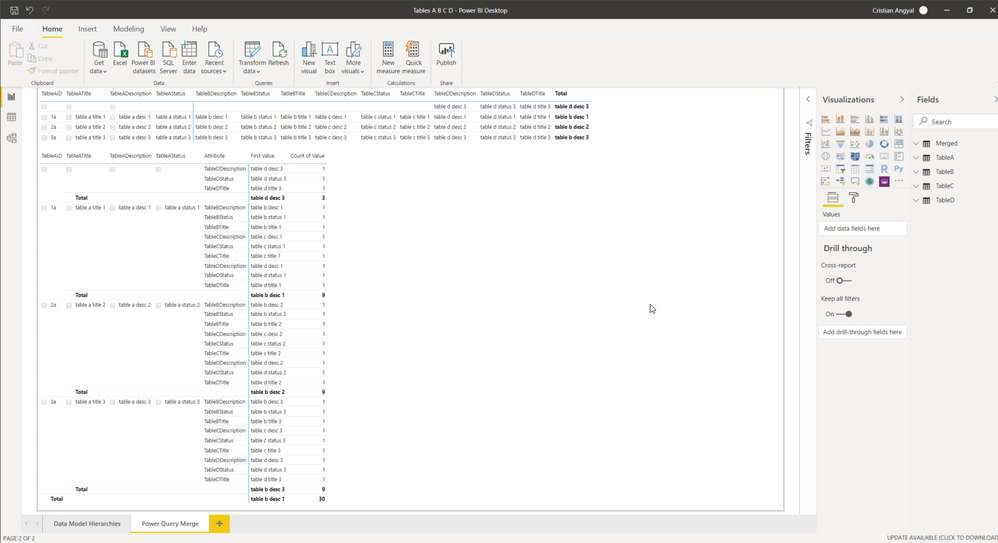
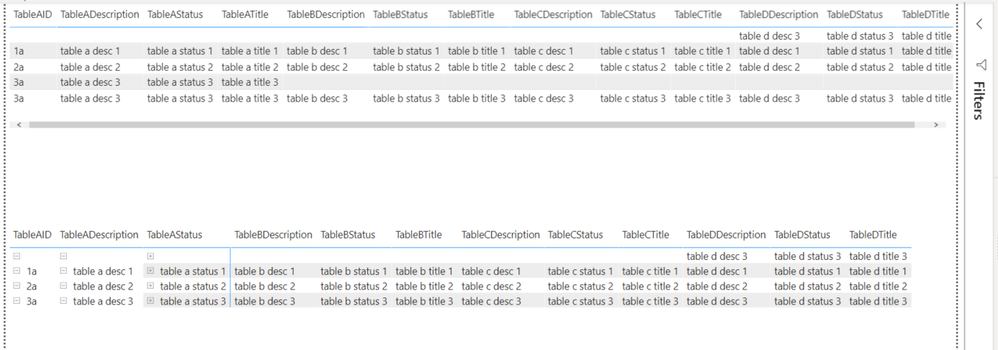
Removed the duplicates and tried to do a model in file "Tables A B C D.pbix". Also did a PQ Merge from the tables and you have the results on the second page.
Still I wanted to do the merge as I initially wanted and built another file (Tables A B C D (B and C with duplicates.pbix) with two solutions inside as I don't know all the details of the hierachy that you need.
As I can't attach the files please leave an email address and I'll be glad to send them to you for detailed study.
If you liked my solution please give it a thumbs up 👍.
If I did answer your question please mark my post as a solution ✅.
Thank you !
Regards,
Cristian
Looking at the structure Merge is the best option. But this has been a real data Append can be explored.
Refer to this link: https://radacad.com/append-vs-merge-in-power-bi-and-power-query
Try to use merge
Hello @ksivaganesh99 ,
I would connect to each table with Power Query, build a separate query to merge all of them and load only the last query to the model and build a Matrix table out of it,
If you could post the sample excel file I could give it a try,
If you liked my solution please give it a thumbs up 👍.
If I did answer your question please mark my post as a solution ✅.
Thank you !
Cristian
Thanks for the suggestion. Really appreciate. I pasted all the tables below. Please give a try and let me know the output.
Table A
| TableAID | TableADescription | TableATitle | TableAStatus | TabelBForeignKey |
| 1a | table a desc 1 | table a title 1 | table a status 1 | 1b |
| 2a | table a desc 2 | table a title 2 | table a status 2 | 2b |
| 3a | table a desc 3 | table a title 3 | table a status 3 | 3b |
| 3a | table a desc 3 | table a title 3 | table a status 3 | 4b |
Table B
| TableBID | TableBDescription | TableBTitle | TableBStatus | TabelCForeignKey |
| 1b | table b desc 1 | table b title 1 | table b status 1 | 1c |
| 2b | table b desc 2 | table b title 2 | table b status 2 | 2c |
| 3b | table b desc 3 | table b title 3 | table b status 3 | 3c |
| 3b | table b desc 3 | table b title 3 | table b status 3 | 3c |
Table C
| TableCID | TableCDescription | TableCTitle | TableCStatus | TabelDForeignKey |
| 1c | table c desc 1 | table c title 1 | table c status 1 | 1d |
| 2c | table c desc 2 | table c title 2 | table c status 2 | 2d |
| 3c | table c desc 3 | table c title 3 | table c status 3 | 3d |
| 3c | table c desc 3 | table c title 3 | table c status 3 | 3d |
Table D
| TableDID | TableDDescription | TableDTitle | TableDStatus |
| 1d | table d desc 1 | table d title 1 | table d status 1 |
| 2d | table d desc 2 | table d title 2 | table d status 2 |
| 3d | table d desc 3 | table d title 3 | table d status 3 |
| 4d | table d desc 3 | table d title 3 | table d status 3 |
@Cristian_Angyal Thanks in advance.
Hello @ksivaganesh99 ,
Just loaded the tables in a PBI Report and tried to do a model: it was not possible with One to Many relationships as Table B and C are containing duplicate rows,
Removed the duplicates and tried to do a model in file "Tables A B C D.pbix". Also did a PQ Merge from the tables and you have the results on the second page.
Still I wanted to do the merge as I initially wanted and built another file (Tables A B C D (B and C with duplicates.pbix) with two solutions inside as I don't know all the details of the hierachy that you need.
As I can't attach the files please leave an email address and I'll be glad to send them to you for detailed study.
If you liked my solution please give it a thumbs up 👍.
If I did answer your question please mark my post as a solution ✅.
Thank you !
Regards,
Cristian
The Power BI Data Visualization World Championships is back! Get ahead of the game and start preparing now!
Check out the November 2025 Power BI update to learn about new features.
| User | Count |
|---|---|
| 68 | |
| 46 | |
| 44 | |
| 29 | |
| 20 |
| User | Count |
|---|---|
| 202 | |
| 130 | |
| 102 | |
| 71 | |
| 55 |