Join us at FabCon Atlanta from March 16 - 20, 2026, for the ultimate Fabric, Power BI, AI and SQL community-led event. Save $200 with code FABCOMM.
Register now!The Power BI Data Visualization World Championships is back! Get ahead of the game and start preparing now! Learn more
I have the below sample data and need to display hirearchial report with all the column fields based on that data.
Tables are linked in data model using foreignkey. Table A Table B TableC Table D.
Please help me in the approach I can take to acheive this. Any help is highly appreciable.
Solved! Go to Solution.
Hello @ksivaganesh99 ,
Just loaded the tables in a PBI Report and tried to do a model: it was not possible with One to Many relationships as Table B and C are containing duplicate rows,
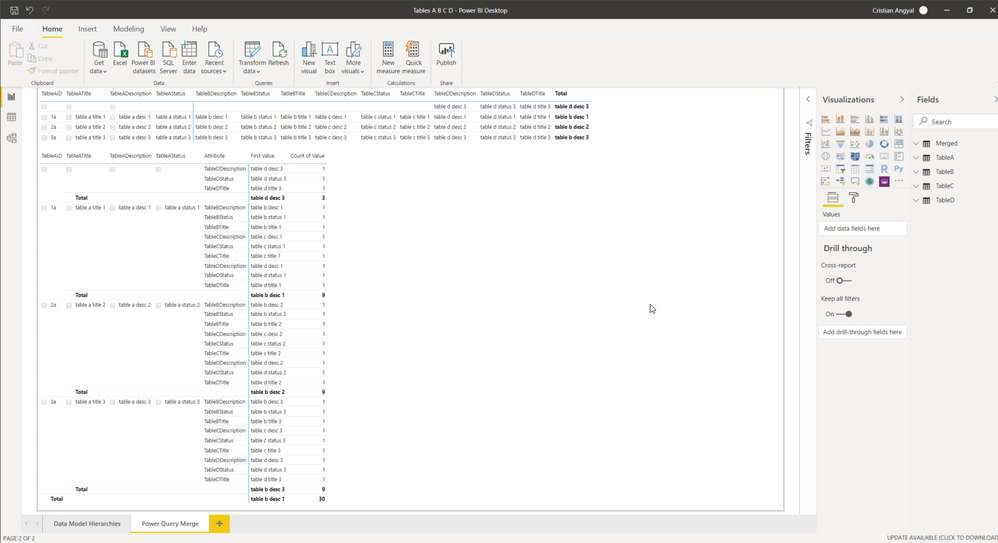
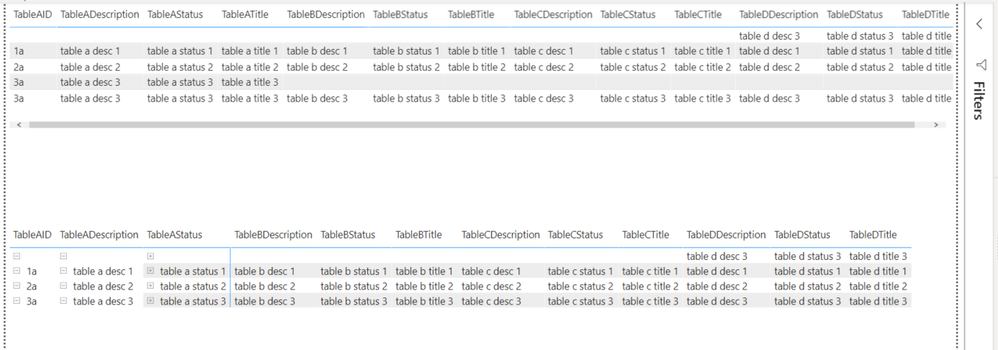
Removed the duplicates and tried to do a model in file "Tables A B C D.pbix". Also did a PQ Merge from the tables and you have the results on the second page.
Still I wanted to do the merge as I initially wanted and built another file (Tables A B C D (B and C with duplicates.pbix) with two solutions inside as I don't know all the details of the hierachy that you need.
As I can't attach the files please leave an email address and I'll be glad to send them to you for detailed study.
If you liked my solution please give it a thumbs up 👍.
If I did answer your question please mark my post as a solution ✅.
Thank you !
Regards,
Cristian
Looking at the structure Merge is the best option. But this has been a real data Append can be explored.
Refer to this link: https://radacad.com/append-vs-merge-in-power-bi-and-power-query
Try to use merge
Hello @ksivaganesh99 ,
I would connect to each table with Power Query, build a separate query to merge all of them and load only the last query to the model and build a Matrix table out of it,
If you could post the sample excel file I could give it a try,
If you liked my solution please give it a thumbs up 👍.
If I did answer your question please mark my post as a solution ✅.
Thank you !
Cristian
Thanks for the suggestion. Really appreciate. I pasted all the tables below. Please give a try and let me know the output.
Table A
| TableAID | TableADescription | TableATitle | TableAStatus | TabelBForeignKey |
| 1a | table a desc 1 | table a title 1 | table a status 1 | 1b |
| 2a | table a desc 2 | table a title 2 | table a status 2 | 2b |
| 3a | table a desc 3 | table a title 3 | table a status 3 | 3b |
| 3a | table a desc 3 | table a title 3 | table a status 3 | 4b |
Table B
| TableBID | TableBDescription | TableBTitle | TableBStatus | TabelCForeignKey |
| 1b | table b desc 1 | table b title 1 | table b status 1 | 1c |
| 2b | table b desc 2 | table b title 2 | table b status 2 | 2c |
| 3b | table b desc 3 | table b title 3 | table b status 3 | 3c |
| 3b | table b desc 3 | table b title 3 | table b status 3 | 3c |
Table C
| TableCID | TableCDescription | TableCTitle | TableCStatus | TabelDForeignKey |
| 1c | table c desc 1 | table c title 1 | table c status 1 | 1d |
| 2c | table c desc 2 | table c title 2 | table c status 2 | 2d |
| 3c | table c desc 3 | table c title 3 | table c status 3 | 3d |
| 3c | table c desc 3 | table c title 3 | table c status 3 | 3d |
Table D
| TableDID | TableDDescription | TableDTitle | TableDStatus |
| 1d | table d desc 1 | table d title 1 | table d status 1 |
| 2d | table d desc 2 | table d title 2 | table d status 2 |
| 3d | table d desc 3 | table d title 3 | table d status 3 |
| 4d | table d desc 3 | table d title 3 | table d status 3 |
@Cristian_Angyal Thanks in advance.
Hello @ksivaganesh99 ,
Just loaded the tables in a PBI Report and tried to do a model: it was not possible with One to Many relationships as Table B and C are containing duplicate rows,
Removed the duplicates and tried to do a model in file "Tables A B C D.pbix". Also did a PQ Merge from the tables and you have the results on the second page.
Still I wanted to do the merge as I initially wanted and built another file (Tables A B C D (B and C with duplicates.pbix) with two solutions inside as I don't know all the details of the hierachy that you need.
As I can't attach the files please leave an email address and I'll be glad to send them to you for detailed study.
If you liked my solution please give it a thumbs up 👍.
If I did answer your question please mark my post as a solution ✅.
Thank you !
Regards,
Cristian
The Power BI Data Visualization World Championships is back! Get ahead of the game and start preparing now!
| User | Count |
|---|---|
| 66 | |
| 44 | |
| 40 | |
| 29 | |
| 19 |
| User | Count |
|---|---|
| 200 | |
| 126 | |
| 103 | |
| 70 | |
| 54 |