cancel
Showing results for 
Search instead for 
Did you mean: 

Did you hear? There's a new SQL AI Developer certification (DP-800). Start preparing now and be one of the first to get certified. Register now

Reply
Anonymous
Not applicable

Hierarchy problem

Hello,


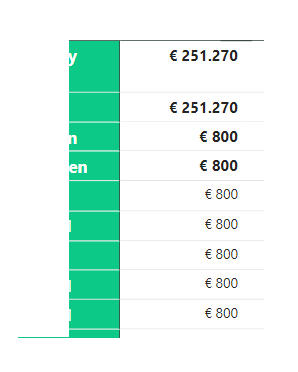
I have a problem with my hierarchy. I have two diferrent tables in PowerBI in one matrix. The hierarchy is in total five levels, but the budget is at level four. How do i get rid of the budget at level 5? Is there anything that i do wrong?


matthijs_0-1616662016434.png


1 ACCEPTED SOLUTION

Hey @Anonymous ,


I mean you don't show anything, just 5 rows with "Waar" and 2 with "Onwaar".
Show the measure, show how the table looks, show your matrix.


Otherwise, check:

myMeasure = IF( [thisWaarMeasure] = "Waar", BLANK(), [thisWaarMeasure] )


If you need any help please let me know.
If I answered your question I would be happy if you could mark my post as a solution ✔️ and give it a thumbs up 👍
 
Best regards
Denis
 

View solution in original post

4 REPLIES 4
vanessafvg
Community Champion
Community Champion

its really hard to understand what is occuring with the information you have provided, firstly demonstrate what your hierarchy is, then please demonstrate what you expect.    one woudl need to see the data to understand what is going on.


If I took the time to answer your question and I came up with a solution, please mark my post as a solution and /or give kudos freely for the effort 🙂 Thank you!

Proud to be a Super User!


selimovd
Super User
Super User

Hey @Anonymous ,


you can check with the function ISINSCOPE if the desired level is in scope.

If yes, then return blank, otherwise the budget.


If you need any help please let me know.
If I answered your question I would be happy if you could mark my post as a solution ✔️ and give it a thumbs up 👍
 
Best regards
Denis
 
Anonymous
Not applicable

hello thanks for your answer.


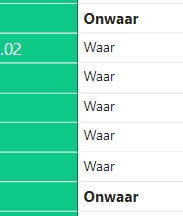
matthijs_0-1616665146890.png


everything that is true (waar) must be empty and otherwise it must fills in the budget. do i need for this an if formula or how do i do this?

Hey @Anonymous ,


I mean you don't show anything, just 5 rows with "Waar" and 2 with "Onwaar".
Show the measure, show how the table looks, show your matrix.


Otherwise, check:

myMeasure = IF( [thisWaarMeasure] = "Waar", BLANK(), [thisWaarMeasure] )


If you need any help please let me know.
If I answered your question I would be happy if you could mark my post as a solution ✔️ and give it a thumbs up 👍
 
Best regards
Denis
 

Helpful resources

Announcements
April Power BI Update Carousel

Power BI Monthly Update - April 2026

Check out the April 2026 Power BI update to learn about new features.

Fabric SQL PBI Data Days

Data Days 2026 coming soon!

Sign up to receive a private message when registration opens and key events begin.

New to Fabric survey Carousel

New to Fabric Survey

If you have recently started exploring Fabric, we'd love to hear how it's going. Your feedback can help with product improvements.

Power BI DataViz World Championships carousel

Power BI DataViz World Championships - June 2026

A new Power BI DataViz World Championship is coming this June! Don't miss out on submitting your entry.