- Power BI forums
- Get Help with Power BI
- Desktop
- Service
- Report Server
- Power Query
- Mobile Apps
- Developer
- DAX Commands and Tips
- Custom Visuals Development Discussion
- Health and Life Sciences
- Power BI Spanish forums
- Translated Spanish Desktop
- Training and Consulting
- Instructor Led Training
- Dashboard in a Day for Women, by Women
- Galleries
- Data Stories Gallery
- Themes Gallery
- Contests Gallery
- QuickViz Gallery
- Quick Measures Gallery
- Visual Calculations Gallery
- Notebook Gallery
- Translytical Task Flow Gallery
- TMDL Gallery
- R Script Showcase
- Webinars and Video Gallery
- Ideas
- Custom Visuals Ideas (read-only)
- Issues
- Issues
- Events
- Upcoming Events
Learn from the best! Meet the four finalists headed to the FINALS of the Power BI Dataviz World Championships! Register now
- Power BI forums
- Forums
- Get Help with Power BI
- Desktop
- Re: Hierarchy inside Measure
- Subscribe to RSS Feed
- Mark Topic as New
- Mark Topic as Read
- Float this Topic for Current User
- Bookmark
- Subscribe
- Printer Friendly Page


- Mark as New
- Bookmark
- Subscribe
- Mute
- Subscribe to RSS Feed
- Permalink
- Report Inappropriate Content
Hierarchy inside Measure
Hello,
See attached example data
My data has a planned number of people (planned column) per category
There's 2 categories - the master column and legend where each legend fall beneath a master to establish a hierarchy ie 1 has 11, 12, and 13
All have hardkeyed plans. The masters have their own independent from a legend value.
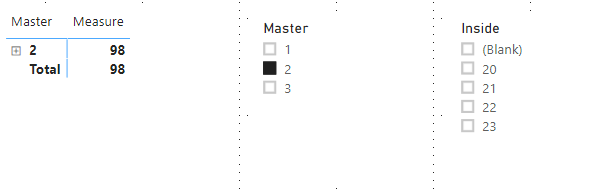
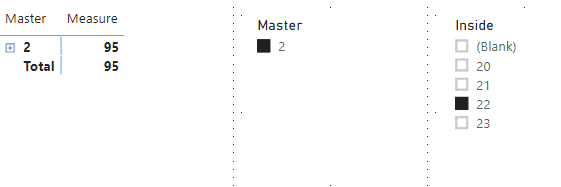
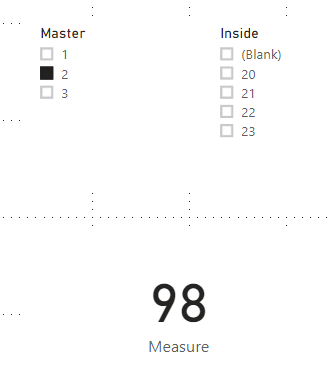
How can I have a measure that switch between the correct master then legend after filtering ie If i have a master filter and select 2, 98 appears then if i filter again to 22, 95 appears.
Solved! Go to Solution.


- Mark as New
- Bookmark
- Subscribe
- Mute
- Subscribe to RSS Feed
- Permalink
- Report Inappropriate Content
Hi,
Do you want to show this measure in matrix visual?
If so, please try this measure:
Measure =
IF (
    CALCULATE ( DISTINCTCOUNT ( 'Table'[Inside] ), ALLSELECTED ( 'Table' ) )
        <> CALCULATE ( DISTINCTCOUNT ( 'Table'[Inside] ), ALL ( 'Table' ) ),
    IF (
        ISINSCOPE ( 'Table'[Inside] ),
        BLANK (),
        CALCULATE (
            MAXX ( ALLSELECTED ( 'Table' ), 'Table'[Plan] ),
            FILTER ( 'Table', 'Table'[Master] = SELECTEDVALUE ( 'Table'[Master] ) )
        )
    ),
    CALCULATE (
        MAX ( 'Table'[Plan] ),
        FILTER (
            'Table',
            'Table'[Master] = SELECTEDVALUE ( 'Table'[Master] )
                && 'Table'[Inside] = SELECTEDVALUE ( 'Table'[Inside] )
        )
    )
)
When only selecting master in slicer, it shows:
When both selecting master and inside in slicers, it shows:
Here is my changed pbix file:
Best Regards,
Giotto Zhi
- Mark as New
- Bookmark
- Subscribe
- Mute
- Subscribe to RSS Feed
- Permalink
- Report Inappropriate Content
Hi,
Please try this measure:
Measure =
IF (
    SELECTEDVALUE ( 'Table'[Inside] ) = BLANK (),
    CALCULATE (
        MAXX ( ALLSELECTED ( 'Table' ), 'Table'[Plan] ),
        FILTER ( 'Table', 'Table'[Master] = SELECTEDVALUE ( 'Table'[Master] ) )
    ),
    CALCULATE (
        MAX ( 'Table'[Plan] ),
        FILTER (
            'Table',
            'Table'[Master] = SELECTEDVALUE ( 'Table'[Master] )
                && 'Table'[Inside] = SELECTEDVALUE ( 'Table'[Inside] )
        )
    )
)
Choose this measure as a Card visual, when you only select master in slicer, it shows:
When you continue to select Inside in slicer, it shows:

Here is my test pbix file:
Hope this helps.
Best Regards,
Giotto Zhi
- Mark as New
- Bookmark
- Subscribe
- Mute
- Subscribe to RSS Feed
- Permalink
- Report Inappropriate Content
Can this be applied to a measure rather than a card?
- Mark as New
- Bookmark
- Subscribe
- Mute
- Subscribe to RSS Feed
- Permalink
- Report Inappropriate Content
Hi,
Do you want to show this measure in matrix visual?
If so, please try this measure:
Measure =
IF (
    CALCULATE ( DISTINCTCOUNT ( 'Table'[Inside] ), ALLSELECTED ( 'Table' ) )
        <> CALCULATE ( DISTINCTCOUNT ( 'Table'[Inside] ), ALL ( 'Table' ) ),
    IF (
        ISINSCOPE ( 'Table'[Inside] ),
        BLANK (),
        CALCULATE (
            MAXX ( ALLSELECTED ( 'Table' ), 'Table'[Plan] ),
            FILTER ( 'Table', 'Table'[Master] = SELECTEDVALUE ( 'Table'[Master] ) )
        )
    ),
    CALCULATE (
        MAX ( 'Table'[Plan] ),
        FILTER (
            'Table',
            'Table'[Master] = SELECTEDVALUE ( 'Table'[Master] )
                && 'Table'[Inside] = SELECTEDVALUE ( 'Table'[Inside] )
        )
    )
)
When only selecting master in slicer, it shows:
When both selecting master and inside in slicers, it shows:
Here is my changed pbix file:
Best Regards,
Giotto Zhi


- Mark as New
- Bookmark
- Subscribe
- Mute
- Subscribe to RSS Feed
- Permalink
- Report Inappropriate Content
- Mark as New
- Bookmark
- Subscribe
- Mute
- Subscribe to RSS Feed
- Permalink
- Report Inappropriate Content
The values are displaying correctly when inside a matrix but not when plotted on a line graph
- Mark as New
- Bookmark
- Subscribe
- Mute
- Subscribe to RSS Feed
- Permalink
- Report Inappropriate Content
I'm only getting blank values using isinscope

Helpful resources

Join our Fabric User Panel
Share feedback directly with Fabric product managers, participate in targeted research studies and influence the Fabric roadmap.

Power BI Community Update - March 2026
Check out the March 2026 Power BI update to learn about new features.

| User | Count |
|---|---|
| 55 | |
| 37 | |
| 23 | |
| 17 | |
| 17 |


| User | Count |
|---|---|
| 69 | |
| 58 | |
| 39 | |
| 21 | |
| 21 |


