cancel
Showing results for 
Search instead for 
Did you mean: 

July 7 - July 17 | Round 2 of the Power BI Dataviz World Championships. Don't miss your chance! Learn more

Reply
Sakamoto_S
Frequent Visitor

Hierarchy - Column

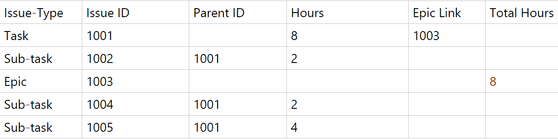
Sakamoto_S_0-1621282304916.png


Epic = Grand Parent, Task = Parent and Sub-task = child. I need help. I am newbie and trying to create a new column("Total Hours") that will show the sum of Sub-task hours to epic row. See example above in red for your reference. 

6 REPLIES 6
v-xiaotang
Community Support
Community Support

Hi @

-

Try this,

Total Hours =
VAR total_subtask =
    CALCULATE (
        SUM ( 'Table'[Hours] ),
        FILTER ( ALL ( 'Table' ), 'Table'[Issue-Type] = "Sub-task" )
    )
RETURN
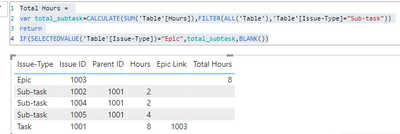
    IF ( SELECTEDVALUE ( 'Table'[Issue-Type] ) = "Epic", total_subtask, BLANK () )

Result:

v-xiaotang_0-1621561404985.png

See sample file attached below.


Best Regards,

Community Support Team _ Tang

If this post helps, please consider Accept it as the solution to help the other members find it more quickly.

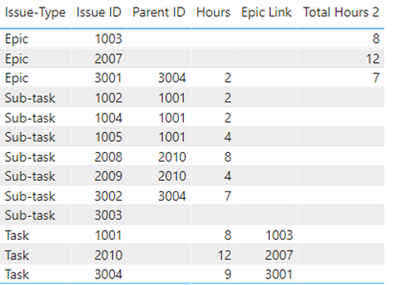
Hi @v-xiaotang, Thanks but what if there are another epics with different issue IDs? for example https://ibb.co/5BgD9D4 

Hi @Sakamoto_S 

-

Thanks for your reply.

But it would be better for the precondition to be given at the beginning. Because the solutions are different.🤣

-

create the measure firstly:

_IssueID = LEFT(SELECTEDVALUE('Table'[Issue ID]),1)

then, create the measure,


Total Hours 2 =
VAR total_subtask =
    CALCULATE (
        SUM ( 'Table'[Hours] ),
        FILTER (
            ALL ( 'Table' ),
            'Table'[Issue-Type] = "Sub-task"
                && LEFT ( SELECTEDVALUE ( 'Table'[Issue ID] ), 1 ) = [_IssueID]
        )
    )
RETURN
    IF (
        SELECTEDVALUE ( 'Table'[Issue-Type] ) = "Epic"
            && LEFT ( SELECTEDVALUE ( 'Table'[Issue ID] ), 1 ) = [_IssueID],
        total_subtask,
        BLANK ()
    )


Result:

v-xiaotang_0-1622101034388.png

Hope it helps!

See sample file attached below.


Best Regards,

Community Support Team _ Tang

If this post helps, please consider Accept it as the solution✔️ to help the other members find it more quickly.

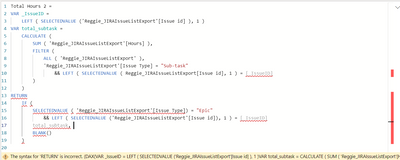
Hi @v-xiaotang Thanks. I tried your query but I've encountered some errors.

Sakamoto_S_0-1623119853914.png


The syntax for 'RETURN' is incorrect. (DAX(VAR _IssueID = LEFT ( SELECTEDVALUE ('Reggie_JIRAIssueListExport'[Issue id] ), 1 )VAR total_subtask = CALCULATE ( SUM ( 'Reggie_JIRAIssueListExport'[Hours] ), FILTER ( ALL ( 'Reggie_JIRAIssueListExport' ), 'Reggie_JIRAIssueListExport'[Issue Type] = "Sub-task" && LEFT ( SELECTEDVALUE ( Reggie_JIRAIssueListExport[Issue id], 1 ) = [_IssueID] ) )RETURN IF ( SELECTEDVALUE ( 'Reggie_JIRAIssueListExport'[Issue Type]) = "Epic" && LEFT ( SELECTEDVALUE ('Reggie_JIRAIssueListExport'[Issue id]), 1 ) = [_IssueID] total_subtask, BLANK() ))).

.pbix file here 

Hi  @Sakamoto_S 

sorry, I forgot to say you need to create the measure first, ( I've corrected my reply

_IssueID = 
    LEFT ( SELECTEDVALUE ('Reggie_JIRAIssueListExport'[Issue id] ), 1 )

then, create the measure

Total Hours 2 = 
VAR total_subtask =
    CALCULATE (
        SUM ( 'Reggie_JIRAIssueListExport'[Hours] ),
        FILTER (
            ALL ( 'Reggie_JIRAIssueListExport' ),
            'Reggie_JIRAIssueListExport'[Issue Type] = "Sub-task"
                && LEFT ( SELECTEDVALUE ( 'Reggie_JIRAIssueListExport'[Issue id]), 1 ) = [_IssueID]
        )
    )
RETURN 
    IF (
        SELECTEDVALUE( 'Reggie_JIRAIssueListExport'[Issue Type]) = "Epic"
            && LEFT ( SELECTEDVALUE ('Reggie_JIRAIssueListExport'[Issue id]), 1 ) = [_IssueID],
        total_subtask, 
        BLANK()
    )


Best Regards,

Community Support Team _ Tang

If this post helps, please consider Accept it as the solution✔️ to help the other members find it more quickly.


MFelix
Super User
Super User

Hi @Sakamoto_S ,


You need to follow a Hierarchy parent-child setup.


Check the SQLBI post about a similar setup.


https://www.daxpatterns.com/parent-child-hierarchies/


Believe that the only question here is the fact that you have the total hours in task and in subtasks. 


Regards

Miguel Félix


Did I answer your question? Mark my post as a solution!

Proud to be a Super User!

Check out my blog: Power BI em Português


Helpful resources

Announcements
FabCon and SQLCon Barcelona 2026

FabCon & SQLCon – Barcelona 2026

Join us in Barcelona for FabCon and SQLCon, the Fabric, Power BI, SQL, and AI community event. Save €200 with code FABCMTY200.

60 days of Data Days Carousel

Data Days 2026

Join Data Days 2026: 60 days of free live/on-demand sessions, challenges, study groups, and certification opportunities.

Power BI DataViz World Championships carousel

Power BI DataViz World Championships - June 2026

A new Power BI DataViz World Championship is coming this June! Don't miss out on submitting your entry.

Top Solution Authors