cancel
Showing results for 
Search instead for 
Did you mean: 

The Power BI Data Visualization World Championships is back! Get ahead of the game and start preparing now! Learn more

Reply
Sakamoto_S
Frequent Visitor

Hierarchy - Column

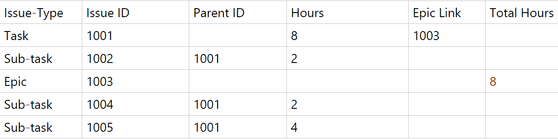
Sakamoto_S_0-1621282304916.png


Epic = Grand Parent, Task = Parent and Sub-task = child. I need help. I am newbie and trying to create a new column("Total Hours") that will show the sum of Sub-task hours to epic row. See example above in red for your reference. 

6 REPLIES 6
v-xiaotang
Community Support
Community Support

Hi @

-

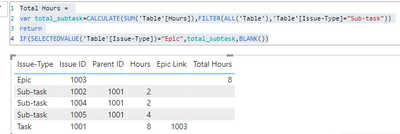
Try this,

Total Hours =
VAR total_subtask =
    CALCULATE (
        SUM ( 'Table'[Hours] ),
        FILTER ( ALL ( 'Table' ), 'Table'[Issue-Type] = "Sub-task" )
    )
RETURN
    IF ( SELECTEDVALUE ( 'Table'[Issue-Type] ) = "Epic", total_subtask, BLANK () )

Result:

v-xiaotang_0-1621561404985.png

See sample file attached below.


Best Regards,

Community Support Team _ Tang

If this post helps, please consider Accept it as the solution to help the other members find it more quickly.

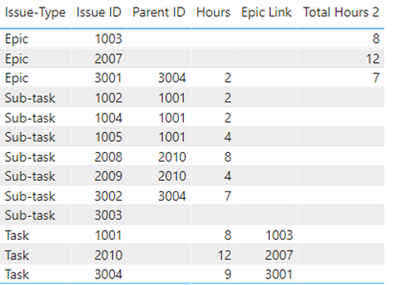
Hi @v-xiaotang, Thanks but what if there are another epics with different issue IDs? for example https://ibb.co/5BgD9D4 

Hi @Sakamoto_S 

-

Thanks for your reply.

But it would be better for the precondition to be given at the beginning. Because the solutions are different.🤣

-

create the measure firstly:

_IssueID = LEFT(SELECTEDVALUE('Table'[Issue ID]),1)

then, create the measure,


Total Hours 2 =
VAR total_subtask =
    CALCULATE (
        SUM ( 'Table'[Hours] ),
        FILTER (
            ALL ( 'Table' ),
            'Table'[Issue-Type] = "Sub-task"
                && LEFT ( SELECTEDVALUE ( 'Table'[Issue ID] ), 1 ) = [_IssueID]
        )
    )
RETURN
    IF (
        SELECTEDVALUE ( 'Table'[Issue-Type] ) = "Epic"
            && LEFT ( SELECTEDVALUE ( 'Table'[Issue ID] ), 1 ) = [_IssueID],
        total_subtask,
        BLANK ()
    )


Result:

v-xiaotang_0-1622101034388.png

Hope it helps!

See sample file attached below.


Best Regards,

Community Support Team _ Tang

If this post helps, please consider Accept it as the solution✔️ to help the other members find it more quickly.

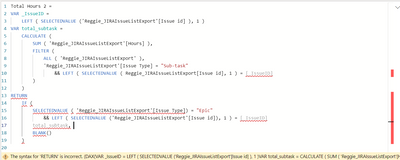
Hi @v-xiaotang Thanks. I tried your query but I've encountered some errors.

Sakamoto_S_0-1623119853914.png


The syntax for 'RETURN' is incorrect. (DAX(VAR _IssueID = LEFT ( SELECTEDVALUE ('Reggie_JIRAIssueListExport'[Issue id] ), 1 )VAR total_subtask = CALCULATE ( SUM ( 'Reggie_JIRAIssueListExport'[Hours] ), FILTER ( ALL ( 'Reggie_JIRAIssueListExport' ), 'Reggie_JIRAIssueListExport'[Issue Type] = "Sub-task" && LEFT ( SELECTEDVALUE ( Reggie_JIRAIssueListExport[Issue id], 1 ) = [_IssueID] ) )RETURN IF ( SELECTEDVALUE ( 'Reggie_JIRAIssueListExport'[Issue Type]) = "Epic" && LEFT ( SELECTEDVALUE ('Reggie_JIRAIssueListExport'[Issue id]), 1 ) = [_IssueID] total_subtask, BLANK() ))).

.pbix file here 

Hi  @Sakamoto_S 

sorry, I forgot to say you need to create the measure first, ( I've corrected my reply

_IssueID = 
    LEFT ( SELECTEDVALUE ('Reggie_JIRAIssueListExport'[Issue id] ), 1 )

then, create the measure

Total Hours 2 = 
VAR total_subtask =
    CALCULATE (
        SUM ( 'Reggie_JIRAIssueListExport'[Hours] ),
        FILTER (
            ALL ( 'Reggie_JIRAIssueListExport' ),
            'Reggie_JIRAIssueListExport'[Issue Type] = "Sub-task"
                && LEFT ( SELECTEDVALUE ( 'Reggie_JIRAIssueListExport'[Issue id]), 1 ) = [_IssueID]
        )
    )
RETURN 
    IF (
        SELECTEDVALUE( 'Reggie_JIRAIssueListExport'[Issue Type]) = "Epic"
            && LEFT ( SELECTEDVALUE ('Reggie_JIRAIssueListExport'[Issue id]), 1 ) = [_IssueID],
        total_subtask, 
        BLANK()
    )


Best Regards,

Community Support Team _ Tang

If this post helps, please consider Accept it as the solution✔️ to help the other members find it more quickly.


MFelix
Super User
Super User

Hi @Sakamoto_S ,


You need to follow a Hierarchy parent-child setup.


Check the SQLBI post about a similar setup.


https://www.daxpatterns.com/parent-child-hierarchies/


Believe that the only question here is the fact that you have the total hours in task and in subtasks. 


Regards

Miguel Félix


Did I answer your question? Mark my post as a solution!

Proud to be a Super User!

Check out my blog: Power BI em Português


Helpful resources

Announcements
Power BI DataViz World Championships

Power BI Dataviz World Championships

The Power BI Data Visualization World Championships is back! Get ahead of the game and start preparing now!

December 2025 Power BI Update Carousel

Power BI Monthly Update - December 2025

Check out the December 2025 Power BI Holiday Recap!

FabCon Atlanta 2026 carousel

FabCon Atlanta 2026

Join us at FabCon Atlanta, March 16-20, for the ultimate Fabric, Power BI, AI and SQL community-led event. Save $200 with code FABCOMM.