Get certified for free when you join Fabric Data Days 2026 and dive into Fabric, Power BI, SQL, AI, and other essential data skills.
Join nowJuly 7 - July 17 | Round 2 of the Power BI Dataviz World Championships. Don't miss your chance! Learn more
Hello Community,
I'm currently tasked with hiding a set of visuals until a row within a table has been selected. I've seen where this can be done using filters but not with the table visual. Is this possible and if so how might I go about it?
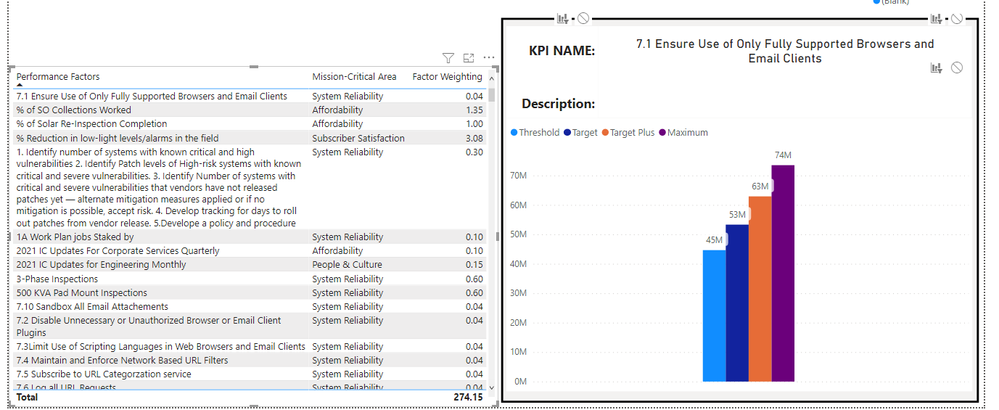
In the picture below I want the right side box the be empty unless a row in the table (left) is selected.
Is there a way to see if a table is filtering the page?
Thank you and please let me know if I need to provide any further information.
Solved! Go to Solution.
Hi, @GunnerJ
Thank you for your feedback.
Please check the link down below.
I created something like, if not selected then blue color (you can change it to anything) otherwise transparent color.
You can check the Dax measure in the sample pbix file.
https://www.dropbox.com/s/qc44vpztcejtm9m/GunnerJ.pbix?dl=0
Hi, My name is Jihwan Kim.
If this post helps, then please consider accept it as the solution to help other members find it faster, and give a big thumbs up.
Hi, @GunnerJ
I tried to cover the chart by card visual.
And I wrote a measure for the card visual background color something like below.
If something is selected, then the card visual background color becomes transparent, if not selected, then background color.
But one drawback is that users cannot hover over the chart visualization.
Hi, My name is Jihwan Kim.
If this post helps, then please consider accept it as the solution to help other members find it faster, and give a big thumbs up.
@Jihwan_Kim Thank you for the response. Do you have a file or example of that measure? I'd like to test it out myself.
Hi, @GunnerJ
Thank you for your feedback.
Please check the link down below.
I created something like, if not selected then blue color (you can change it to anything) otherwise transparent color.
You can check the Dax measure in the sample pbix file.
https://www.dropbox.com/s/qc44vpztcejtm9m/GunnerJ.pbix?dl=0
Hi, My name is Jihwan Kim.
If this post helps, then please consider accept it as the solution to help other members find it faster, and give a big thumbs up.
You could move the graph to a different page and make that page into a tooltip. Then assign that tooltip page as the tooltip target on your table. The user would see the graph when they moused over a row in the table.
I showed the end user that option and they still hope to have the visual hide and appear upon selection but the tooltip is being used as a backup.
Join us in Barcelona for FabCon and SQLCon, the Fabric, Power BI, SQL, and AI community event. Save €200 with code FABCMTY200.
Join Fabric Data Days 2026: 60 days of free live/on-demand sessions, challenges, study groups, and certification opportunities.
| User | Count |
|---|---|
| 22 | |
| 22 | |
| 18 | |
| 17 | |
| 13 |
| User | Count |
|---|---|
| 63 | |
| 50 | |
| 46 | |
| 41 | |
| 39 |