

Get certified for free when you join Fabric Data Days 2026 and dive into Fabric, Power BI, SQL, AI, and other essential data skills.
Join nowJuly 28 -August 9 | Final Round of the Power BI Dataviz World Championships. This is your chance. Learn more
with selection
If there is data it works fine, but when there is no data a see something like this:
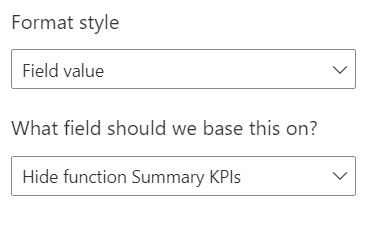
Conditional formating for this viusal not allow me to add more then one field value
Can You tell me how to fix this problem ?
Regards Piotr.
Solved! Go to Solution.
Hide function Summary KPIs =
SWITCH(TRUE(),
ISBLANK([Your measure name]),"#FFFFFF00",
NOT(ISFILTERED ('Accountflex Data'[Dealer ID and Name Filter])),"#FFFFFF00",
"#000000")
Proud to be a Super User!
Hide function Summary KPIs =
SWITCH(TRUE(),
ISBLANK([Your measure name]),"#FFFFFF00",
NOT(ISFILTERED ('Accountflex Data'[Dealer ID and Name Filter])),"#FFFFFF00",
"#000000")
Proud to be a Super User!
Join us in Barcelona for FabCon and SQLCon, the Fabric, Power BI, SQL, and AI community event. Save €200 with code FABCMTY200.
If you love stickers, then you will definitely want to check out our community sticker challenge, Barcelona edition!
Check out the July 2026 Power BI update to learn about new features.
| User | Count |
|---|---|
| 30 | |
| 29 | |
| 25 | |
| 23 | |
| 16 |
| User | Count |
|---|---|
| 45 | |
| 32 | |
| 17 | |
| 16 | |
| 16 |