This time we’re going bigger than ever. Fabric, Power BI, SQL, AI and more. We're covering it all. You won't want to miss it.
Learn moreLevel up your Power BI skills this month - build one visual each week and tell better stories with data! Get started
@Anonymous this was a great post put on by you which I have used. I rolling 13 months. I need the data to be a Rolling 12 months.
How can I do this please?
Can @Anonymous or anyone else help?
This is the link - https://community.powerbi.com/t5/Desktop/Rolling-13-months-DAX/td-p/663677
Thanks
Solved! Go to Solution.
Hi @Anonymous ,
Please update the measures like this.
2Sales Rolling 12 ACT =
VAR Maximum_Date =
MAX ( 'Rolling Calendar'[Date] )
VAR Minimum_Date =
EDATE(Maximum_Date,-11)
VAR Selected_Date =
MAX ( 'Calendar'[Date] )
RETURN
IF (
Selected_Date <= Maximum_Date
&& Selected_Date >= Minimum_Date,
[Sales ACT],
BLANK ()
)2Sales Rolling 12 Month ACT (Totals) =
IF (
HASONEFILTER ( 'Calendar'[Date] ),
[2Sales Rolling 12 ACT],
SUMX ( 'Calendar', [2Sales Rolling 12 ACT] )
)
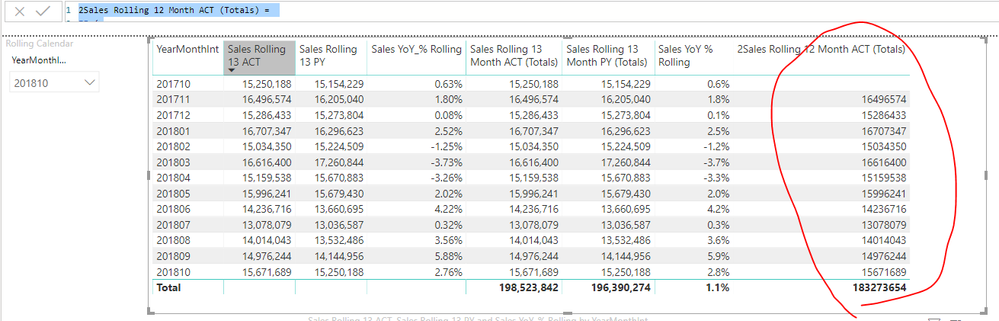
Also please check the pbix as attached.
Hi @Anonymous ,
Please update the measures like this.
2Sales Rolling 12 ACT =
VAR Maximum_Date =
MAX ( 'Rolling Calendar'[Date] )
VAR Minimum_Date =
EDATE(Maximum_Date,-11)
VAR Selected_Date =
MAX ( 'Calendar'[Date] )
RETURN
IF (
Selected_Date <= Maximum_Date
&& Selected_Date >= Minimum_Date,
[Sales ACT],
BLANK ()
)2Sales Rolling 12 Month ACT (Totals) =
IF (
HASONEFILTER ( 'Calendar'[Date] ),
[2Sales Rolling 12 ACT],
SUMX ( 'Calendar', [2Sales Rolling 12 ACT] )
)
Also please check the pbix as attached.
Hi @Anonymous
Would it help to use
Sales Rolling 12 ACT =
VAR Maximum_Date =
MAX ( 'Rolling Calendar'[Date] )
VAR Minimum_Date =
DATE ( YEAR ( Maximum_Date ) - 1; MONTH ( Maximum_Date ); DAY( Maximum_Date ) )
VAR Selected_Date =
MAX ( 'Calendar'[Date] )
RETURN
IF (
Selected_Date <= Maximum_Date
&& Selected_Date > Minimum_Date;
[Sales ACT];
BLANK ()
)
Check out the April 2026 Power BI update to learn about new features.
Sign up to receive a private message when registration opens and key events begin.
If you have recently started exploring Fabric, we'd love to hear how it's going. Your feedback can help with product improvements.
| User | Count |
|---|---|
| 34 | |
| 26 | |
| 25 | |
| 22 | |
| 18 |
| User | Count |
|---|---|
| 65 | |
| 35 | |
| 32 | |
| 25 | |
| 23 |