cancel
Showing results for 
Search instead for 
Did you mean: 

Learn from the best! Meet the four finalists headed to the FINALS of the Power BI Dataviz World Championships! Register now

Reply

Help

Hi all, hope you're well,


Can anyone please help me with this,


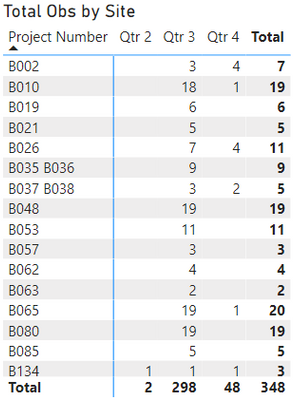
I got two tables with related data. I've summarized table 1 (Observations per site) like this:


Total Obs = CALCULATECOUNT ('2. Observations'[Project Number]),FILTER('2. Observations','2. Observations'[Date Created]))
 
AndresTorresM_3-1634444580041.png


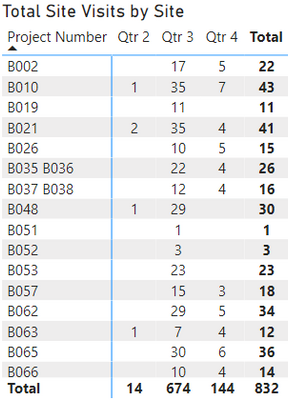
And then, I have summarized the second table (Site Visits per site) like this:

 
Site Visits = COUNTROWSSUMMARIZE('4. CoW Productivity', '4. CoW Productivity'[Project Number], '4. CoW Productivity'[Date Created]))
 
AndresTorresM_4-1634444601422.png


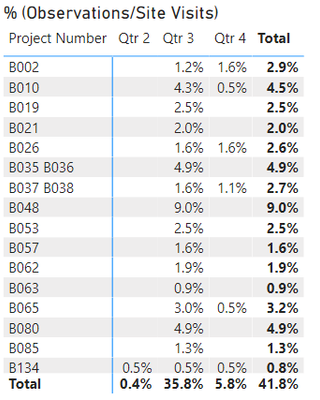
Now, my question is, how can I get a new table showing me [%] of number of Obs (table 1)/ number of site visits (table 2)??.

I got to show the data in the same way per site. I have tried this, but I couldn't get the logical values I needed. However, the total percentage is correct. For instance, if you see the values in table 1 for B002=7 and in table 2 B002=22, the percentage value in the following table for B002 should be ( 7 / 22=31.8% ), but I'm getting 2.9%. In contrast, for the totals ( 348 / 832 = 41.8%) which is correct.


#Obs/Site InspectionsDIVIDE[Total Obs][Site Visits] )


AndresTorresM_2-1634444459188.png


 Thanks,


Andres Torres


1 ACCEPTED SOLUTION
HotChilli
Community Champion
Community Champion

I created a Project dimension table and added 1:m relationships to the 3 main tables.

I made the existing relationships between fact tables inactive ( I would probably delete them but I left that for you to do if required).

I've changed the measure on the first table to be a little simpler but you'll need to check the impact on the rest of the report.

I would advise creating your own Dates table and using that instead of the built-in date features (entirely up to you).

It also looks like the CoW productivity table is really a slowly changing dimension so you might want to do something with this (I didn't investigate too much because I wanted to do the simplest thing that works to fix the initial posted question).

I'll send the pbix thru the internal mail system.

Let me know how it goes.

View solution in original post

4 REPLIES 4
HotChilli
Community Champion
Community Champion

I created a Project dimension table and added 1:m relationships to the 3 main tables.

I made the existing relationships between fact tables inactive ( I would probably delete them but I left that for you to do if required).

I've changed the measure on the first table to be a little simpler but you'll need to check the impact on the rest of the report.

I would advise creating your own Dates table and using that instead of the built-in date features (entirely up to you).

It also looks like the CoW productivity table is really a slowly changing dimension so you might want to do something with this (I didn't investigate too much because I wanted to do the simplest thing that works to fix the initial posted question).

I'll send the pbix thru the internal mail system.

Let me know how it goes.

Hi @HotChilli ,


Thanks heaps for that. It works perfectly. I still need to understand a bit more about the relationship between the data tables, but I'm definitely going to create a new dates table like you suggested.


Many thanks,


Andres Torres

HotChilli
Community Champion
Community Champion

Hello @SantiagoTorres , I've got the pbix.  I'm going to spend a bit of time remodelling it and I'll post back.

It looks like sensitive data so I suggest you remove the link from the above post.

HotChilli
Community Champion
Community Champion

can you post/link your pbix please?

I want to see the model relationships, also I think your first 2 measures can be simplified but it will depend on what the model looks like.

Helpful resources

Announcements
Join our Fabric User Panel

Join our Fabric User Panel

Share feedback directly with Fabric product managers, participate in targeted research studies and influence the Fabric roadmap.

February Power BI Update Carousel

Power BI Monthly Update - February 2026

Check out the February 2026 Power BI update to learn about new features.

FabCon Atlanta 2026 carousel

FabCon Atlanta 2026

Join us at FabCon Atlanta, March 16-20, for the ultimate Fabric, Power BI, AI and SQL community-led event. Save $200 with code FABCOMM.